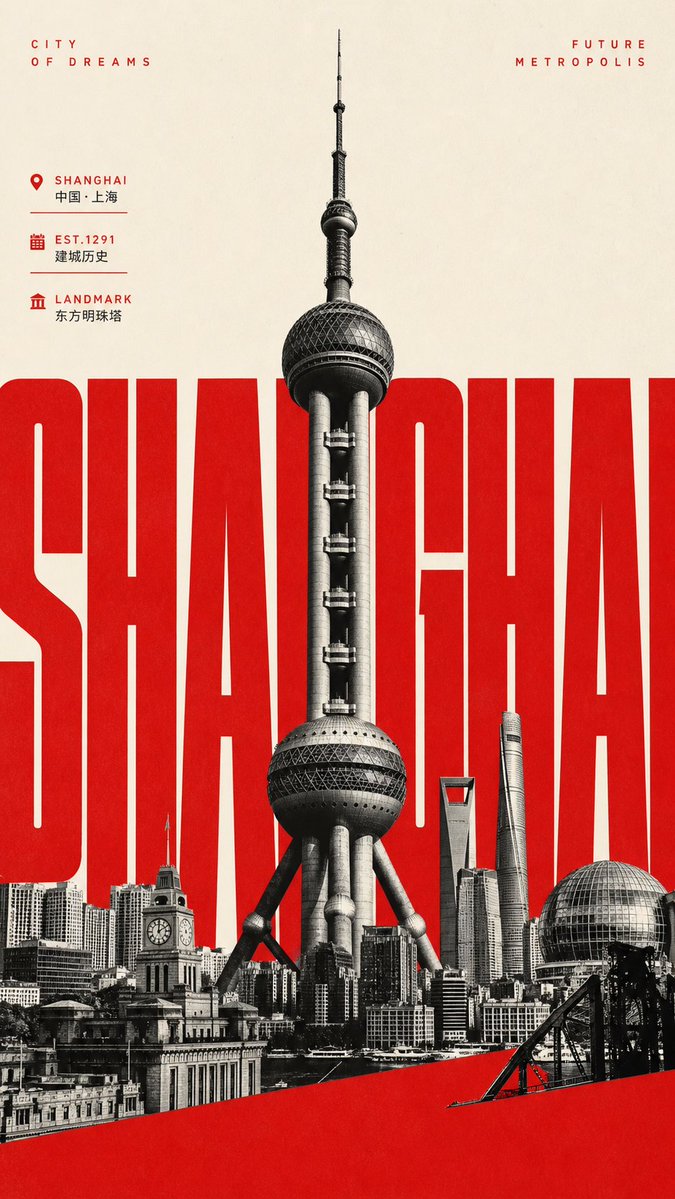
Giant Typography Shanghai Travel Poster
A bold vertical cultural tourism poster featuring Shanghai landmarks, oversized red city typography, and minimalist vintage print styling.
Este é um exemplo de prompt GPT Image 2 para Gráfico e pôster . Use o prompt pronto para copiar abaixo para gerar visuais semelhantes e revise a atribuição Awesome GPT Image 2 Prompts e os direitos de uso comercial antes de reutilizá-los.
Precisa do conjunto completo de instruções? Use o Gráfico e pôster Para obter mais exemplos relacionados, acesse o hub de tópicos ou abra o GPT Image 2 catálogo de prompts Para obter o índice completo de exemplos, estruturas reutilizáveis e atribuição de fontes.
Free 1K preview
Generate one preview image instantly, no sign-up required.
2787/4000
Incitar
prompt pronto para copiar
Objective: Create a vertical cultural tourism poster for {argument name="city name" default="Shanghai"}, combining oversized typography, landmark photography, and minimalist tourism poster aesthetics.

Canvas: Tall vertical poster, 9:16 aspect ratio. Warm off-white paper background with subtle grain and a slight vintage print texture, using a high-contrast color scheme of red, black, and cream.

Main Layout: Place a massive, compressed, bold sans-serif word in the center of the image, reading {argument name="giant city text" default="SHANGHAI"}. The letters must be bright red, extremely large and tightly spaced, extending to the left and right edges, with some letters cropped. In front of the red word, center a black and white silhouette of the Oriental Pearl Tower, rising vertically from the lower skyline to almost the top edge, showcasing sharp architectural details and a realistic photo collage texture.

Foreground Skyline: Create a dense black and white collage of the Shanghai skyline at the bottom, including 6 clearly visible landmark/building elements: 1) The Oriental Pearl Tower as the central subject, 2) A historical clock tower building in the lower left, 3) The Shanghai World Financial Center with a trapezoidal top near the center-right, 4) The Shanghai Tower with a spiral shape to its right, 5) A spherical glass pavilion/dome in the lower right, and 6) Various low-rise buildings along the Bund forming a continuous base. Add a solid red diagonal band across the bottom of the image, extending from the lower left to the middle right, partially obscuring the skyline.

Top Text: In the upper left corner, place small, widely spaced red capital letters “CITY / OF DREAMS” arranged in two lines. In the upper right corner, place the corresponding red capital letters “FUTURE / METROPOLIS” arranged in two lines.

Information Panel: On the upper left side below the title, include 3 lines of compact tourism information with red icons, red English labels, smaller black Chinese text, and thin dividers: 1) A map location icon, label “SHANGHAI”, text “China · Shanghai”; 2) A calendar icon, label “EST.1291”, text “Founding History”; 3) A classic landmark icon, label “LANDMARK”, text “Oriental Pearl Tower”.

Style: Modern Chinese tourism poster, influenced by Swiss grid design, brutalist oversized typography, black and white architectural photography, simple negative space, sharp edges, ink graininess similar to letterpress printing, high-end tourism promotional design.

Constraints: Use only red, black, grayscale, and warm cream colors. Keep the poster simple. Do not add people, cars, logos, QR codes, watermarks, or additional paragraph text. Retain the above specified exact English and Chinese text, unless customized through the city name slot.
Variáveis de prompt
Marcadores de posição editáveis para argumentos encontrados no prompt, com seus valores padrão.
Variável
city name
Padrão
Shanghai
Variável
giant city text
Padrão
SHANGHAI
Best for
- - Gráfico e pôster visual exploration
- - Image generation and reference-image edits
- - Reusable briefs that keep source attribution visible
Change these parts
- - Subject, product, character, or scene
- - Aspect ratio, camera, lighting, and background
- - Brand, text, color, and output constraints
Recommended model and settings
- - Model: gpt-image-2
- - Input mode: Texto para Imagem
- - Aspect ratio: source
- - Commercial status: review original source
How to use this prompt
- 1. Copy the prompt and preserve its structure for the first test.
- 2. Replace the subject, context, and publishing channel.
- 3. Change one camera, lighting, or style variable per iteration.
- 4. Inspect the output, source, text, and rights before reuse.
Limitations, source, and reuse cautions
- - Generated output is an editable draft, not factual, legal, or rights evidence.
- - Review the linked source, people, brands, logos, text, and third-party media before commercial use.
Importado de Awesome GPT Image 2 Prompts . É necessário dar crédito. O uso comercial é permitido allowed ; revise os direitos da fonte antes de utilizá-lo mediante pagamento.
Mais casos nesta categoria
Priorizados por categoria, compatibilidade do modo de entrada, qualidade e menor risco.

Manga Desert Radio Telescope Road Trip
Texto para Imagem

Fashion Studio Portrait with Blue Rim Lighting
Texto para Imagem

Spring Editorial Fashion Collage
Texto para Imagem

New Chinese-Style Editorial Portrait
Texto para Imagem

Transparent Earbuds on Stone Pedestal
Texto para Imagem

Grumpy Rhino Storybook Illustration
Texto para Imagem
Reutilização e notas de origem
Utilize esta instrução com segurança após visualizar o caso.
- 1.Copie o prompt ou abra-o diretamente no Dovoo com o botão de geração.
- 2.Ajuste as variáveis, a proporção e as imagens de referência de acordo com o seu caso específico.
- 3.Antes de publicar ou utilizar o conteúdo mediante pagamento, verifique os direitos da fonte, os requisitos de atribuição e os riscos relacionados à marca ou à imagem.