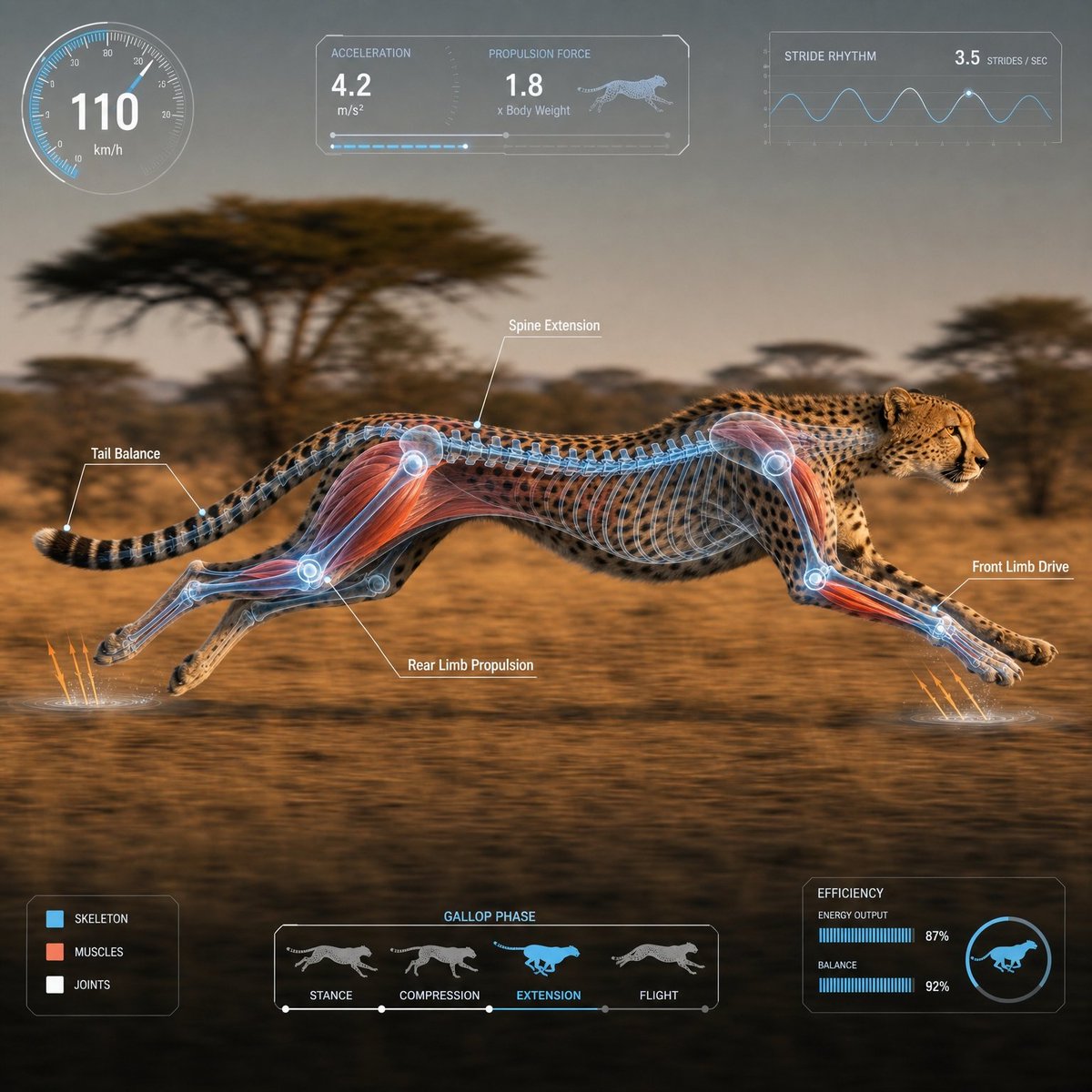
Scientific Animal Motion Analysis HUD
A highly detailed technical prompt for generating photorealistic animal motion studies featuring transparent anatomical overlays and scientific HUD elements.
Este é um exemplo de prompt GPT Image 2 para Outra Inspiração . Use o prompt pronto para copiar abaixo para gerar visuais semelhantes e revise a atribuição Awesome GPT Image 2 Prompts e os direitos de uso comercial antes de reutilizá-los.
Precisa do conjunto completo de instruções? Use o Outra Inspiração Para obter mais exemplos relacionados, acesse o hub de tópicos ou abra o GPT Image 2 catálogo de prompts Para obter o índice completo de exemplos, estruturas reutilizáveis e atribuição de fontes.
Free 1K preview
Generate one preview image instantly, no sign-up required.
1883/4000
Incitar
prompt pronto para copiar
1:1 square composition. Suited for video material. Please provide a photorealistic depiction of a {argument name="animal name" default="cheetah"} moving in its natural habitat, captured in a high-speed tracking shot from the side.
The camera is a medium-long shot, pulled back sufficiently. The composition ensures the entire body is completely within the frame, with no clipping of major parts like the head, torso, legs, wings, fins, or tail. The subject is placed in the center safety zone, within 60-70% of the horizontal width, leaving margins on all sides. A lateral silhouette moving from left to right. The background has a light horizontal motion blur, while the subject is in sharp focus.
Accurately overlay a transparent 3D skeleton or appropriate anatomical layer on the body, emphasizing muscles, joints, the extension of the spine and trunk, and propulsive parts like legs, wings, fins, and tail. Semi-transparent blue/white base with red or orange accents on key areas.
Display a fixed-layout semi-transparent HUD at the edge of the screen. The UI should not obscure the subject and must have the same placement every time.
Top Left: Circular speedometer
Top Center: Acceleration/Force/Propulsion panel
Top Right: Stride/Flap/Swimming rhythm graph
Bottom Left: Muscle/Skeletal/Joint legend
Bottom Center: Motion phase timeline
Bottom Right: Small energy efficiency/balance chart
Maximum of 4 annotations. Short English labels only. Clean, sci-fi documentary-style UI in white, cyan, and light blue. Numbers are for reference; avoid long text or dense UI. Cinematic natural lighting, high definition, photorealistic, organized scientific documentary style.
Avoid: Close-ups, body clipping, limbs out of frame, multiple animals, extra legs, distorted joints, human-like skeleton, unreadable text, crowded UI, giant graphs, UI hiding the subject, excessive light effects.
Variáveis de prompt
Marcadores de posição editáveis para argumentos encontrados no prompt, com seus valores padrão.
Variável
animal name
Padrão
cheetah
Best for
- - Outra Inspiração visual exploration
- - Image generation and reference-image edits
- - Reusable briefs that keep source attribution visible
Change these parts
- - Subject, product, character, or scene
- - Aspect ratio, camera, lighting, and background
- - Brand, text, color, and output constraints
Recommended model and settings
- - Model: gpt-image-2
- - Input mode: Texto para Imagem
- - Aspect ratio: source
- - Commercial status: review original source
How to use this prompt
- 1. Copy the prompt and preserve its structure for the first test.
- 2. Replace the subject, context, and publishing channel.
- 3. Change one camera, lighting, or style variable per iteration.
- 4. Inspect the output, source, text, and rights before reuse.
Limitations, source, and reuse cautions
- - Generated output is an editable draft, not factual, legal, or rights evidence.
- - Review the linked source, people, brands, logos, text, and third-party media before commercial use.
Importado de Awesome GPT Image 2 Prompts . É necessário dar crédito. O uso comercial é permitido allowed ; revise os direitos da fonte antes de utilizá-lo mediante pagamento.
Mais casos nesta categoria
Priorizados por categoria, compatibilidade do modo de entrada, qualidade e menor risco.




Reutilização e notas de origem
Utilize esta instrução com segurança após visualizar o caso.
- 1.Copie o prompt ou abra-o diretamente no Dovoo com o botão de geração.
- 2.Ajuste as variáveis, a proporção e as imagens de referência de acordo com o seu caso específico.
- 3.Antes de publicar ou utilizar o conteúdo mediante pagamento, verifique os direitos da fonte, os requisitos de atribuição e os riscos relacionados à marca ou à imagem.