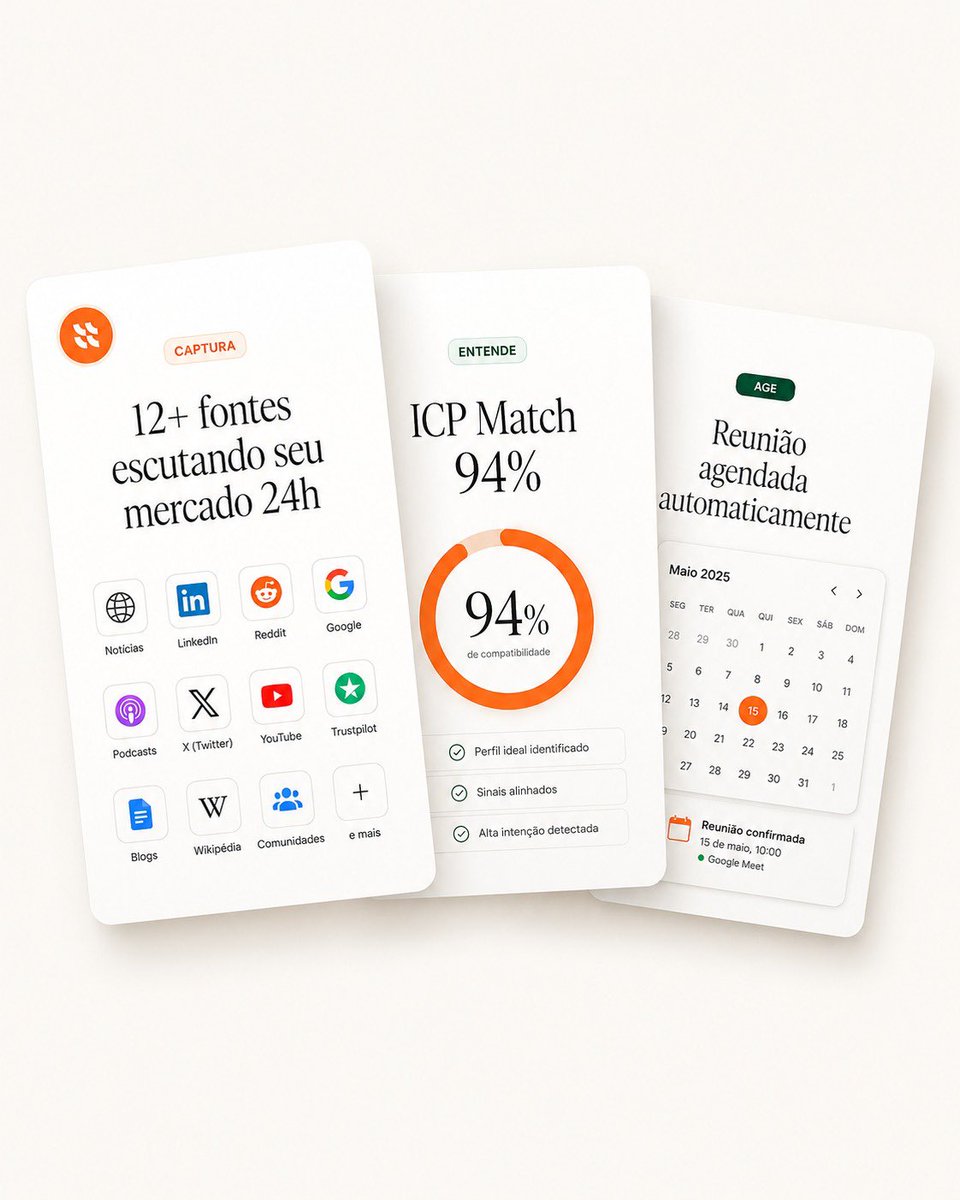
Cartões de recursos SaaS sobrepostos
Uma maquete de página inicial refinada com três cartões de recursos SaaS sobrepostos para captura, pontuação de partidas e agendamento automatizado.
Este é um exemplo de prompt GPT Image 2 para Produto e Comercial . Use o prompt pronto para copiar abaixo para gerar visuais semelhantes e revise a atribuição Awesome GPT Image 2 Prompts e os direitos de uso comercial antes de reutilizá-los.
Precisa do conjunto completo de instruções? Use o Produto e Comercial Para obter mais exemplos relacionados, acesse o hub de tópicos ou abra o GPT Image 2 catálogo de prompts Para obter o índice completo de exemplos, estruturas reutilizáveis e atribuição de fontes.
Free 1K preview
Generate one preview image instantly, no sign-up required.
3357/4000
Incitar
prompt pronto para copiar
Goal: Create a clean landing-page hero visual showing three overlapping white SaaS feature cards for a sales intelligence / lead monitoring product, in a premium minimal Figma-style mockup.

Canvas: Square 1:1 composition, warm off-white background with very soft beige gradient, subtle vignette, realistic soft shadows under cards. Cards are tall rounded rectangles with slight perspective tilt and depth, floating in the center. Use elegant editorial serif typography for large headings and small sans-serif labels.

Layout: Arrange exactly 3 vertical cards, overlapping horizontally. The left card is in front and tilted slightly counterclockwise, the middle card is centered and nearly upright, the right card sits behind and tilted slightly clockwise. Keep generous whitespace and rounded corners.

Card 1, left card — capture sources: At the top left place a small orange circular logo icon with abstract white marks. Near the top center place a pale peach pill label reading “CAPTURA”. Large headline in Portuguese: “{argument name="left card headline" default="12+ fontes escutando seu mercado 24h"}”. Below it, show exactly 12 small rounded source tiles in a 3-column by 4-row grid, each with an icon and label. The 12 labels are: “Notícias”, “LinkedIn”, “Reddit”, “Google”, “Podcasts”, “X (Twitter)”, “YouTube”, “Trustpilot”, “Blogs”, “Wikipédia”, “Comunidades”, “e mais”. Use recognizable simplified icons: globe, LinkedIn logo, Reddit alien, Google G, podcast glyph, X logo, YouTube play button, green trust star, document/blog icon, W, group/community dots, plus sign.

Card 2, center card — match score: Place a pale green pill label reading “ENTENDE”. Main headline text: “{argument name="match headline" default="ICP Match 94%"}”. Center a thick circular donut progress ring in bright orange, almost complete, with pale peach remainder. Inside the ring, display “{argument name="match percentage" default="94%"}” in large serif type and a tiny subtitle “de compatibilidade”. Below the ring place exactly 3 thin rounded checklist rows with small green check icons and the labels: “Perfil ideal identificado”, “Sinais alinhados”, “Alta intenção detectada”.

Card 3, right card — action scheduling: Place a dark green pill label reading “AGE”. Large headline in Portuguese: “{argument name="right card headline" default="Reunião agendada automaticamente"}”. Below it, include a compact calendar widget headed “Maio 2025” with weekday labels in Portuguese: “SEG”, “TER”, “QUA”, “QUI”, “SEX”, “SÁB”, “DOM”. Show a monthly grid of dates with the 15 highlighted by an orange circle. Add small left and right chevrons near the calendar header. At the bottom, include a confirmation block with an orange calendar icon and the text “Reunião confirmada”, “15 de maio, 10:00”, and a green dot followed by “Google Meet”.

Visual style: High-end SaaS landing page aesthetic, soft 3D paper cards, off-white surfaces, thin pale gray dividers, muted green and orange accent colors, subtle shadows, crisp vector UI icons, refined typography, realistic but clean product mockup.

Constraints: Use exactly 3 cards, exactly 12 source tiles on the left card, exactly 3 checklist rows on the middle card, and one calendar widget on the right card. Keep all text legible, no people, no extra logos beyond the specified source icons, no watermark, no browser chrome.
Variáveis de prompt
Marcadores de posição editáveis para argumentos encontrados no prompt, com seus valores padrão.
Variável
left card headline
Padrão
12+ fontes escutando seu mercado 24h
Variável
match headline
Padrão
ICP Match 94%
Variável
match percentage
Padrão
94%
Variável
right card headline
Padrão
Reunião agendada automaticamente
Best for
- - Produto e Comercial visual exploration
- - Image generation and reference-image edits
- - Reusable briefs that keep source attribution visible
Change these parts
- - Subject, product, character, or scene
- - Aspect ratio, camera, lighting, and background
- - Brand, text, color, and output constraints
Recommended model and settings
- - Model: gpt-image-2
- - Input mode: Texto para Imagem
- - Aspect ratio: source
- - Commercial status: review original source
How to use this prompt
- 1. Copy the prompt and preserve its structure for the first test.
- 2. Replace the subject, context, and publishing channel.
- 3. Change one camera, lighting, or style variable per iteration.
- 4. Inspect the output, source, text, and rights before reuse.
Limitations, source, and reuse cautions
- - Generated output is an editable draft, not factual, legal, or rights evidence.
- - Review the linked source, people, brands, logos, text, and third-party media before commercial use.
Importado de Awesome GPT Image 2 Prompts . É necessário dar crédito. O uso comercial é permitido allowed ; revise os direitos da fonte antes de utilizá-lo mediante pagamento.
Mais casos nesta categoria
Priorizados por categoria, compatibilidade do modo de entrada, qualidade e menor risco.

Transparent Earbuds on Stone Pedestal
Texto para Imagem

Wet Transparent Earbud Macro
Texto para Imagem

Overhead Pepperoni Pizza Photo
Texto para Imagem

Y2K Style Photo Booth Collage
Texto para Imagem

Fashion Studio Portrait with Blue Rim Lighting
Texto para Imagem

Greyscale Puzzle Portrait with Color Accent
Texto para Imagem
Reutilização e notas de origem
Utilize esta instrução com segurança após visualizar o caso.
- 1.Copie o prompt ou abra-o diretamente no Dovoo com o botão de geração.
- 2.Ajuste as variáveis, a proporção e as imagens de referência de acordo com o seu caso específico.
- 3.Antes de publicar ou utilizar o conteúdo mediante pagamento, verifique os direitos da fonte, os requisitos de atribuição e os riscos relacionados à marca ou à imagem.