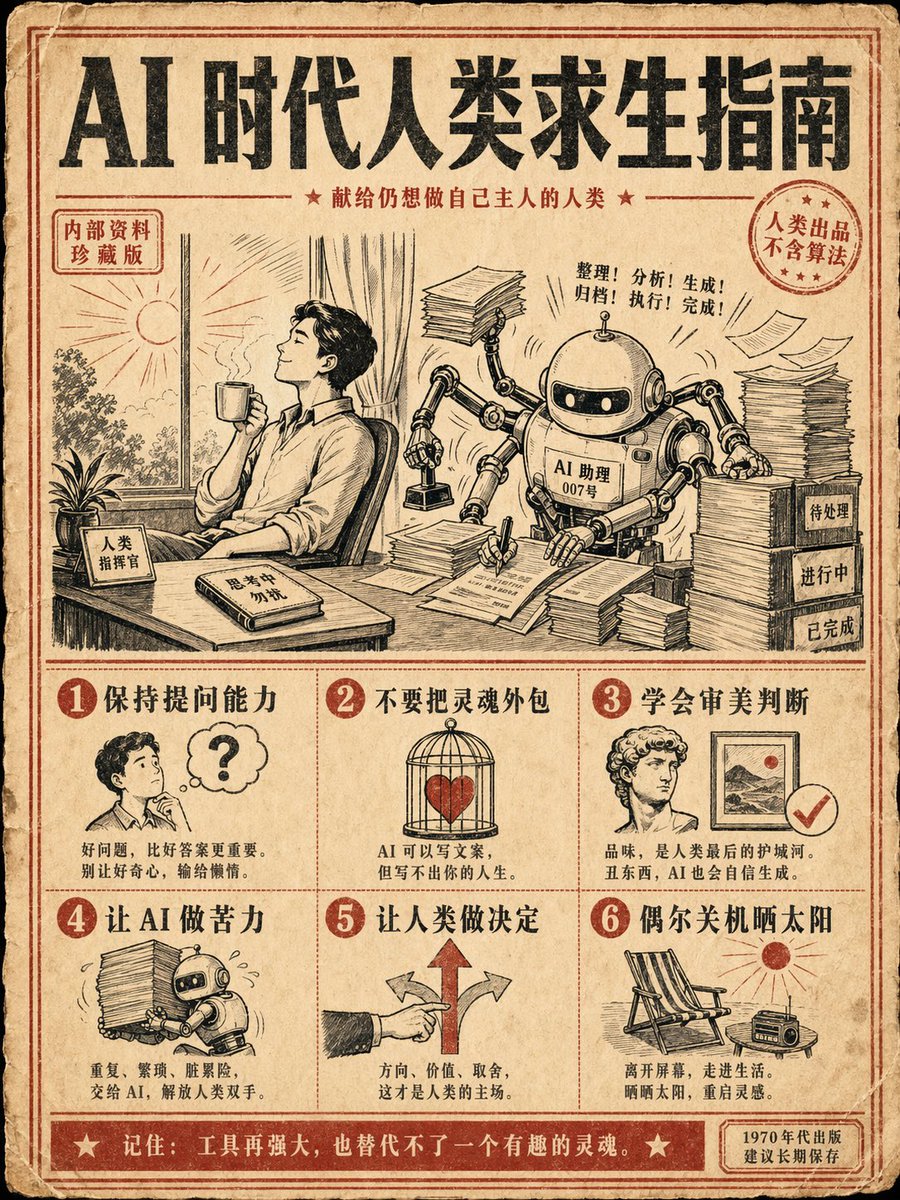
Pôster do Guia de Sobrevivência à IA Retrô
Proposta para um pôster instrutivo vintage no estilo dos anos 70, com várias etapas e texto específico em chinês sobre a sobrevivência humana na era da IA.
Este é um exemplo de prompt GPT Image 2 para Gráfico e pôster . Use o prompt pronto para copiar abaixo para gerar visuais semelhantes e revise a atribuição Awesome GPT Image 2 Prompts e os direitos de uso comercial antes de reutilizá-los.
Precisa do conjunto completo de instruções? Use o Gráfico e pôster Para obter mais exemplos relacionados, acesse o hub de tópicos ou abra o GPT Image 2 catálogo de prompts Para obter o índice completo de exemplos, estruturas reutilizáveis e atribuição de fontes.
Free 1K preview
Generate one preview image instantly, no sign-up required.
1040/4000
Incitar
prompt pronto para copiar
Generate a 3:4 vertical retro instruction poster with the theme: "{argument name="topic" default="AI Survival Guide for Humans"}". Style: {argument name="style" default="1970s science popularization manual + modern internet memes"}, beige old paper, black and red dual-color printing, coarse grain texture, and retro illustration icons. The screen is divided into 6 steps, each with a small illustration and a clear Chinese title: 1. Maintain questioning ability 2. Do not outsource your soul 3. Learn aesthetic judgment 4. Let AI do the hard labor 5. Let humans make decisions 6. Occasionally shut down and enjoy the sun. {argument name="center illustration" default="Center illustration: a human sitting at a desk with a gentle robot assistant next to them, the robot is frantically processing documents while the human holds a coffee looking at the sunlight outside the window."} Requirements: accurate and readable Chinese text, layout like a real publication, humorous but thoughtful, suitable as a collectible poster for social media.Variáveis de prompt
Marcadores de posição editáveis para argumentos encontrados no prompt, com seus valores padrão.
Variável
topic
Padrão
AI Survival Guide for Humans
Variável
style
Padrão
1970s science popularization manual + modern internet memes
Variável
center illustration
Padrão
Center illustration: a human sitting at a desk with a gentle robot assistant next to them, the robot is frantically processing documents while the human holds a coffee looking at the sunlight outside the window.
Best for
- - Gráfico e pôster visual exploration
- - Image generation and reference-image edits
- - Reusable briefs that keep source attribution visible
Change these parts
- - Subject, product, character, or scene
- - Aspect ratio, camera, lighting, and background
- - Brand, text, color, and output constraints
Recommended model and settings
- - Model: gpt-image-2
- - Input mode: Texto para Imagem
- - Aspect ratio: source
- - Commercial status: review original source
How to use this prompt
- 1. Copy the prompt and preserve its structure for the first test.
- 2. Replace the subject, context, and publishing channel.
- 3. Change one camera, lighting, or style variable per iteration.
- 4. Inspect the output, source, text, and rights before reuse.
Limitations, source, and reuse cautions
- - Generated output is an editable draft, not factual, legal, or rights evidence.
- - Review the linked source, people, brands, logos, text, and third-party media before commercial use.
Importado de Awesome GPT Image 2 Prompts . É necessário dar crédito. O uso comercial é permitido allowed ; revise os direitos da fonte antes de utilizá-lo mediante pagamento.
Mais casos nesta categoria
Priorizados por categoria, compatibilidade do modo de entrada, qualidade e menor risco.

Grumpy Rhino Storybook Illustration
Texto para Imagem

Martial Arts Legend Character Bible Sheet
Texto para Imagem

Manga Desert Radio Telescope Road Trip
Texto para Imagem

Android Quantum Lab Workstation
Texto para Imagem

Surreal 3D Chess Match Artwork
Texto para Imagem

Pink Hijab Mirror Selfie Portrait
Texto para Imagem
Reutilização e notas de origem
Utilize esta instrução com segurança após visualizar o caso.
- 1.Copie o prompt ou abra-o diretamente no Dovoo com o botão de geração.
- 2.Ajuste as variáveis, a proporção e as imagens de referência de acordo com o seu caso específico.
- 3.Antes de publicar ou utilizar o conteúdo mediante pagamento, verifique os direitos da fonte, os requisitos de atribuição e os riscos relacionados à marca ou à imagem.