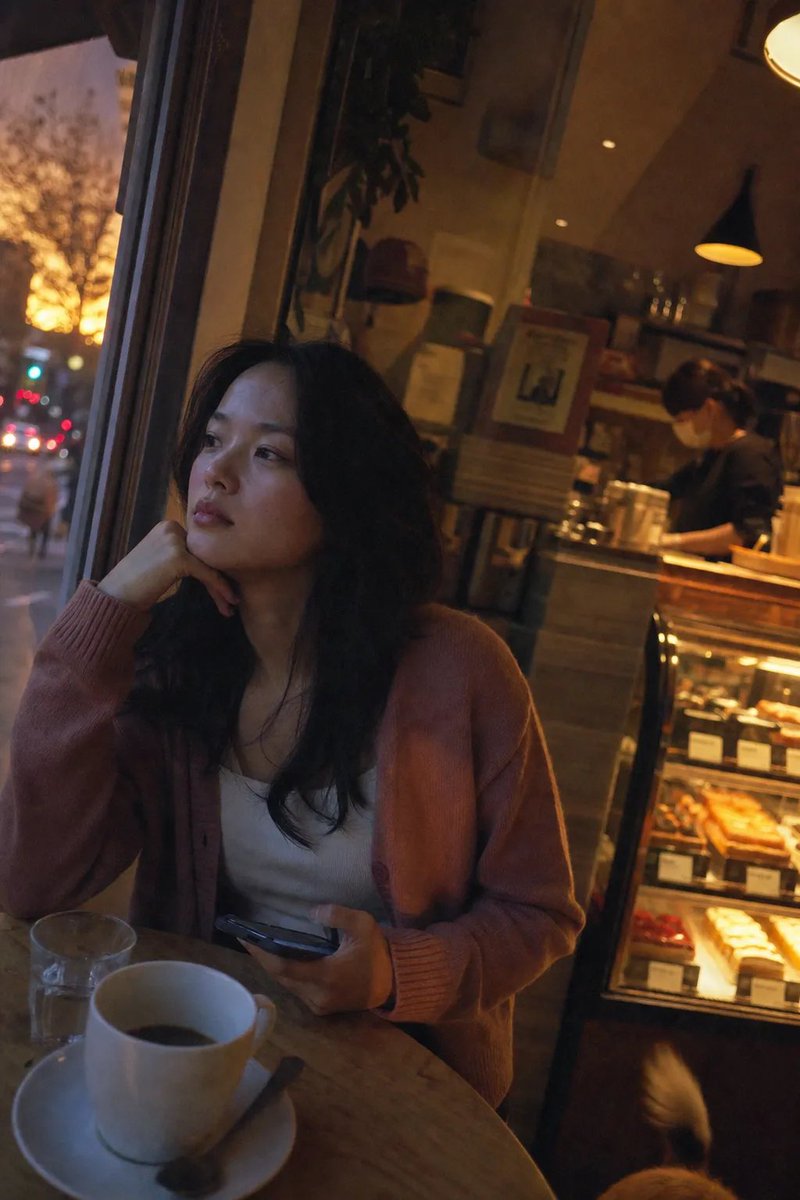
Retro 2004 Digital Camera Aesthetic Portrait
Generates a nostalgic, photorealistic image of a woman in a cafe, mimicking the low-quality flash and color science of an early 2000s pocket camera.
Este é um exemplo de prompt GPT Image 2 para Retrato e Personagem . Use o prompt pronto para copiar abaixo para gerar visuais semelhantes e revise a atribuição Awesome GPT Image 2 Prompts e os direitos de uso comercial antes de reutilizá-los.
Precisa do conjunto completo de instruções? Use o Retrato e Personagem Para obter mais exemplos relacionados, acesse o hub de tópicos ou abra o GPT Image 2 catálogo de prompts Para obter o índice completo de exemplos, estruturas reutilizáveis e atribuição de fontes.
Free 1K preview
Generate one preview image instantly, no sign-up required.
1320/4000
Incitar
prompt pronto para copiar
A completely ordinary everyday photo taken by accident with a cheap 2004 pocket digital camera, forced flash off. A {argument name="subject description" default="young Japanese woman"} sits at a {argument name="setting" default="small table directly beside a large cafe window"}, her face 100% photorealistic—a quiet, contemplative expression, eyes gazing out at the street, chin resting gently on her hand. She wears a {argument name="outfit" default="soft dusty pink cardigan over a white top"}, her dark hair falling loosely over her shoulders. On the table before her, a cup of coffee has gone slightly cold, a small spoon resting on the saucer. Her other hand holds a phone, the screen dim. The window behind her glows with warm amber sunset light, casting a soft halo on her silhouette. The background is slightly cluttered with a blurred barista behind the counter, a pastry display, and glowing red and amber bokeh from the streetlights outside. Canon color science, Kodak Portra 400 color palette, accurate skin tones, warm orange highlights, muted green shadows, soft glow, fine film grain, editorial documentary color grading. Slightly underexposed, visible image noise, compressed JPEG artifacts. A stray dog tail wags near the pastry display at the bottom right corner. dutch angle, stray dog tail --ar 9:16Variáveis de prompt
Marcadores de posição editáveis para argumentos encontrados no prompt, com seus valores padrão.
Variável
subject description
Padrão
young Japanese woman
Variável
setting
Padrão
small table directly beside a large cafe window
Variável
outfit
Padrão
soft dusty pink cardigan over a white top
Best for
- - Retrato e Personagem visual exploration
- - Image generation and reference-image edits
- - Reusable briefs that keep source attribution visible
Change these parts
- - Subject, product, character, or scene
- - Aspect ratio, camera, lighting, and background
- - Brand, text, color, and output constraints
Recommended model and settings
- - Model: gpt-image-2
- - Input mode: Texto para Imagem
- - Aspect ratio: source
- - Commercial status: review original source
How to use this prompt
- 1. Copy the prompt and preserve its structure for the first test.
- 2. Replace the subject, context, and publishing channel.
- 3. Change one camera, lighting, or style variable per iteration.
- 4. Inspect the output, source, text, and rights before reuse.
Limitations, source, and reuse cautions
- - Generated output is an editable draft, not factual, legal, or rights evidence.
- - Review the linked source, people, brands, logos, text, and third-party media before commercial use.
Importado de Awesome GPT Image 2 Prompts . É necessário dar crédito. O uso comercial é permitido allowed ; revise os direitos da fonte antes de utilizá-lo mediante pagamento.
Mais casos nesta categoria
Priorizados por categoria, compatibilidade do modo de entrada, qualidade e menor risco.

GPT Image 2 Real-Life Character Street Snap
Texto para Imagem

Studio Portrait of Woman with Sunglasses
Texto para Imagem

Cinematic Blue Backlit Portrait
Texto para Imagem

GPT Image 2 Prompt: Garden Dappled Light
Texto para Imagem

Morning Bed Stretching Legs Prompt
Texto para Imagem

Playful Morning Selfie Portrait
Texto para Imagem
Reutilização e notas de origem
Utilize esta instrução com segurança após visualizar o caso.
- 1.Copie o prompt ou abra-o diretamente no Dovoo com o botão de geração.
- 2.Ajuste as variáveis, a proporção e as imagens de referência de acordo com o seu caso específico.
- 3.Antes de publicar ou utilizar o conteúdo mediante pagamento, verifique os direitos da fonte, os requisitos de atribuição e os riscos relacionados à marca ou à imagem.