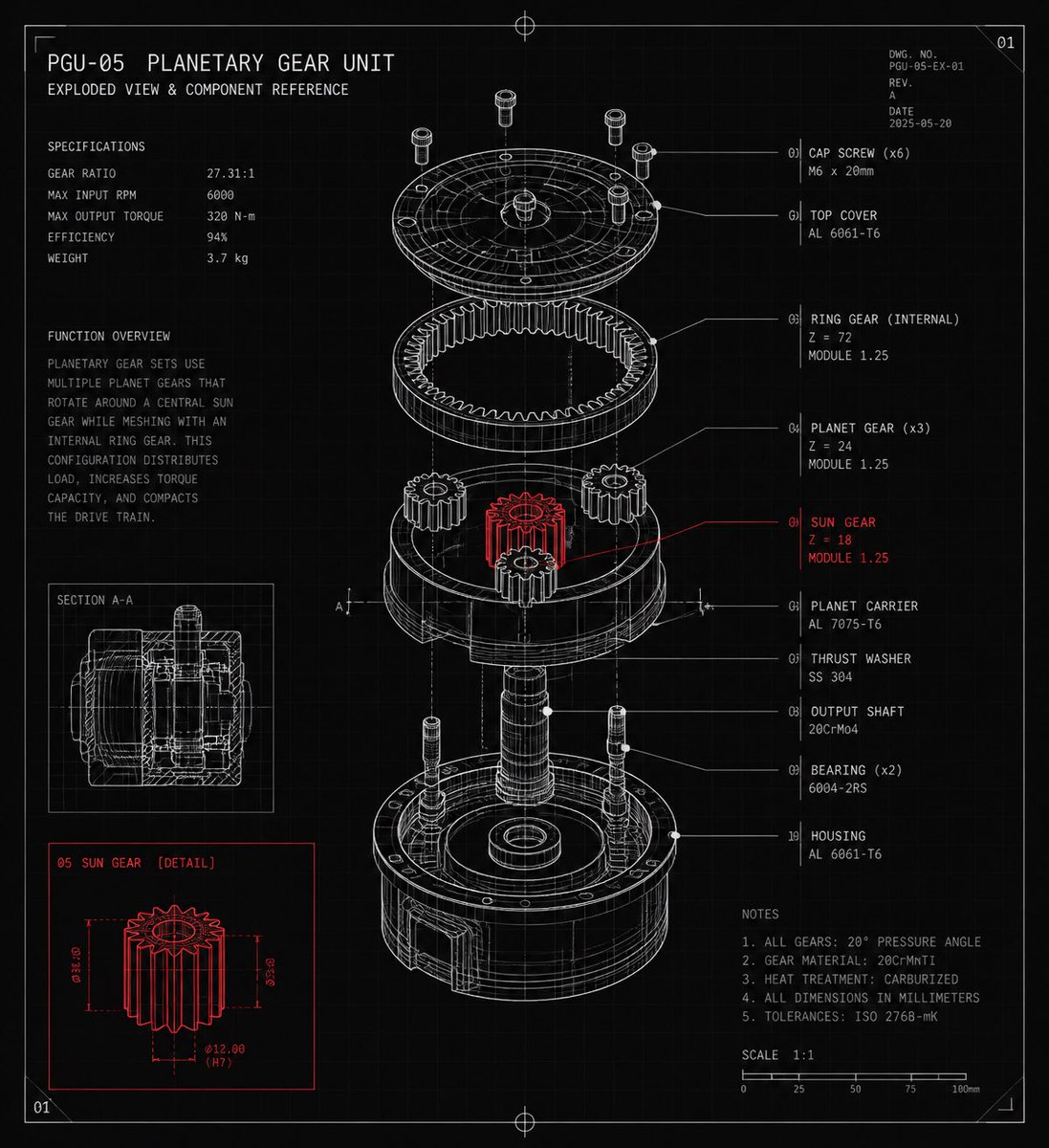
Planetary Gear Unit Blueprint
A detailed CAD-style exploded-view blueprint poster for a planetary gear unit with labeled components, specifications, notes, and red-highlighted sun gear details.
Este é um exemplo de prompt GPT Image 2 para Gráfico e pôster . Use o prompt pronto para copiar abaixo para gerar visuais semelhantes e revise a atribuição Awesome GPT Image 2 Prompts e os direitos de uso comercial antes de reutilizá-los.
Precisa do conjunto completo de instruções? Use o Gráfico e pôster Para obter mais exemplos relacionados, acesse o hub de tópicos ou abra o GPT Image 2 catálogo de prompts Para obter o índice completo de exemplos, estruturas reutilizáveis e atribuição de fontes.
Free 1K preview
Generate one preview image instantly, no sign-up required.
2951/4000
Incitar
prompt pronto para copiar
Goal: Create a dark technical blueprint poster of a mechanical exploded assembly labeled {argument name="unit name" default="PGU-05 Planetary Gear Unit"}, with the subtitle “Exploded View & Component Reference,” styled like a precision engineering CAD reference sheet.

Canvas: Square 1:1 format on a black/charcoal background with a faint grid, thin border lines, corner crop marks, small registration crosshairs at the top and bottom center, and a small sheet number “01” in the upper-right corner. Use white and light gray monoline drafting lines, with selective red highlights.

Main subject: Center a detailed isometric exploded view of a planetary gear unit, vertically arranged from top to bottom. Show exactly 10 labeled component groups with leader lines on the right: 01 Cap screw (x6), 02 Top cover, 03 Ring gear internal, 04 Planet gear (x3), 05 Sun gear, 06 Planet carrier, 07 Thrust washer, 08 Output shaft, 09 Bearing (x2), 10 Housing. Render the exploded parts as transparent wireframe/technical linework with hidden construction lines and dotted alignment axes. Make the sun gear the only emphasized component in red, positioned in the middle of the assembly, with a red leader line and red label.

Left information panel: At the upper left, place the title “PGU-05 PLANETARY GEAR UNIT” and subtitle “EXPLODED VIEW & COMPONENT REFERENCE.” Below it, include a specifications block with exactly 5 rows: Gear ratio 27.31:1, Max input RPM 6000, Max output torque 320 N-m, Efficiency 94%, Weight 3.7 kg. Under that, add a function overview paragraph explaining that a planetary gear set uses multiple planet gears rotating around a central sun gear while meshing with an internal ring gear, distributing load and increasing torque capacity in a compact drive train.

Inset diagrams: Add exactly 2 inset boxes on the lower-left side. The upper inset is labeled “SECTION A-A” and shows a white line cross-section of the assembled gear unit. The lower inset is labeled “05 SUN GEAR [DETAIL]” and uses red linework to show the isolated sun gear with dimension arrows and annotations such as Ø18.00, Ø32.00, and Ø12.00 (H7).

Right reference panel: Use compact monospaced technical text for the component list and notes. Include material and tooth-count callouts such as ring gear Z=72 module 1.25, planet gear Z=24 module 1.25, and sun gear Z=18 module 1.25. Add a notes block with exactly 5 numbered notes: all gears 20° pressure angle, gear material 20CrMnTi, heat treatment carburized, all dimensions in millimeters, tolerances ISO 2768-mK. Add a bottom scale bar labeled 1:1 with ticks from 0 to 100 mm.

Visual style: High-detail CAD drafting aesthetic, thin precise strokes, clean monospaced typography, subtle glow on white linework, red accent only for the sun gear detail and corresponding callouts, no photographic shading, no color except white/gray and red. Keep all text legible and aligned like a professional mechanical drawing.
Variáveis de prompt
Marcadores de posição editáveis para argumentos encontrados no prompt, com seus valores padrão.
Variável
unit name
Padrão
PGU-05 Planetary Gear Unit
Best for
- - Gráfico e pôster visual exploration
- - Image generation and reference-image edits
- - Reusable briefs that keep source attribution visible
Change these parts
- - Subject, product, character, or scene
- - Aspect ratio, camera, lighting, and background
- - Brand, text, color, and output constraints
Recommended model and settings
- - Model: gpt-image-2
- - Input mode: Texto para Imagem
- - Aspect ratio: source
- - Commercial status: review original source
How to use this prompt
- 1. Copy the prompt and preserve its structure for the first test.
- 2. Replace the subject, context, and publishing channel.
- 3. Change one camera, lighting, or style variable per iteration.
- 4. Inspect the output, source, text, and rights before reuse.
Limitations, source, and reuse cautions
- - Generated output is an editable draft, not factual, legal, or rights evidence.
- - Review the linked source, people, brands, logos, text, and third-party media before commercial use.
Importado de Awesome GPT Image 2 Prompts . É necessário dar crédito. O uso comercial é permitido allowed ; revise os direitos da fonte antes de utilizá-lo mediante pagamento.
Mais casos nesta categoria
Priorizados por categoria, compatibilidade do modo de entrada, qualidade e menor risco.

Cute Speech Bubble Mascot Profile Icon
Texto para Imagem

Tuxedo Cat Photo and Line Art Diptych
Texto para Imagem

Luxury Travel Fashion Portrait Prompt
Texto para Imagem

Autumn Cozy Casual Outfit Prompt
Texto para Imagem

Cute Focus Desk Flat Lay and Kawaii Illustration
Texto para Imagem

Studio Portrait of Woman with Sunglasses
Texto para Imagem
Reutilização e notas de origem
Utilize esta instrução com segurança após visualizar o caso.
- 1.Copie o prompt ou abra-o diretamente no Dovoo com o botão de geração.
- 2.Ajuste as variáveis, a proporção e as imagens de referência de acordo com o seu caso específico.
- 3.Antes de publicar ou utilizar o conteúdo mediante pagamento, verifique os direitos da fonte, os requisitos de atribuição e os riscos relacionados à marca ou à imagem.