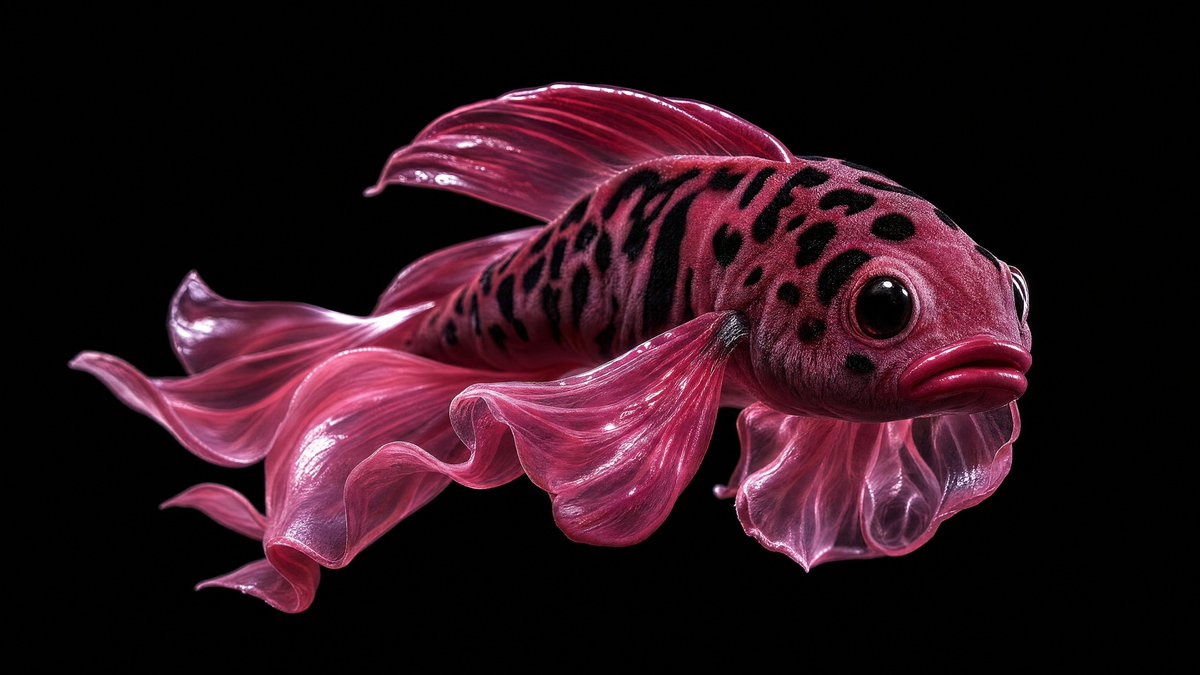
Glossy Pink Betta Fish Transformation
Transforms the reference’s dark glossy macro aesthetic into a surreal magenta betta fish with dramatic studio lighting and a central censor block.
Este é um exemplo de prompt GPT Image 2 para Retrato e Personagem . Use o prompt pronto para copiar abaixo para gerar visuais semelhantes e revise a atribuição Awesome GPT Image 2 Prompts e os direitos de uso comercial antes de reutilizá-los.
Precisa do conjunto completo de instruções? Use o Retrato e Personagem Para obter mais exemplos relacionados, acesse o hub de tópicos ou abra o GPT Image 2 catálogo de prompts Para obter o índice completo de exemplos, estruturas reutilizáveis e atribuição de fontes.
Free 1K preview
Generate one preview image instantly, no sign-up required.
Free text preview doesn’t preserve reference-image consistency.
1226/4000
Incitar
prompt pronto para copiar
Using REFERENCE_0 as the visual style reference only, transform the surreal glossy macro studio aesthetic into a single {argument name="subject" default="pink betta fish"}. Remove the mouths, teeth, tennis ball, jewelry, and mirror reflection entirely. Keep the high-contrast black background, dramatic wet-looking highlights, close-up product-photography lighting, and hyper-detailed texture. Create the fish in side profile facing right, with a rounded spotted head, large glossy black eye, pouty lips, and translucent flowing fins. Use a saturated {argument name="main color" default="deep magenta pink"} palette with darker black speckles across the head and upper body. Show exactly 6 prominent fin elements: 1 large rippling tail fin trailing left, 1 top dorsal fin, 1 long lower flowing fin, 1 rounded gill-side fin near the head, and 2 thin dangling ventral fins. Add a centered opaque rectangular censor block over the middle of the fish body, colored {argument name="censor block color" default="dark burgundy"}, with sharp edges and no text. Composition should be wide horizontal, minimal, isolated on {argument name="background color" default="pure black"}, with no extra objects, no reflection, and no typography.Variáveis de prompt
Marcadores de posição editáveis para argumentos encontrados no prompt, com seus valores padrão.
Variável
subject
Padrão
pink betta fish
Variável
main color
Padrão
deep magenta pink
Variável
censor block color
Padrão
dark burgundy
Variável
background color
Padrão
pure black
Best for
- - Retrato e Personagem visual exploration
- - Image generation and reference-image edits
- - Reusable briefs that keep source attribution visible
Change these parts
- - Subject, product, character, or scene
- - Aspect ratio, camera, lighting, and background
- - Brand, text, color, and output constraints
Recommended model and settings
- - Model: gpt-image-2
- - Input mode: Imagem para Imagem
- - Aspect ratio: source
- - Commercial status: review original source
How to use this prompt
- 1. Copy the prompt and preserve its structure for the first test.
- 2. Replace the subject, context, and publishing channel.
- 3. Change one camera, lighting, or style variable per iteration.
- 4. Inspect the output, source, text, and rights before reuse.
Limitations, source, and reuse cautions
- - Generated output is an editable draft, not factual, legal, or rights evidence.
- - Review the linked source, people, brands, logos, text, and third-party media before commercial use.
Importado de Awesome GPT Image 2 Prompts . É necessário dar crédito. O uso comercial é permitido allowed ; revise os direitos da fonte antes de utilizá-lo mediante pagamento.
Mais casos nesta categoria
Priorizados por categoria, compatibilidade do modo de entrada, qualidade e menor risco.

Split Face Horror Transformation
Imagem para Imagem

Greyscale Puzzle Portrait with Color Accent
Texto para Imagem

Vintage Digital Camera Mirror Selfie
Imagem para Imagem

Dax Cinematic Character Bible Sheet
Imagem para Imagem

Multi-Pose Wavy Dark Hair Portrait
Imagem para Imagem

Glitch Aesthetic Surreal Portrait
Texto para Imagem
Reutilização e notas de origem
Utilize esta instrução com segurança após visualizar o caso.
- 1.Copie o prompt ou abra-o diretamente no Dovoo com o botão de geração.
- 2.Ajuste as variáveis, a proporção e as imagens de referência de acordo com o seu caso específico.
- 3.Antes de publicar ou utilizar o conteúdo mediante pagamento, verifique os direitos da fonte, os requisitos de atribuição e os riscos relacionados à marca ou à imagem.