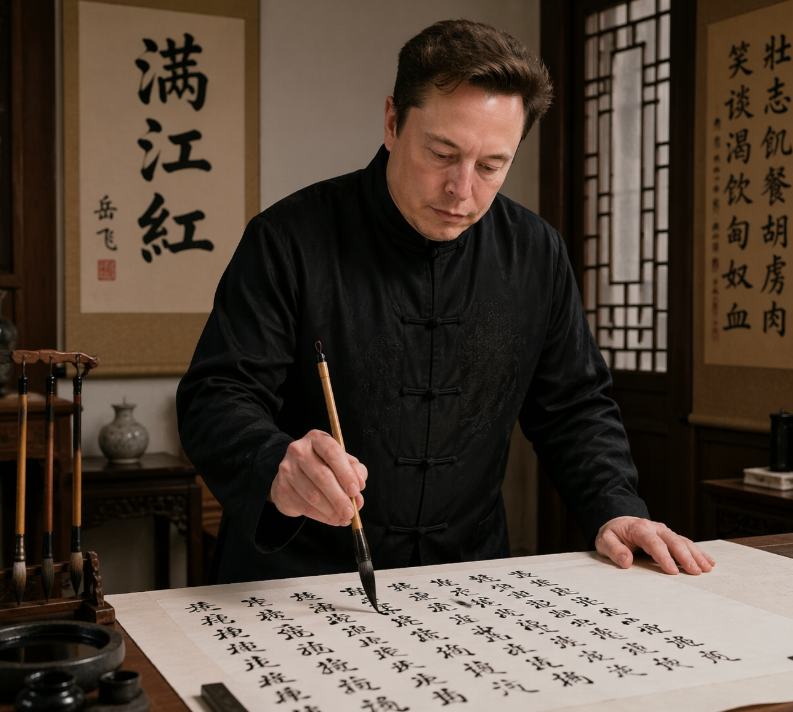
Cena fotorrealista de um estudioso de caligrafia
Este exercício gera um retrato realista de uma figura famosa do mundo da tecnologia praticando caligrafia chinesa em um escritório tradicional, ideal para sátiras editoriais, mashups culturais ou posts de comparação em redes sociais.
Este é um exemplo de prompt GPT Image 2 para Retrato e Personagem . Use o prompt pronto para copiar abaixo para gerar visuais semelhantes e revise a atribuição Awesome GPT Image 2 Prompts e os direitos de uso comercial antes de reutilizá-los.
Free 1K preview
Generate one preview image instantly, no sign-up required.
Incitar
prompt pronto para copiar
A realistic indoor portrait of {argument name="subject" default="Elon Musk"} standing at a traditional Chinese writing desk, practicing brush calligraphy on a large sheet of rice paper. He wears a black Tang-style Chinese jacket with frog-button closures and subtle embroidered texture, leaning slightly forward with one hand resting on the table and the other holding a calligraphy brush vertically over the paper. The scene is a warm, elegant scholar's studio with dark wooden furniture, a carved brush stand holding exactly 4 hanging calligraphy brushes on the left, an ink stone and small ink containers in the lower-left foreground, and a small ceramic vase on a side table in the back. Behind him are exactly 2 vertical hanging scrolls: the left scroll prominently displays the large characters {argument name="left scroll text" default="Full River Red"}, and the right scroll contains a longer column of Chinese calligraphy. A wooden lattice window appears on the right side, letting in soft ambient light. The paper on the desk is filled with many lines of black Chinese calligraphy in flowing semi-cursive script, suggesting he is writing {argument name="written poem" default="《Full River Red》"}. Use a documentary-style, photorealistic aesthetic with cinematic warm lighting, rich wood tones, authentic calligraphy tools, shallow depth of field, waist-up composition, and a serious, focused atmosphere.Variáveis de prompt
Marcadores de posição editáveis para argumentos encontrados no prompt, com seus valores padrão.
Best for
- - Retrato e Personagem visual exploration
- - Image generation and reference-image edits
- - Reusable briefs that keep source attribution visible
Change these parts
- - Subject, product, character, or scene
- - Aspect ratio, camera, lighting, and background
- - Brand, text, color, and output constraints
Recommended model and settings
- - Model: gpt-image-2
- - Input mode: Texto para Imagem
- - Aspect ratio: source
- - Commercial status: review original source
How to use this prompt
- 1. Copy the prompt and preserve its structure for the first test.
- 2. Replace the subject, context, and publishing channel.
- 3. Change one camera, lighting, or style variable per iteration.
- 4. Inspect the output, source, text, and rights before reuse.
Limitations, source, and reuse cautions
- - Generated output is an editable draft, not factual, legal, or rights evidence.
- - Review the linked source, people, brands, logos, text, and third-party media before commercial use.
Mais casos nesta categoria
Priorizados por categoria, compatibilidade do modo de entrada, qualidade e menor risco.






Reutilização e notas de origem
Utilize esta instrução com segurança após visualizar o caso.
- 1.Copie o prompt ou abra-o diretamente no Dovoo com o botão de geração.
- 2.Ajuste as variáveis, a proporção e as imagens de referência de acordo com o seu caso específico.
- 3.Antes de publicar ou utilizar o conteúdo mediante pagamento, verifique os direitos da fonte, os requisitos de atribuição e os riscos relacionados à marca ou à imagem.