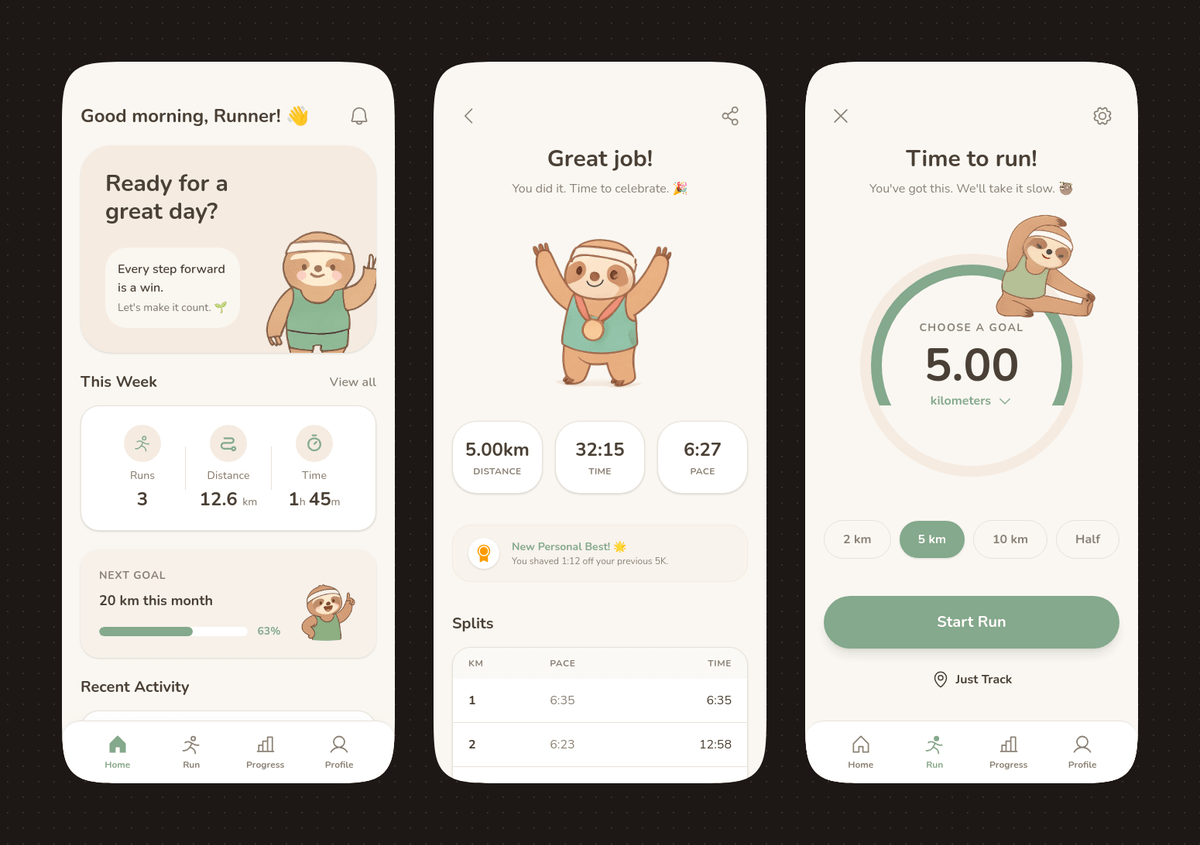
Interface de aplicativo de corrida em tons pastel com mascote de preguiça.
Este prompt gera um conceito refinado de aplicativo móvel de três telas com estilo pastel suave e um mascote de preguiça fofo, ideal para apresentações de design de aplicativos e protótipos de interface de usuário editáveis.
Este é um exemplo de prompt GPT Image 2 para Gráfico e pôster . Use o prompt pronto para copiar abaixo para gerar visuais semelhantes e revise a atribuição Awesome GPT Image 2 Prompts e os direitos de uso comercial antes de reutilizá-los.
Precisa do conjunto completo de instruções? Use o Gráfico e pôster Para obter mais exemplos relacionados, acesse o hub de tópicos ou abra o GPT Image 2 catálogo de prompts Para obter o índice completo de exemplos, estruturas reutilizáveis e atribuição de fontes.
Free 1K preview
Generate one preview image instantly, no sign-up required.
4000/4000
Incitar
prompt pronto para copiar
{
  "type": "mobile fitness app UI mockup",
  "style": "clean modern pastel app design, soft beige and warm white surfaces, muted sage green accents, rounded cards and buttons, subtle shadows, thin minimalist line icons, friendly playful branding with a sloth mascot, dribbble-style presentation on a dark brown dotted background",
  "theme": "running tracker app",
  "layout": {
    "device_count": 3,
    "arrangement": "three tall smartphone screens side by side, evenly spaced, front view",
    "background": "very dark brown with a faint evenly spaced dot grid",
    "screens": [
      {
        "position": "left",
        "screen_type": "home dashboard",
        "header": {
          "greeting": "Good morning, Runner! 👋",
          "left_icon": "none",
          "right_icon": "notification bell"
        },
        "hero_card": {
          "headline": "Ready for a great day?",
          "subcard_text_line_1": "Every step forward is a win.",
          "subcard_text_line_2": "Let's make it count. 🌱",
          "illustration": "cute sloth wearing a cream headband and mint-green workout outfit, standing and waving inside the card on the right"
        },
        "sections": [
          {
            "title": "This Week",
            "position": "upper middle",
            "count": 3,
            "labels": [
              "Runs",
              "Distance",
              "Time"
            ],
            "values": [
              "3",
              "12.6 km",
              "1h 45m"
            ],
            "presentation": "single rounded stats card with three equal columns and pale green circular icons"
          },
          {
            "title": "NEXT GOAL",
            "position": "middle lower",
            "count": 1,
            "labels": [
              "20 km this month"
            ],
            "values": [
              "63%"
            ],
            "presentation": "rounded progress card with green progress bar and small waving sloth illustration on the right"
          },
          {
            "title": "Recent Activity",
            "position": "lower",
            "count": 1,
            "labels": [
              "Recent Activity"
            ],
            "presentation": "top edge of another rounded card visible, cropped by the bottom navigation"
          }
        ],
        "bottom_nav": {
          "count": 4,
          "labels": [
            "Home",
            "Run",
            "Progress",
            "Profile"
          ],
          "active": "Home"
        }
      },
      {
        "position": "center",
        "screen_type": "run summary",
        "header": {
          "left_icon": "back chevron",
          "center_text": "Great job!",
          "subtext": "You did it. Time to celebrate. 🎉",
          "right_icon": "share"
        },
        "hero_illustration": "cute sloth wearing a headband, mint athletic outfit, and a gold medal, both arms raised in celebration",
        "stats_row": {
          "count": 3,
          "labels": [
            "Distance",
            "Time",
            "PACE"
          ],
          "values": [
            "5.00km",
            "32:15",
            "6:27"
          ],
          "presentation": "three rounded statistic pills"
        },
        "achievement_card": {
          "count": 1,
          "title": "New Personal Best! 🌟",
          "subtitle": "You shaved 1:12 off your previous 5K.",
          "icon": "small gold medal badge"
        },
        "table_section": {
          "title": "Splits",
          "count": 2,
          "columns": [
            "KM",
            "PACE",
            "Time"
          ],
          "rows": [
            [
              "1",
              "6:35",
              "6:35"
            ],
            [
              "2",
              "6:23",
              "12:58"
            ]
          ],
          "presentation": "rounded white table card with light dividers"
        }
      },
      {
        "position": "right",
        "screen_type": "run goal setup",
        "header": {
          "left_icon": "close x",
          "center_text": "Time to run!",
          "subtext": "You've got this. We'll take it slow. 🦥",
          "right_icon": "settings gear"
        },
        "goal_visual": {
          "type": "circular progress selector",
          "top_label": "CHOOSE A GOAL",
          "main_value": "5.00",
          "unit": "KM",
          "ring": "thick partial sage-green arc on a pale beige circle",
          "illustration": "small sloth stretching on the upper-right edge of the circle"
        },
        "goal_options": {
          "count": 4,
          "labels": [
            "2 km",
            "5 km",
            "10 km",
            "Half"
          ],
          "active": "5 km"
        },
        "primary_cta": {
          "label": "Start Run",
          "style": "large rounded sage-green button"
        },
        "secondary_action": {
          "label": "Just Track",
          "icon": "location pin"
        },
        "bottom_nav": {
          "count": 4,
          "labels": [
            "Home",
            "Run",
            "Progress",
            "Profile"
          ],
          "active": "Run"
        }
      }
    ]
  }
}
Best for
- - Gráfico e pôster visual exploration
- - Image generation and reference-image edits
- - Reusable briefs that keep source attribution visible
Change these parts
- - Subject, product, character, or scene
- - Aspect ratio, camera, lighting, and background
- - Brand, text, color, and output constraints
Recommended model and settings
- - Model: gpt-image-2
- - Input mode: Texto para Imagem
- - Aspect ratio: source
- - Commercial status: review original source
How to use this prompt
- 1. Copy the prompt and preserve its structure for the first test.
- 2. Replace the subject, context, and publishing channel.
- 3. Change one camera, lighting, or style variable per iteration.
- 4. Inspect the output, source, text, and rights before reuse.
Limitations, source, and reuse cautions
- - Generated output is an editable draft, not factual, legal, or rights evidence.
- - Review the linked source, people, brands, logos, text, and third-party media before commercial use.
Importado de Awesome GPT Image 2 Prompts . É necessário dar crédito. O uso comercial é permitido allowed ; revise os direitos da fonte antes de utilizá-lo mediante pagamento.
Mais casos nesta categoria
Priorizados por categoria, compatibilidade do modo de entrada, qualidade e menor risco.

Grumpy Rhino Storybook Illustration
Texto para Imagem

Surreal 3D Chess Match Artwork
Texto para Imagem

Y2K Style Photo Booth Collage
Texto para Imagem

Transparent Earbuds on Stone Pedestal
Texto para Imagem

Martial Arts Legend Character Bible Sheet
Texto para Imagem

Pink Hijab Mirror Selfie Portrait
Texto para Imagem
Reutilização e notas de origem
Utilize esta instrução com segurança após visualizar o caso.
- 1.Copie o prompt ou abra-o diretamente no Dovoo com o botão de geração.
- 2.Ajuste as variáveis, a proporção e as imagens de referência de acordo com o seu caso específico.
- 3.Antes de publicar ou utilizar o conteúdo mediante pagamento, verifique os direitos da fonte, os requisitos de atribuição e os riscos relacionados à marca ou à imagem.