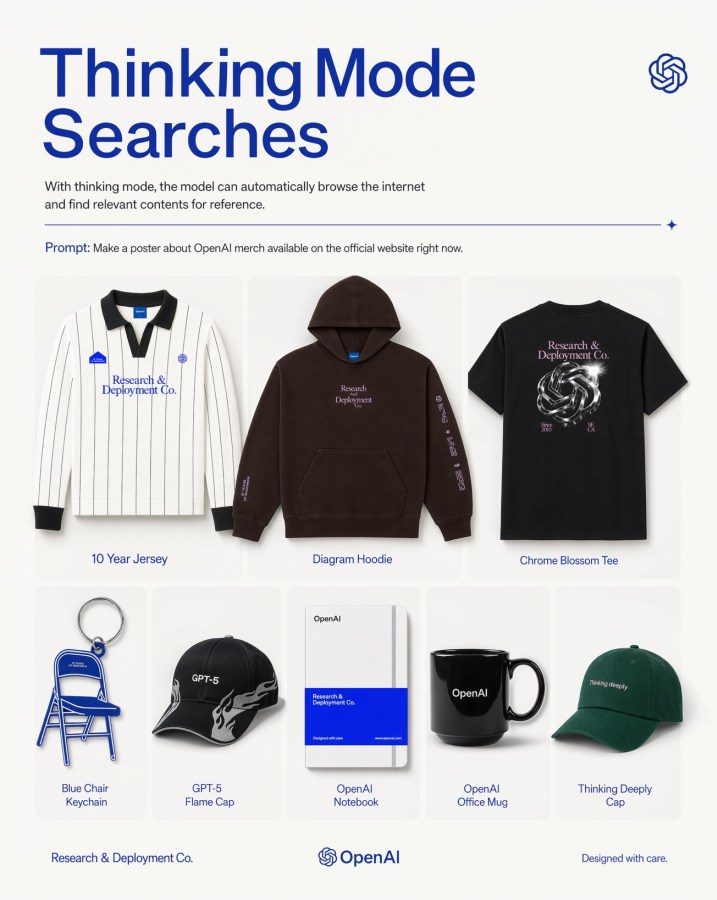
Grade de pôsteres de produtos da OpenAI
Um pôster editorial moderno que apresenta oito itens de merchandising com o tema OpenAI em uma grade de produtos organizada, ideal para promoção de marcas de tecnologia ou para recursos visuais de marketing em mídias sociais.
Este é um exemplo de prompt GPT Image 2 para Produto e Comercial . Use o prompt pronto para copiar abaixo para gerar visuais semelhantes e revise a atribuição Awesome GPT Image 2 Prompts e os direitos de uso comercial antes de reutilizá-los.
Precisa do conjunto completo de instruções? Use o Produto e Comercial Para obter mais exemplos relacionados, acesse o hub de tópicos ou abra o GPT Image 2 catálogo de prompts Para obter o índice completo de exemplos, estruturas reutilizáveis e atribuição de fontes.
Free 1K preview
Generate one preview image instantly, no sign-up required.
2414/4000
Incitar
prompt pronto para copiar
A clean, minimalist promotional poster on an off-white background in a modern tech-brand style. At the top left, a very large bold sans-serif headline in deep cobalt blue reads {argument name="headline text" default="Thinking Mode Searches"} split across two lines. Beneath it, a smaller gray explanatory sentence says that with thinking mode, the model can automatically browse the internet and find relevant contents for reference. At the top right, place a small blue OpenAI knot logo. Below the intro text, add a thin horizontal blue divider line ending with a tiny sparkle icon on the right. Under that, include a prompt line in small text with the word “Prompt:” in blue followed by the sentence {argument name="prompt text" default="Make a poster about OpenAI merch available on the official website right now."}. The main body is a centered 3-by-2 product grid with 8 total merchandise items shown as clean catalog cutouts with soft shadows inside rounded pale cards. Top row has 3 larger products: 1) a white long-sleeve striped rugby-style jersey with black collar and cuffs, small blue patches, and blue chest text “Research & Deployment Co.”, labeled “10 Year Jersey”; 2) a dark brown pullover hoodie with front pocket, small centered chest text “Research Deployment Co.” and sleeve print, labeled “Diagram Hoodie”; 3) a black T-shirt viewed from the back with a metallic knot graphic and pale pink text “Research & Deployment Co.”, labeled “Chrome Blossom Tee”. Bottom row has 5 smaller products: 4) a blue folding chair keychain shaped like a chair, labeled “Blue Chair Keychain”; 5) a black baseball cap with white flame graphics and “GPT-5” on the front, labeled “GPT-5 Flame Cap”; 6) a white notebook with a bold blue lower band and minimal OpenAI branding, labeled “OpenAI Notebook”; 7) a glossy black mug with “OpenAI” in white, labeled “OpenAI Office Mug”; 8) a dark green baseball cap with small white text “Thinking deeply”, labeled “Thinking Deeply Cap”. Keep all item labels centered below each product in small blue sans-serif text. Along the bottom footer, place “Research & Deployment Co.” on the left, the OpenAI knot logo plus wordmark centered, and “Designed with care.” on the right. Use a balanced editorial layout, lots of whitespace, premium product-ad poster aesthetics, subtle shadows, crisp studio lighting, and a restrained palette of off-white, blue, black, brown, and green.Variáveis de prompt
Marcadores de posição editáveis para argumentos encontrados no prompt, com seus valores padrão.
Variável
headline text
Padrão
Thinking Mode Searches
Variável
prompt text
Padrão
Make a poster about OpenAI merch available on the official website right now.
Best for
- - Produto e Comercial visual exploration
- - Image generation and reference-image edits
- - Reusable briefs that keep source attribution visible
Change these parts
- - Subject, product, character, or scene
- - Aspect ratio, camera, lighting, and background
- - Brand, text, color, and output constraints
Recommended model and settings
- - Model: gpt-image-2
- - Input mode: Texto para Imagem
- - Aspect ratio: source
- - Commercial status: review original source
How to use this prompt
- 1. Copy the prompt and preserve its structure for the first test.
- 2. Replace the subject, context, and publishing channel.
- 3. Change one camera, lighting, or style variable per iteration.
- 4. Inspect the output, source, text, and rights before reuse.
Limitations, source, and reuse cautions
- - Generated output is an editable draft, not factual, legal, or rights evidence.
- - Review the linked source, people, brands, logos, text, and third-party media before commercial use.
Importado de Awesome GPT Image 2 Prompts . É necessário dar crédito. O uso comercial é permitido allowed ; revise os direitos da fonte antes de utilizá-lo mediante pagamento.
Mais casos nesta categoria
Priorizados por categoria, compatibilidade do modo de entrada, qualidade e menor risco.

Transparent Earbuds on Stone Pedestal
Texto para Imagem

Overhead Pepperoni Pizza Photo
Texto para Imagem

Wet Transparent Earbud Macro
Texto para Imagem

Fashion Studio Portrait with Blue Rim Lighting
Texto para Imagem

New Chinese-Style Editorial Portrait
Texto para Imagem

Pink Hijab Mirror Selfie Portrait
Texto para Imagem
Reutilização e notas de origem
Utilize esta instrução com segurança após visualizar o caso.
- 1.Copie o prompt ou abra-o diretamente no Dovoo com o botão de geração.
- 2.Ajuste as variáveis, a proporção e as imagens de referência de acordo com o seu caso específico.
- 3.Antes de publicar ou utilizar o conteúdo mediante pagamento, verifique os direitos da fonte, os requisitos de atribuição e os riscos relacionados à marca ou à imagem.