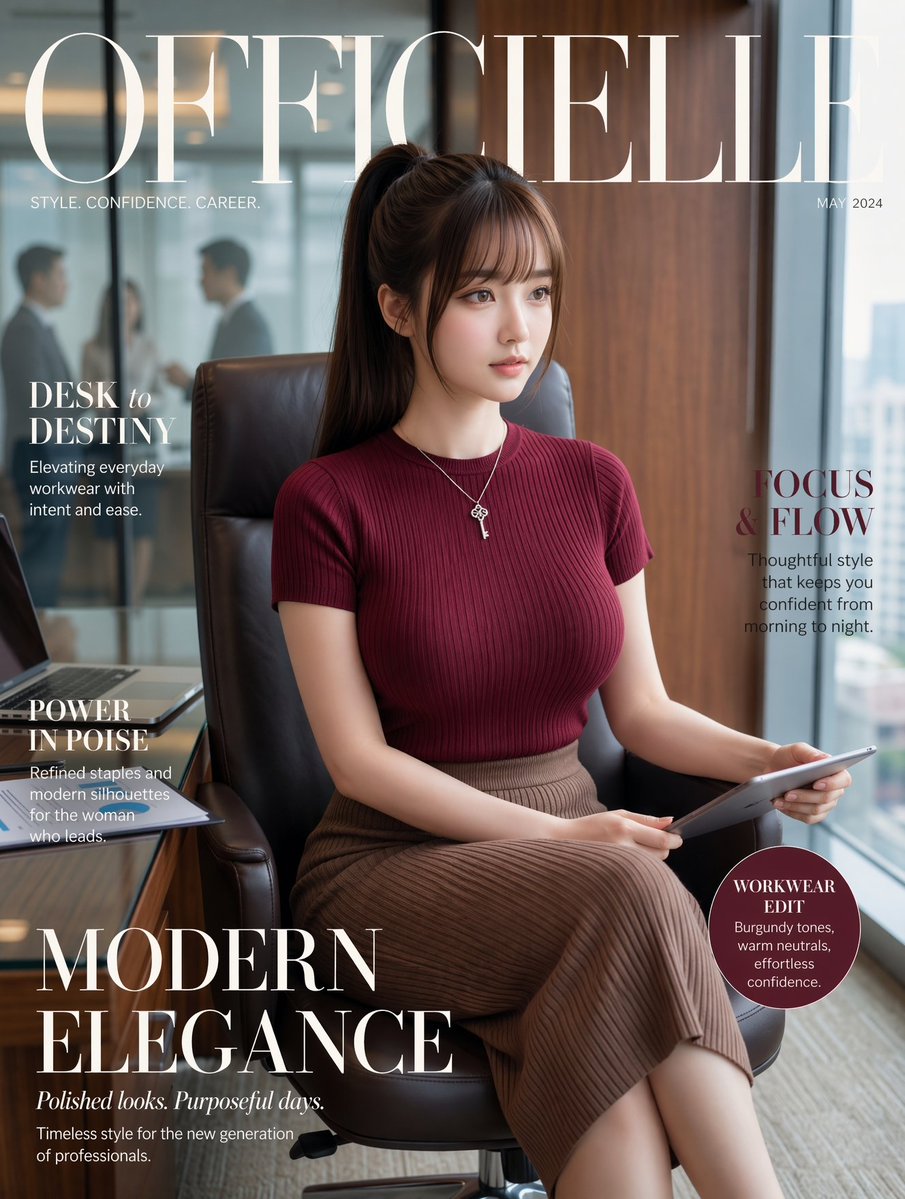
Capa da revista Office Fashion
Este prompt gera um retrato sofisticado para a capa de uma revista editorial, apresentando uma mulher de negócios elegante em um escritório moderno, ideal para campanhas de moda, branding e vestuário de trabalho.
Este é um exemplo de prompt GPT Image 2 para Moda e Beleza . Use o prompt pronto para copiar abaixo para gerar visuais semelhantes e revise a atribuição Awesome GPT Image 2 Prompts e os direitos de uso comercial antes de reutilizá-los.
Free 1K preview
Generate one preview image instantly, no sign-up required.
Free text preview doesn’t preserve reference-image consistency.
Incitar
prompt pronto para copiar
Luxury fashion magazine cover, vertical portrait, featuring a poised young professional woman seated in a black leather office chair in a modern high-rise office. She has {argument name="hair color" default="dark brown"} hair styled in a sleek high ponytail with soft side bangs, and wears a fitted ribbed short-sleeve knit top in {argument name="top color" default="deep burgundy"}, a high-waisted pleated midi skirt in taupe-brown, and a delicate silver necklace with small key-like layered pendants. She sits with legs crossed, holding a slim tablet across her lap, looking calm, composed, and quietly powerful. The setting is a polished executive office with a wooden wall panel on the right, floor-to-ceiling glass behind her, a blurred meeting scene with 2 indistinct businesspeople visible through the glass on the left, and a desk edge in the lower left corner with an open laptop and stacked documents. Soft natural daylight, refined editorial styling, realistic fashion photography, warm neutral tones, subtle background blur, premium magazine aesthetic. Overlay elegant magazine typography: giant serif masthead reading {argument name="magazine title" default="OFFICIELLE"} across the top in ivory white, small subtitle below the left side reading "STYLE. CONFIDENCE. CAREER.", date at top right reading {argument name="cover date" default="MAY 2024"}. Add 5 cover lines total: left upper "DESK to DESTINY" with smaller subtext "Elevating everyday workwear with intent and ease.", left middle "POWER IN POISE" with smaller subtext "Refined staples and modern silhouettes for the woman who leads.", right middle "FOCUS & FLOW" with smaller subtext "Thoughtful style that keeps you confident from morning to night.", large bottom-left headline "MODERN ELEGANCE" with italic subheading "Polished looks. Purposeful days." and small text "Timeless style for the new generation of professionals.", and a circular badge at lower right containing "WORKWEAR EDIT" and smaller text "Burgundy tones, warm neutrals, effortless confidence." Clean balanced layout, upscale women’s fashion magazine cover, confident office-as-runway mood, highly realistic, sophisticated, cinematic softness.Variáveis de prompt
Marcadores de posição editáveis para argumentos encontrados no prompt, com seus valores padrão.
Best for
- - Moda e Beleza visual exploration
- - Image generation and reference-image edits
- - Reusable briefs that keep source attribution visible
Change these parts
- - Subject, product, character, or scene
- - Aspect ratio, camera, lighting, and background
- - Brand, text, color, and output constraints
Recommended model and settings
- - Model: gpt-image-2
- - Input mode: Imagem para Imagem
- - Aspect ratio: source
- - Commercial status: review original source
How to use this prompt
- 1. Copy the prompt and preserve its structure for the first test.
- 2. Replace the subject, context, and publishing channel.
- 3. Change one camera, lighting, or style variable per iteration.
- 4. Inspect the output, source, text, and rights before reuse.
Limitations, source, and reuse cautions
- - Generated output is an editable draft, not factual, legal, or rights evidence.
- - Review the linked source, people, brands, logos, text, and third-party media before commercial use.
Mais casos nesta categoria
Priorizados por categoria, compatibilidade do modo de entrada, qualidade e menor risco.






Reutilização e notas de origem
Utilize esta instrução com segurança após visualizar o caso.
- 1.Copie o prompt ou abra-o diretamente no Dovoo com o botão de geração.
- 2.Ajuste as variáveis, a proporção e as imagens de referência de acordo com o seu caso específico.
- 3.Antes de publicar ou utilizar o conteúdo mediante pagamento, verifique os direitos da fonte, os requisitos de atribuição e os riscos relacionados à marca ou à imagem.