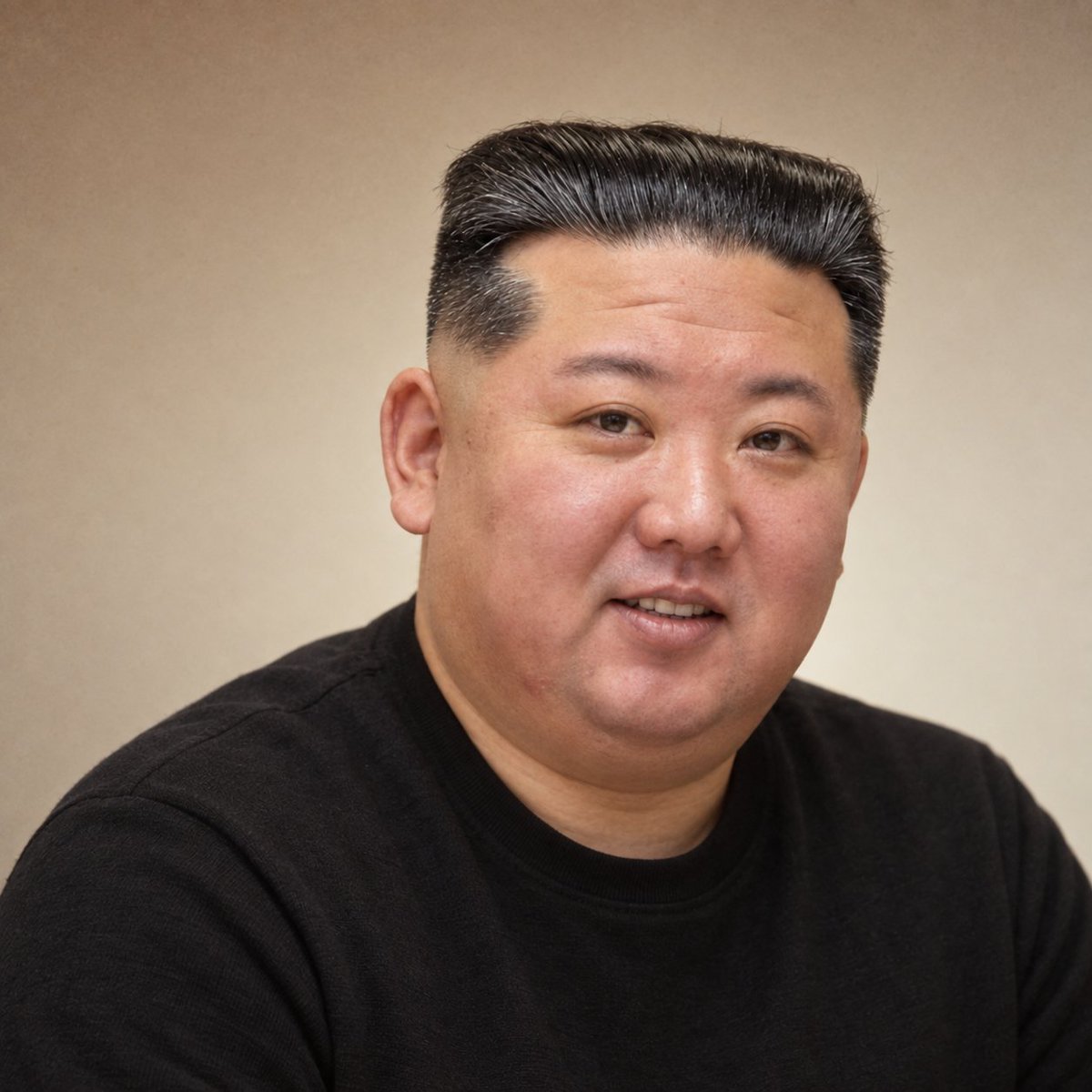
Realistic Professional Avatar Prompt
A highly detailed prompt for GPT Image 2 (referred to as GPT2/chatGPT web version) to generate realistic, natural professional avatars with specific lighting, background, and texture instructions.
Este é um exemplo de prompt GPT Image 2 para Retrato e Personagem . Use o prompt pronto para copiar abaixo para gerar visuais semelhantes e revise a atribuição Awesome GPT Image 2 Prompts e os direitos de uso comercial antes de reutilizá-los.
Precisa do conjunto completo de instruções? Use o Retrato e Personagem Para obter mais exemplos relacionados, acesse o hub de tópicos ou abra o GPT Image 2 catálogo de prompts Para obter o índice completo de exemplos, estruturas reutilizáveis e atribuição de fontes.
Free 1K preview
Generate one preview image instantly, no sign-up required.
Free text preview doesn’t preserve reference-image consistency.
1913/4000
Incitar
prompt pronto para copiar
Generate a real, natural, and approachable professional headshot based on the input photo, highly maintaining identity consistency, facial proportions, face shape, hairline, age perception, and original gender expression without changing appearance. 1:1 square composition, framed from chest up, using asymmetric visual balance: subject slightly right, retaining about 18% headroom, left and top-left forming main negative space, avoiding ID-photo centering and tight cropping. Natural shoulder line, slight head tilt, looking directly at camera, relaxed, confident, friendly expression, natural smile or toothy smile allowed.

Clothing is simple dark round-neck or minimalist top, naturally adapted to the person's original style; females retain natural hairstyle, makeup, and moderate jewelry; males retain stubble, hairstyle, and other realistic features, no stereotypical gender styling. Background is a real warm-toned wall: low-brightness red-brown/caramel warm gray at top, gray-beige/apricot in middle, cream-white at bottom, forming non-linear vertical gradient via natural light falloff, wall reflection, and slight vignette; add fine, low-amplitude, high-frequency random noise, more obvious in shadows, simulating early digital sensors and slight JPEG texture.

Use large-area soft window light, low lighting ratio, low local contrast, no rim light or commercial studio shaping. Skin tone maintains real hue differences and natural blood color; females avoid porcelain skin smoothing, males avoid over-emphasizing rough texture; reduce high-frequency skin details and clarity, retain mid-low frequency facial structure, making skin soft but real. Overall low-saturation warm tone, soft highlights, slight lift in blacks, reduced blue-cyan tones, presenting 2000s–2010s early digital headshot quality: smart, trustworthy, relaxed, natural, approachable, rather than modern high-end commercial portrait.
Best for
- - Retrato e Personagem visual exploration
- - Image generation and reference-image edits
- - Reusable briefs that keep source attribution visible
Change these parts
- - Subject, product, character, or scene
- - Aspect ratio, camera, lighting, and background
- - Brand, text, color, and output constraints
Recommended model and settings
- - Model: gpt-image-2
- - Input mode: Imagem para Imagem
- - Aspect ratio: source
- - Commercial status: review original source
How to use this prompt
- 1. Copy the prompt and preserve its structure for the first test.
- 2. Replace the subject, context, and publishing channel.
- 3. Change one camera, lighting, or style variable per iteration.
- 4. Inspect the output, source, text, and rights before reuse.
Limitations, source, and reuse cautions
- - Generated output is an editable draft, not factual, legal, or rights evidence.
- - Review the linked source, people, brands, logos, text, and third-party media before commercial use.
Importado de Awesome GPT Image 2 Prompts . É necessário dar crédito. O uso comercial é permitido allowed ; revise os direitos da fonte antes de utilizá-lo mediante pagamento.
Mais casos nesta categoria
Priorizados por categoria, compatibilidade do modo de entrada, qualidade e menor risco.

Sci-Fi Cyan Lighting Effect
Imagem para Imagem

Stylish Man Street Lamp Portrait
Imagem para Imagem

Oversized Head Cartoon Caricature Prompt
Imagem para ImagemRisco médio

Studio Portrait of Woman with Sunglasses
Texto para Imagem

Street Selfie with Cat in Matching Cap
Texto para Imagem

Cinematic Blue Backlit Portrait
Texto para Imagem
Reutilização e notas de origem
Utilize esta instrução com segurança após visualizar o caso.
- 1.Copie o prompt ou abra-o diretamente no Dovoo com o botão de geração.
- 2.Ajuste as variáveis, a proporção e as imagens de referência de acordo com o seu caso específico.
- 3.Antes de publicar ou utilizar o conteúdo mediante pagamento, verifique os direitos da fonte, os requisitos de atribuição e os riscos relacionados à marca ou à imagem.