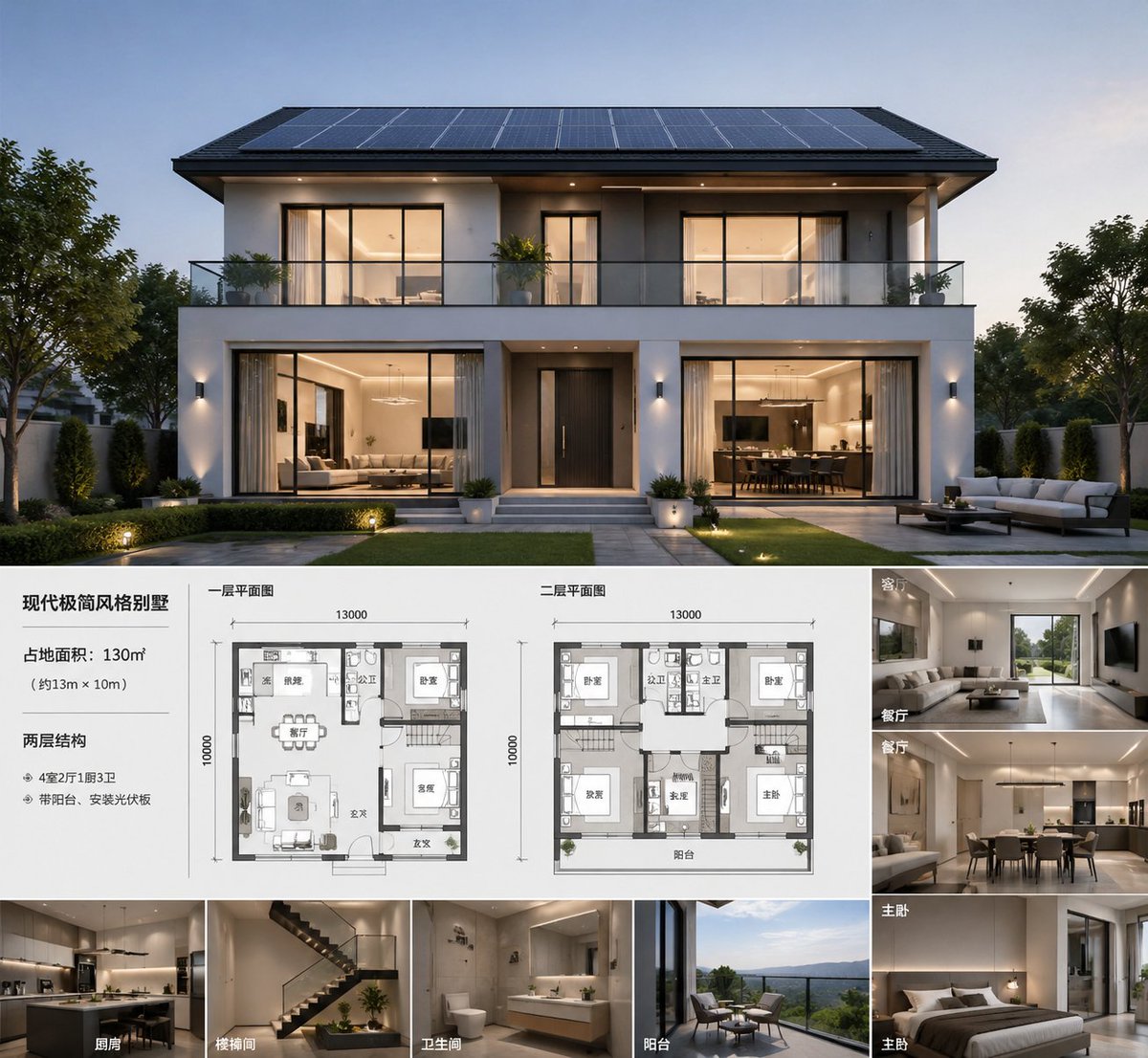
Painel de Apresentação da Arquitetura Moderna de Vilas
Gera um painel arquitetônico premium no estilo imobiliário com uma renderização principal de uma casa ao entardecer, duas plantas baixas e oito prévias de interiores com legendas para apresentações de design ou marketing de imóveis.
Este é um exemplo de prompt GPT Image 2 para Interiores e Arquitetura . Use o prompt pronto para copiar abaixo para gerar visuais semelhantes e revise a atribuição Awesome GPT Image 2 Prompts e os direitos de uso comercial antes de reutilizá-los.
Free 1K preview
Generate one preview image instantly, no sign-up required.
Incitar
prompt pronto para copiar
A sophisticated architectural presentation project showcasing {argument name="building type" default="modern minimalist villa"}, presented as a photorealistic dusk exterior rendering of a symmetrical, double-story luxury residence. The main visual image occupies the upper half: a front-facing modern house with a clean white and charcoal gray facade, wide eaves, a full-width balcony with glass railings, large warm-lit windows, a centered dark entrance door, landscaped lawn, paved pathways, and refined garden lighting, with most of the roof covered in solar panels. The overall atmosphere is elegant and high-end, presenting a tranquil evening blue hue with warm interior lighting, realistic materials, and soft shadows, possessing top-tier real estate visualization quality. The lower half features a clean presentation layout on a white background with Chinese labels and fine dividing lines, resembling an architectural concept project. On the left is a text block containing 1 title and 3 lines of specifications: the title is {argument name="headline text" default="modern minimalist villa"}, followed by area, dimensions, and structure/feature descriptions in Chinese. In the middle are 2 labeled floor plans, both drawn in a grayscale architectural plan style, including furniture and room outlines: one labeled “First Floor Plan” and the other labeled “Second Floor Plan,” both marked with dimensions of 13000 x 10000. On the right is a column of 4 interior perspective thumbnails, each with a Chinese room label: “Living Room,” “Dining Room,” “Master Bedroom,” “Master Bedroom.” At the bottom is a horizontally arranged row of 4 additional perspective thumbnails, labeled “Kitchen,” “Stairwell,” “Bathroom,” and “Balcony.” Total number of thumbnails: 8, total number of floor plans: 2, total number of main layout areas: 4. The interior thumbnails should be consistent with the overall design language of the house: warm neutral tones, beige and wood tones, minimalist luxury furniture, integrated lighting, clean cabinetry, modern stairs, hotel-style bathrooms, and landscaped balcony seating. The overall style is a high-end developer sales project or architect concept page, with a clear grid layout, balanced margins, and an editorial-level presentation effect, ultra-detailed, photorealistic, and high-resolution.Variáveis de prompt
Marcadores de posição editáveis para argumentos encontrados no prompt, com seus valores padrão.
Best for
- - Interiores e Arquitetura visual exploration
- - Image generation and reference-image edits
- - Reusable briefs that keep source attribution visible
Change these parts
- - Subject, product, character, or scene
- - Aspect ratio, camera, lighting, and background
- - Brand, text, color, and output constraints
Recommended model and settings
- - Model: gpt-image-2
- - Input mode: Texto para Imagem
- - Aspect ratio: source
- - Commercial status: review original source
How to use this prompt
- 1. Copy the prompt and preserve its structure for the first test.
- 2. Replace the subject, context, and publishing channel.
- 3. Change one camera, lighting, or style variable per iteration.
- 4. Inspect the output, source, text, and rights before reuse.
Limitations, source, and reuse cautions
- - Generated output is an editable draft, not factual, legal, or rights evidence.
- - Review the linked source, people, brands, logos, text, and third-party media before commercial use.
Mais casos nesta categoria
Priorizados por categoria, compatibilidade do modo de entrada, qualidade e menor risco.






Reutilização e notas de origem
Utilize esta instrução com segurança após visualizar o caso.
- 1.Copie o prompt ou abra-o diretamente no Dovoo com o botão de geração.
- 2.Ajuste as variáveis, a proporção e as imagens de referência de acordo com o seu caso específico.
- 3.Antes de publicar ou utilizar o conteúdo mediante pagamento, verifique os direitos da fonte, os requisitos de atribuição e os riscos relacionados à marca ou à imagem.