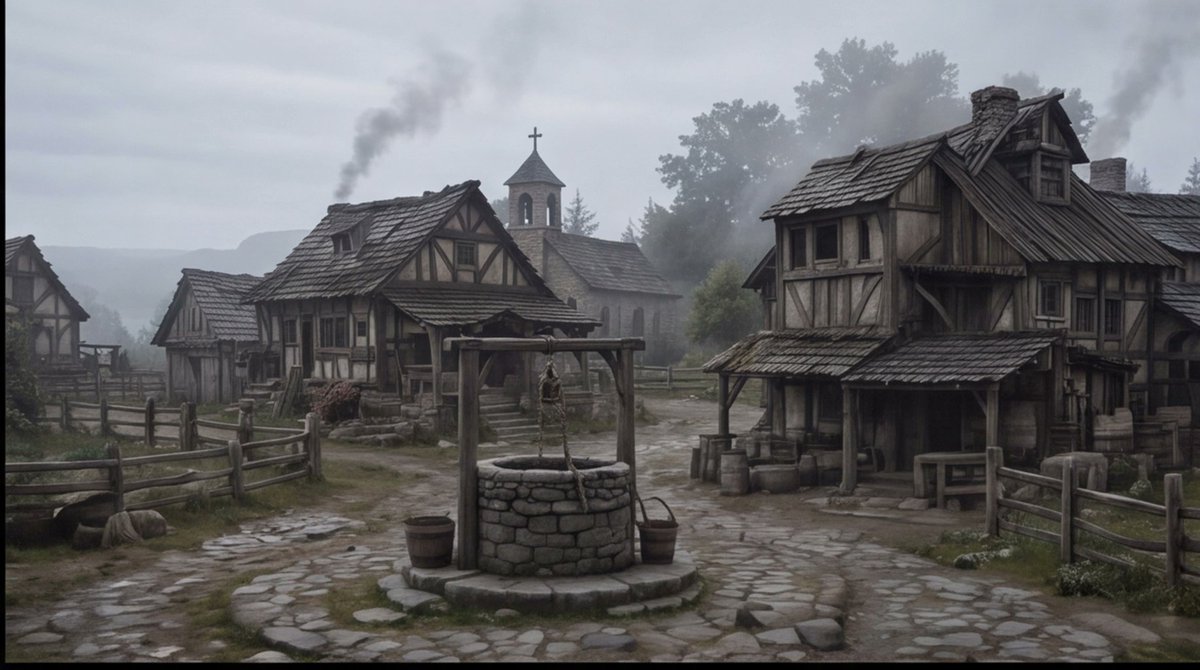
Plano geral de uma vila medieval envolta em névoa
Gera uma praça de vila medieval de fantasia sombria com estilo cinematográfico, adequada para storyboard, arte conceitual ou visuais de ambientação de cena.
Este é um exemplo de prompt GPT Image 2 para Paisagem e Natureza . Use o prompt pronto para copiar abaixo para gerar visuais semelhantes e revise a atribuição Awesome GPT Image 2 Prompts e os direitos de uso comercial antes de reutilizá-los.
Precisa do conjunto completo de instruções? Use o Paisagem e Natureza Para obter mais exemplos relacionados, acesse o hub de tópicos ou abra o GPT Image 2 catálogo de prompts Para obter o índice completo de exemplos, estruturas reutilizáveis e atribuição de fontes.
Free 1K preview
Generate one preview image instantly, no sign-up required.
1396/4000
Incitar
prompt pronto para copiar
Create a cinematic wide establishing shot of a quiet {argument name="setting" default="medieval European village square"} on a cold misty morning, rendered in realistic dark fantasy style. The scene centers on a circular stone well with a wooden frame, hanging rope, bucket, and small barrels beside it, placed on an uneven cobblestone path that forks between rustic half-timbered houses. Show at least four visible timber-and-plaster buildings: a large weathered two-story house on the right with a sagging shingled roof, porch, barrels, crates, and a small table; two smaller cottages on the left and midground with fenced yards; and a stone church in the background with a bell tower and cross. Add wooden split-rail fences, muddy grass patches, scattered stones, worn steps, smoke rising from chimneys, and distant tree silhouettes fading into fog. Use a muted palette of gray, brown, moss green, and charcoal, with overcast sky, damp ground, soft diffuse light, low contrast, subtle haze, and a slightly desaturated film look. No people are visible, making the village feel abandoned or early before dawn. Compose as a wide 16:9 storyboard frame with the well in the lower center foreground, buildings framing both sides, the church tower near the central background, and atmospheric depth created by mist and smoke. Overall mood: {argument name="mood" default="somber, quiet, and ominous"}.Variáveis de prompt
Marcadores de posição editáveis para argumentos encontrados no prompt, com seus valores padrão.
Variável
setting
Padrão
medieval European village square
Variável
mood
Padrão
somber, quiet, and ominous
Best for
- - Paisagem e Natureza visual exploration
- - Image generation and reference-image edits
- - Reusable briefs that keep source attribution visible
Change these parts
- - Subject, product, character, or scene
- - Aspect ratio, camera, lighting, and background
- - Brand, text, color, and output constraints
Recommended model and settings
- - Model: gpt-image-2
- - Input mode: Texto para Imagem
- - Aspect ratio: source
- - Commercial status: review original source
How to use this prompt
- 1. Copy the prompt and preserve its structure for the first test.
- 2. Replace the subject, context, and publishing channel.
- 3. Change one camera, lighting, or style variable per iteration.
- 4. Inspect the output, source, text, and rights before reuse.
Limitations, source, and reuse cautions
- - Generated output is an editable draft, not factual, legal, or rights evidence.
- - Review the linked source, people, brands, logos, text, and third-party media before commercial use.
Importado de Awesome GPT Image 2 Prompts . É necessário dar crédito. O uso comercial é permitido allowed ; revise os direitos da fonte antes de utilizá-lo mediante pagamento.
Mais casos nesta categoria
Priorizados por categoria, compatibilidade do modo de entrada, qualidade e menor risco.

MotoGP POV Cornering Shot
Texto para Imagem

Cinematic Blue Backlit Portrait
Texto para Imagem

Luxury Travel Fashion Portrait Prompt
Texto para Imagem

Hell Hound Character Sheet Infographic
Texto para Imagem

GPT Image 2 Prompt: Garden Dappled Light
Texto para Imagem

GPT Image 2 Real-Life Character Street Snap
Texto para Imagem
Reutilização e notas de origem
Utilize esta instrução com segurança após visualizar o caso.
- 1.Copie o prompt ou abra-o diretamente no Dovoo com o botão de geração.
- 2.Ajuste as variáveis, a proporção e as imagens de referência de acordo com o seu caso específico.
- 3.Antes de publicar ou utilizar o conteúdo mediante pagamento, verifique os direitos da fonte, os requisitos de atribuição e os riscos relacionados à marca ou à imagem.