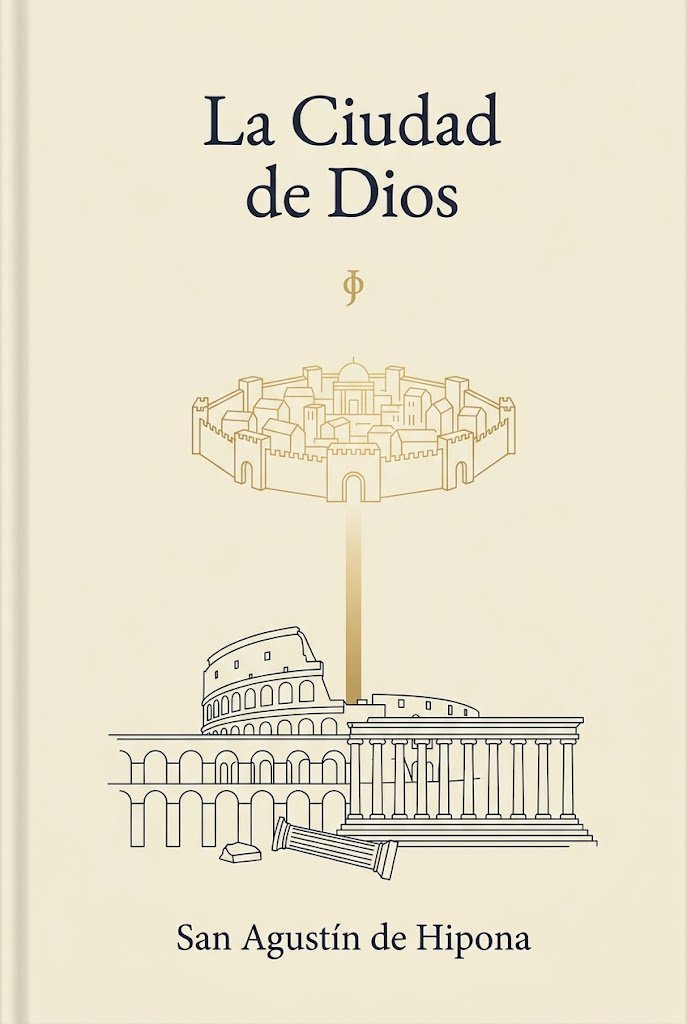
Capa minimalista do livro Santo Agostinho
Este modelo gera uma capa minimalista e elegante para um livro clássico religioso ou filosófico, ideal para edições literárias e publicações devocionais.
Este é um exemplo de prompt GPT Image 2 para Gráfico e pôster . Use o prompt pronto para copiar abaixo para gerar visuais semelhantes e revise a atribuição Awesome GPT Image 2 Prompts e os direitos de uso comercial antes de reutilizá-los.
Precisa do conjunto completo de instruções? Use o Gráfico e pôster Para obter mais exemplos relacionados, acesse o hub de tópicos ou abra o GPT Image 2 catálogo de prompts Para obter o índice completo de exemplos, estruturas reutilizáveis e atribuição de fontes.
Free 1K preview
Generate one preview image instantly, no sign-up required.
1431/4000
Incitar
prompt pronto para copiar
A minimalist classical book cover in vertical format on a warm ivory or parchment background. At the top center, set the title in elegant large dark navy serif type across 2 lines: {argument name="title text" default="La Ciudad de Dios"}. Beneath it, centered with generous spacing, place a small gold phi symbol. In the upper-middle area, draw a delicate thin-line gold illustration of a fortified circular heavenly city with exactly 8 visible outer towers or gate structures, crenelated walls, and compact classical buildings inside, including a central dome. From the bottom center of this city, extend a soft vertical gold beam of light downward. In the lower-middle area, create thin dark navy line art of earthly classical ruins: the Roman Colosseum on the left, a large Greek or Roman temple with a triangular pediment and a long row of columns on the right, a broken fallen column in front, a small stone block near it, and an arched ruin structure spanning the lower left. Keep the composition symmetrical and airy, with lots of empty space, refined editorial balance, and subtle contrast between gold heavenly imagery and dark navy earthly architecture. At the bottom center, place the author name in matching dark navy serif type: {argument name="author name" default="San Agustín de Hipona"}. Clean premium literary design, sacred philosophy aesthetic, no extra text, no texture-heavy effects, no photographic elements.Variáveis de prompt
Marcadores de posição editáveis para argumentos encontrados no prompt, com seus valores padrão.
Variável
title text
Padrão
La Ciudad de Dios
Variável
author name
Padrão
San Agustín de Hipona
Best for
- - Gráfico e pôster visual exploration
- - Image generation and reference-image edits
- - Reusable briefs that keep source attribution visible
Change these parts
- - Subject, product, character, or scene
- - Aspect ratio, camera, lighting, and background
- - Brand, text, color, and output constraints
Recommended model and settings
- - Model: gpt-image-2
- - Input mode: Texto para Imagem
- - Aspect ratio: source
- - Commercial status: review original source
How to use this prompt
- 1. Copy the prompt and preserve its structure for the first test.
- 2. Replace the subject, context, and publishing channel.
- 3. Change one camera, lighting, or style variable per iteration.
- 4. Inspect the output, source, text, and rights before reuse.
Limitations, source, and reuse cautions
- - Generated output is an editable draft, not factual, legal, or rights evidence.
- - Review the linked source, people, brands, logos, text, and third-party media before commercial use.
Importado de Awesome GPT Image 2 Prompts . É necessário dar crédito. O uso comercial é permitido allowed ; revise os direitos da fonte antes de utilizá-lo mediante pagamento.
Mais casos nesta categoria
Priorizados por categoria, compatibilidade do modo de entrada, qualidade e menor risco.

Grumpy Rhino Storybook Illustration
Texto para Imagem

Martial Arts Legend Character Bible Sheet
Texto para Imagem

Surreal 3D Chess Match Artwork
Texto para Imagem

Pink Hijab Mirror Selfie Portrait
Texto para Imagem

Fashion Studio Portrait with Blue Rim Lighting
Texto para Imagem

Spring Editorial Fashion Collage
Texto para Imagem
Reutilização e notas de origem
Utilize esta instrução com segurança após visualizar o caso.
- 1.Copie o prompt ou abra-o diretamente no Dovoo com o botão de geração.
- 2.Ajuste as variáveis, a proporção e as imagens de referência de acordo com o seu caso específico.
- 3.Antes de publicar ou utilizar o conteúdo mediante pagamento, verifique os direitos da fonte, os requisitos de atribuição e os riscos relacionados à marca ou à imagem.