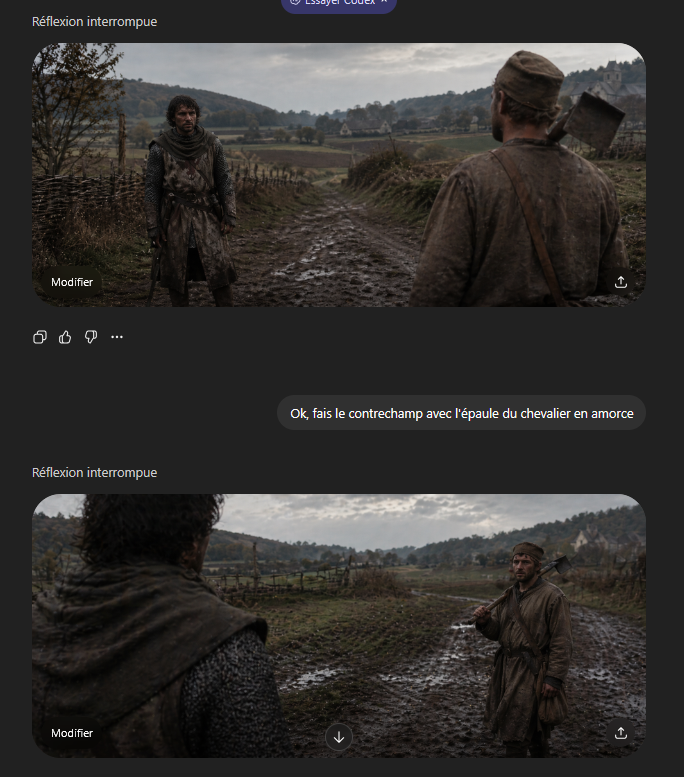
Plano medieval Plano reverso
Uma cena medieval cinematográfica com contraplano em dois ângulos para demonstrar o enquadramento por cima do ombro e a composição de plano e contraplano.
Este é um exemplo de prompt GPT Image 2 para Ilustração e Arte . Use o prompt pronto para copiar abaixo para gerar visuais semelhantes e revise a atribuição Awesome GPT Image 2 Prompts e os direitos de uso comercial antes de reutilizá-los.
Precisa do conjunto completo de instruções? Use o Ilustração e Arte Para obter mais exemplos relacionados, acesse o hub de tópicos ou abra o GPT Image 2 catálogo de prompts Para obter o índice completo de exemplos, estruturas reutilizáveis e atribuição de fontes.
Free 1K preview
Generate one preview image instantly, no sign-up required.
1674/4000
Incitar
prompt pronto para copiar
A cinematic medieval shot-reverse-shot pair presented as a gritty historical film still in an ultrawide 21:9 aspect ratio, overcast natural light, muted earth tones, damp autumn atmosphere, realistic muddy textures, shallow depth of field, and strong foreground shoulder framing. Set the scene on a rutted muddy country road running through a rural valley with rough wooden wattle fences on both sides, low rolling hills covered with sparse trees in the distance, open fields, and a small pale stone farmhouse or chapel on the far right hillside. The two characters face each other on the road. One is a weary medieval peasant man in a dirty brown tunic and cap, average build, carrying a wood-handled axe resting on his shoulder with a leather strap across his chest. The other is a knight or armed traveler in dark weathered chainmail and a worn hooded surcoat, standing still with a guarded posture. Create this as a grammar-of-cinema countershot demonstration: first frame shows the {argument name="foreground character" default="peasant man with axe"} from behind in the right foreground, his shoulder and back occupying the near right side of the frame, while the {argument name="background character" default="knight in chainmail"} stands full figure in the left midground facing camera on the muddy road; second frame reverses the angle and shows the knight’s shoulder and hooded back blurred in the left foreground while the peasant stands in the right midground holding the axe on his shoulder. Keep both shots consistent in location, weather, costume continuity, lens feel, and character spacing, with subdued dramatic realism and a tense conversational standoff.Variáveis de prompt
Marcadores de posição editáveis para argumentos encontrados no prompt, com seus valores padrão.
Variável
foreground character
Padrão
peasant man with axe
Variável
background character
Padrão
knight in chainmail
Best for
- - Ilustração e Arte visual exploration
- - Image generation and reference-image edits
- - Reusable briefs that keep source attribution visible
Change these parts
- - Subject, product, character, or scene
- - Aspect ratio, camera, lighting, and background
- - Brand, text, color, and output constraints
Recommended model and settings
- - Model: gpt-image-2
- - Input mode: Texto para Imagem
- - Aspect ratio: source
- - Commercial status: review original source
How to use this prompt
- 1. Copy the prompt and preserve its structure for the first test.
- 2. Replace the subject, context, and publishing channel.
- 3. Change one camera, lighting, or style variable per iteration.
- 4. Inspect the output, source, text, and rights before reuse.
Limitations, source, and reuse cautions
- - Generated output is an editable draft, not factual, legal, or rights evidence.
- - Review the linked source, people, brands, logos, text, and third-party media before commercial use.
Importado de Awesome GPT Image 2 Prompts . É necessário dar crédito. O uso comercial é permitido allowed ; revise os direitos da fonte antes de utilizá-lo mediante pagamento.
Mais casos nesta categoria
Priorizados por categoria, compatibilidade do modo de entrada, qualidade e menor risco.

Surreal 3D Chess Match Artwork
Texto para Imagem

Grumpy Rhino Storybook Illustration
Texto para Imagem

Manga Desert Radio Telescope Road Trip
Texto para Imagem

Female Clown Cyborg Portrait
Texto para Imagem

Imperial Research Bunker on Volcanic Planet
Texto para Imagem

Android Quantum Lab Workstation
Texto para Imagem
Reutilização e notas de origem
Utilize esta instrução com segurança após visualizar o caso.
- 1.Copie o prompt ou abra-o diretamente no Dovoo com o botão de geração.
- 2.Ajuste as variáveis, a proporção e as imagens de referência de acordo com o seu caso específico.
- 3.Antes de publicar ou utilizar o conteúdo mediante pagamento, verifique os direitos da fonte, os requisitos de atribuição e os riscos relacionados à marca ou à imagem.