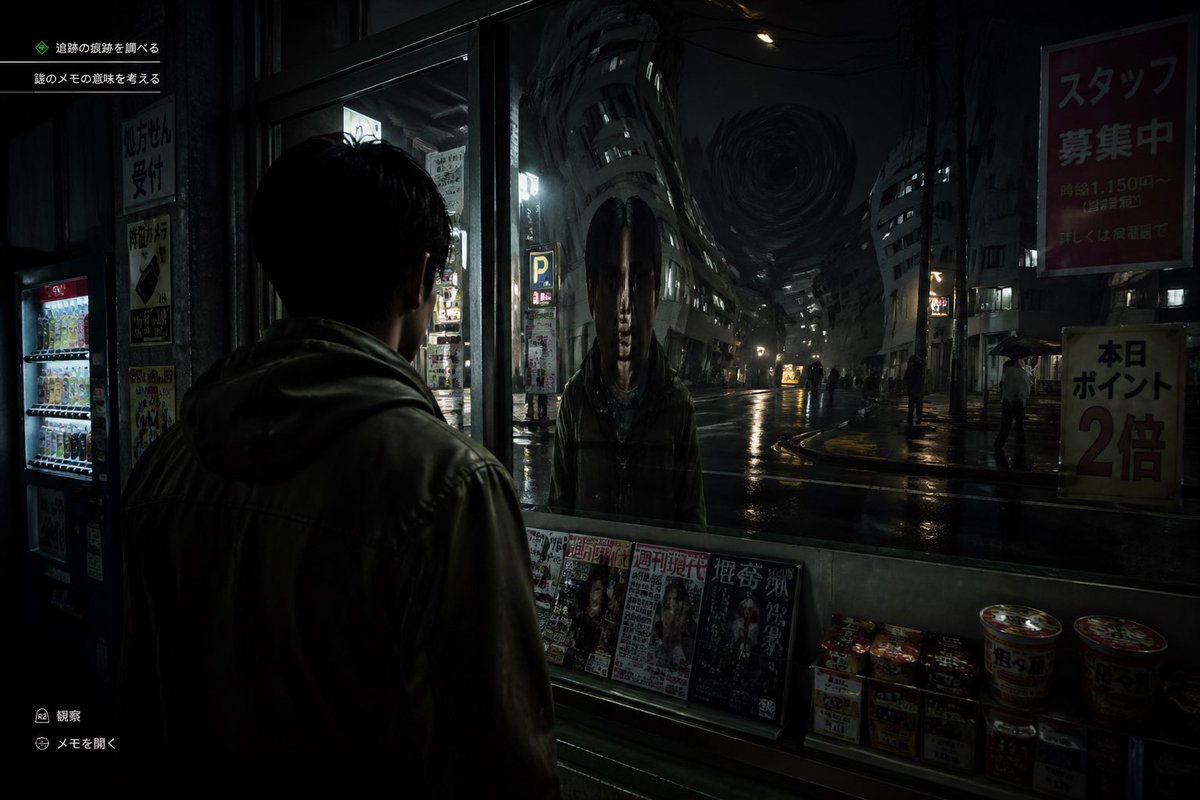
Jogo de terror japonês Street Reflection
Este comando gera uma captura de tela sombria e ultrarrealista de um jogo de terror e sobrevivência, mostrando um homem confrontando um reflexo fantasmagórico e distorcido em uma rua chuvosa de uma cidade japonesa.
Este é um exemplo de prompt GPT Image 2 para Anime e Jogo . Use o prompt pronto para copiar abaixo para gerar visuais semelhantes e revise a atribuição Awesome GPT Image 2 Prompts e os direitos de uso comercial antes de reutilizá-los.
Precisa do conjunto completo de instruções? Use o Anime e Jogo Para obter mais exemplos relacionados, acesse o hub de tópicos ou abra o GPT Image 2 catálogo de prompts Para obter o índice completo de exemplos, estruturas reutilizáveis e atribuição de fontes.
Free 1K preview
Generate one preview image instantly, no sign-up required.
1623/4000
Incitar
prompt pronto para copiar
A cinematic Japanese psychological horror game screenshot at night, shown from a third-person over-the-shoulder perspective behind a young man wearing a dark hooded jacket, standing under a convenience store awning and staring into a large front window. In the glass, instead of a normal reflection, there is a terrifying humanoid figure with an unnaturally elongated oval head, long straight black hair hanging down both sides, a pale expressionless face, and a dark coat, standing directly opposite him. Beyond the reflection is a wet urban street in Japan with glossy rain-soaked asphalt, sparse pedestrians holding umbrellas, dim storefronts, vending machines, parking signs, and tall buildings bending inward in a surreal warped perspective toward a dark swirling vortex in the sky at the end of the street. The convenience store window ledge displays exactly 5 visible magazine covers lined up side by side and exactly 8 instant food items or cup noodles stacked on the lower right. Add subtle in-game UI text in Japanese: exactly 2 objective lines in the upper left, and exactly 2 small action prompts in the lower left. Include readable Japanese street posters and shop signs, such as a large red staff recruitment sign on the upper right and a yellow points campaign sign on the lower right. Lighting is extremely dark, moody, and realistic, with reflections, deep shadows, damp textures, and a faint cold glow from interior lights and street lamps. Style: ultra-realistic survival horror video game, unsettling, grounded, detailed, cinematic, high contrast, eerie silence, no exaggerated action, no bright colors.
Best for
- - Anime e Jogo visual exploration
- - Image generation and reference-image edits
- - Reusable briefs that keep source attribution visible
Change these parts
- - Subject, product, character, or scene
- - Aspect ratio, camera, lighting, and background
- - Brand, text, color, and output constraints
Recommended model and settings
- - Model: gpt-image-2
- - Input mode: Texto para Imagem
- - Aspect ratio: source
- - Commercial status: review original source
How to use this prompt
- 1. Copy the prompt and preserve its structure for the first test.
- 2. Replace the subject, context, and publishing channel.
- 3. Change one camera, lighting, or style variable per iteration.
- 4. Inspect the output, source, text, and rights before reuse.
Limitations, source, and reuse cautions
- - Generated output is an editable draft, not factual, legal, or rights evidence.
- - Review the linked source, people, brands, logos, text, and third-party media before commercial use.
Importado de Awesome GPT Image 2 Prompts . É necessário dar crédito. O uso comercial é permitido allowed ; revise os direitos da fonte antes de utilizá-lo mediante pagamento.
Mais casos nesta categoria
Priorizados por categoria, compatibilidade do modo de entrada, qualidade e menor risco.

Manga Desert Radio Telescope Road Trip
Texto para Imagem

Female Clown Cyborg Portrait
Texto para Imagem

Greyscale Puzzle Portrait with Color Accent
Texto para Imagem

Glitch Aesthetic Surreal Portrait
Texto para Imagem

Surreal 3D Chess Match Artwork
Texto para Imagem

Imperial Research Bunker on Volcanic Planet
Texto para Imagem
Reutilização e notas de origem
Utilize esta instrução com segurança após visualizar o caso.
- 1.Copie o prompt ou abra-o diretamente no Dovoo com o botão de geração.
- 2.Ajuste as variáveis, a proporção e as imagens de referência de acordo com o seu caso específico.
- 3.Antes de publicar ou utilizar o conteúdo mediante pagamento, verifique os direitos da fonte, os requisitos de atribuição e os riscos relacionados à marca ou à imagem.