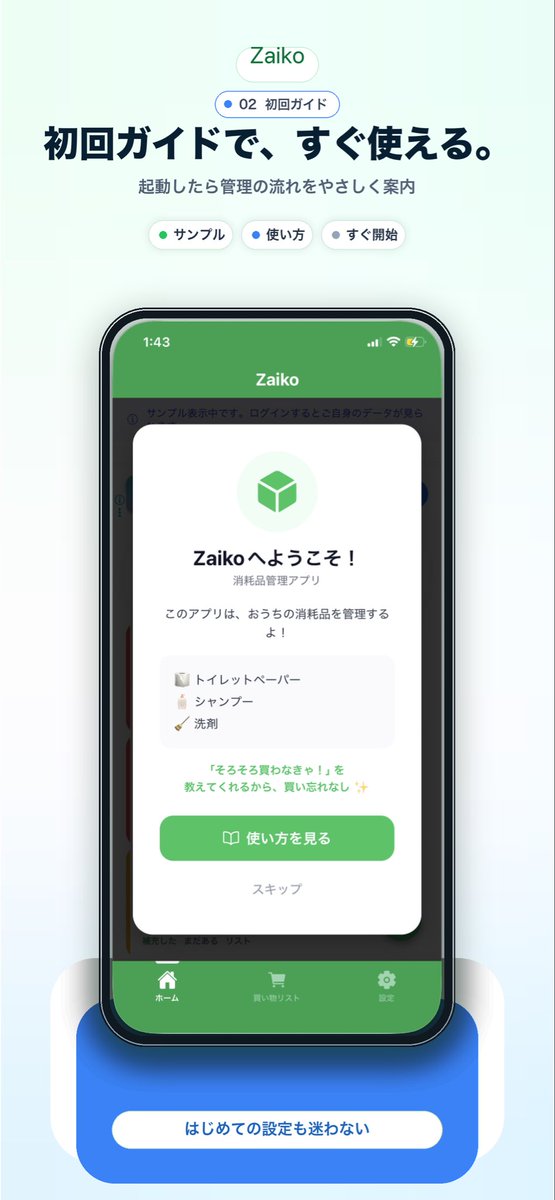
Mockup de promoção de integração de aplicativo japonês
Isso gera um visual de marketing de aplicativo móvel japonês refinado, apresentando um mockup de smartphone e uma tela de boas-vindas, ideal para páginas de destino, materiais da loja de aplicativos ou promoção em mídias sociais.
Este é um exemplo de prompt GPT Image 2 para Produto e Comercial . Use o prompt pronto para copiar abaixo para gerar visuais semelhantes e revise a atribuição Awesome GPT Image 2 Prompts e os direitos de uso comercial antes de reutilizá-los.
Precisa do conjunto completo de instruções? Use o Produto e Comercial Para obter mais exemplos relacionados, acesse o hub de tópicos ou abra o GPT Image 2 catálogo de prompts Para obter o índice completo de exemplos, estruturas reutilizáveis e atribuição de fontes.
Free 1K preview
Generate one preview image instantly, no sign-up required.
2315/4000
Incitar
prompt pronto para copiar
A clean modern app-promo poster on a very pale mint-blue background, centered and vertically composed like a landing page screenshot for a Japanese inventory app. At the top, place a small rounded white pill logo with soft shadow reading {argument name="app name" default="Zaiko"} in green. Beneath it, add a smaller rounded outlined badge with a blue dot and the text "02 初回ガイド". Below that, set a large bold Japanese headline in dark navy: {argument name="headline text" default="初回ガイドで、すぐ使える。"}, followed by a smaller gray subtitle: "起動したら管理の流れをやさしく案内". Under the subtitle, show exactly 3 small rounded white category chips with soft shadows, evenly spaced: "サンプル" with a green dot, "使い方" with a blue dot, and "すぐ開始" with a dark dot. In the center, show a realistic modern smartphone mockup front view with a black bezel, slightly rounded corners, subtle reflections, and a dramatic soft blue glow under it. The phone screen displays the app UI with a green top bar and the title "Zaiko" in white, iPhone-style status icons at top, and a dimmed app interface behind a centered onboarding modal card. The white modal has rounded corners and a soft drop shadow, with a pale green circular icon area containing a green cube symbol at top. Then a bold welcome title in Japanese, "Zaikoへようこそ!", a smaller subtitle "消耗品管理アプリ", and body text "このアプリは、おうちの消耗品を管理するよ!". Add a light gray rounded list box containing exactly 3 sample inventory items on separate lines with tiny icons: "トイレットペーパー", "シャンプー", and "洗剤". Below that, add a small green-highlighted sentence: "『そろそろ買わなきゃ!』を教えてくれるから、買い忘れなし ✨". At the bottom of the modal, include a large rounded green primary button labeled {argument name="button text" default="使い方を見る"} with a small book icon, and below it a muted text link "スキップ". Behind the modal, the app UI should be visible but subdued: a green header, side category strips, and a bottom tab bar with exactly 3 tabs labeled "ホーム", "買い物リスト", and "設定", each with simple white icons. Beneath the phone, place a large rounded blue callout card with soft shadow and a centered white pill label reading {argument name="footer text" default="はじめての設定も迷わない"}. Use a polished Apple-style SaaS marketing aesthetic, soft gradients, subtle shadows, rounded UI elements, crisp typography, and a friendly trustworthy feel.Variáveis de prompt
Marcadores de posição editáveis para argumentos encontrados no prompt, com seus valores padrão.
Variável
app name
Padrão
Zaiko
Variável
headline text
Padrão
初回ガイドで、すぐ使える。
Variável
button text
Padrão
使い方を見る
Variável
footer text
Padrão
はじめての設定も迷わない
Best for
- - Produto e Comercial visual exploration
- - Image generation and reference-image edits
- - Reusable briefs that keep source attribution visible
Change these parts
- - Subject, product, character, or scene
- - Aspect ratio, camera, lighting, and background
- - Brand, text, color, and output constraints
Recommended model and settings
- - Model: gpt-image-2
- - Input mode: Texto para Imagem
- - Aspect ratio: source
- - Commercial status: review original source
How to use this prompt
- 1. Copy the prompt and preserve its structure for the first test.
- 2. Replace the subject, context, and publishing channel.
- 3. Change one camera, lighting, or style variable per iteration.
- 4. Inspect the output, source, text, and rights before reuse.
Limitations, source, and reuse cautions
- - Generated output is an editable draft, not factual, legal, or rights evidence.
- - Review the linked source, people, brands, logos, text, and third-party media before commercial use.
Importado de Awesome GPT Image 2 Prompts . É necessário dar crédito. O uso comercial é permitido allowed ; revise os direitos da fonte antes de utilizá-lo mediante pagamento.
Mais casos nesta categoria
Priorizados por categoria, compatibilidade do modo de entrada, qualidade e menor risco.

Transparent Earbuds on Stone Pedestal
Texto para Imagem

Overhead Pepperoni Pizza Photo
Texto para Imagem

Wet Transparent Earbud Macro
Texto para Imagem

Fashion Studio Portrait with Blue Rim Lighting
Texto para Imagem

Spring Editorial Fashion Collage
Texto para Imagem

Surreal 3D Chess Match Artwork
Texto para Imagem
Reutilização e notas de origem
Utilize esta instrução com segurança após visualizar o caso.
- 1.Copie o prompt ou abra-o diretamente no Dovoo com o botão de geração.
- 2.Ajuste as variáveis, a proporção e as imagens de referência de acordo com o seu caso específico.
- 3.Antes de publicar ou utilizar o conteúdo mediante pagamento, verifique os direitos da fonte, os requisitos de atribuição e os riscos relacionados à marca ou à imagem.