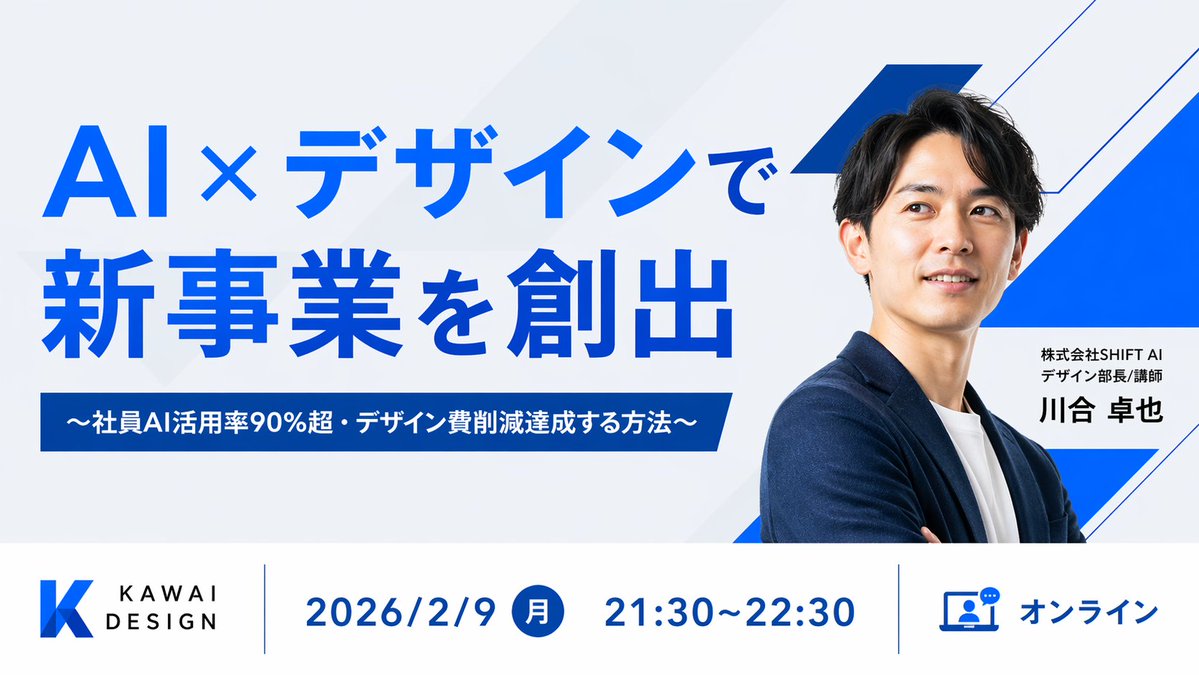
Miniatura do webinar sobre design de IA japonês
Uma miniatura profissional para webinar corporativo com tipografia japonesa marcante, retrato do palestrante e uma barra de informações estruturada para promover eventos de negócios online.
Este é um exemplo de prompt GPT Image 2 para Gráfico e pôster . Use o prompt pronto para copiar abaixo para gerar visuais semelhantes e revise a atribuição Awesome GPT Image 2 Prompts e os direitos de uso comercial antes de reutilizá-los.
Precisa do conjunto completo de instruções? Use o Gráfico e pôster Para obter mais exemplos relacionados, acesse o hub de tópicos ou abra o GPT Image 2 catálogo de prompts Para obter o índice completo de exemplos, estruturas reutilizáveis e atribuição de fontes.
Free 1K preview
Generate one preview image instantly, no sign-up required.
2038/4000
Incitar
prompt pronto para copiar
Create a clean, modern Japanese webinar thumbnail in a wide 16:9 layout with a corporate tech-design aesthetic. Use a very light gray background with subtle diagonal translucent panels and bold electric-blue geometric accents, including 3 angular blue-and-white ribbon shapes on the right side behind the speaker. The composition is split into 2 main horizontal sections: a large hero area on top and an information bar across the bottom. In the top-left hero area, place a large bold sans-serif Japanese headline in vivid blue on 2 lines reading {argument name="headline text" default="AI×デザインで\n新事業を創出"}. Beneath it, add a dark-blue rectangular banner with centered white bold text reading {argument name="subheadline text" default="〜社員AI活用率90%超・デザイン費削減達成する方法〜"}. On the right half, show a sharply lit half-body portrait of {argument name="speaker name" default="Takaya Kawai"}, an East Asian man in his 30s with short black hair, wearing a navy blazer over a white crew-neck shirt, arms folded, facing slightly left toward the headline. Show every face clearly with natural, detailed facial features. Next to his torso, place a white rectangular name card with 2 lines of small black Japanese text above a larger bold black name: {argument name="speaker title" default="株式会社SHIFT AI\nデザイン部長/講師"} and {argument name="speaker name" default="Takaya Kawai"}. Across the bottom, create a white info bar with thin blue vertical dividers and 4 visual components from left to right: 1) a blue gradient angular K logo with the brand text KAWAI DESIGN in black uppercase sans-serif, 2) the date in large blue text reading 2026/2/9, 3) a blue filled circle containing the white Japanese weekday 月 followed by the time 21:30〜22:30 in large blue text, 4) a blue outlined laptop-and-chat icon followed by the blue text オンライン. Keep typography bold and highly legible, with strong hierarchy, generous spacing, precise alignment, minimal clutter, and a polished webinar promotional design suitable for a business landing page or social media thumbnail.Variáveis de prompt
Marcadores de posição editáveis para argumentos encontrados no prompt, com seus valores padrão.
Variável
headline text
Padrão
AI×デザインで\n新事業を創出
Variável
subheadline text
Padrão
〜社員AI活用率90%超・デザイン費削減達成する方法〜
Variável
speaker name
Padrão
Takaya Kawai
Variável
speaker title
Padrão
株式会社SHIFT AI\nデザイン部長/講師
Best for
- - Gráfico e pôster visual exploration
- - Image generation and reference-image edits
- - Reusable briefs that keep source attribution visible
Change these parts
- - Subject, product, character, or scene
- - Aspect ratio, camera, lighting, and background
- - Brand, text, color, and output constraints
Recommended model and settings
- - Model: gpt-image-2
- - Input mode: Texto para Imagem
- - Aspect ratio: source
- - Commercial status: review original source
How to use this prompt
- 1. Copy the prompt and preserve its structure for the first test.
- 2. Replace the subject, context, and publishing channel.
- 3. Change one camera, lighting, or style variable per iteration.
- 4. Inspect the output, source, text, and rights before reuse.
Limitations, source, and reuse cautions
- - Generated output is an editable draft, not factual, legal, or rights evidence.
- - Review the linked source, people, brands, logos, text, and third-party media before commercial use.
Importado de Awesome GPT Image 2 Prompts . É necessário dar crédito. O uso comercial é permitido allowed ; revise os direitos da fonte antes de utilizá-lo mediante pagamento.
Mais casos nesta categoria
Priorizados por categoria, compatibilidade do modo de entrada, qualidade e menor risco.

Spring Editorial Fashion Collage
Texto para Imagem

Pink Hijab Mirror Selfie Portrait
Texto para Imagem

Fashion Studio Portrait with Blue Rim Lighting
Texto para Imagem

Glitch Aesthetic Surreal Portrait
Texto para Imagem

New Chinese-Style Editorial Portrait
Texto para Imagem

Y2K Style Photo Booth Collage
Texto para Imagem
Reutilização e notas de origem
Utilize esta instrução com segurança após visualizar o caso.
- 1.Copie o prompt ou abra-o diretamente no Dovoo com o botão de geração.
- 2.Ajuste as variáveis, a proporção e as imagens de referência de acordo com o seu caso específico.
- 3.Antes de publicar ou utilizar o conteúdo mediante pagamento, verifique os direitos da fonte, os requisitos de atribuição e os riscos relacionados à marca ou à imagem.