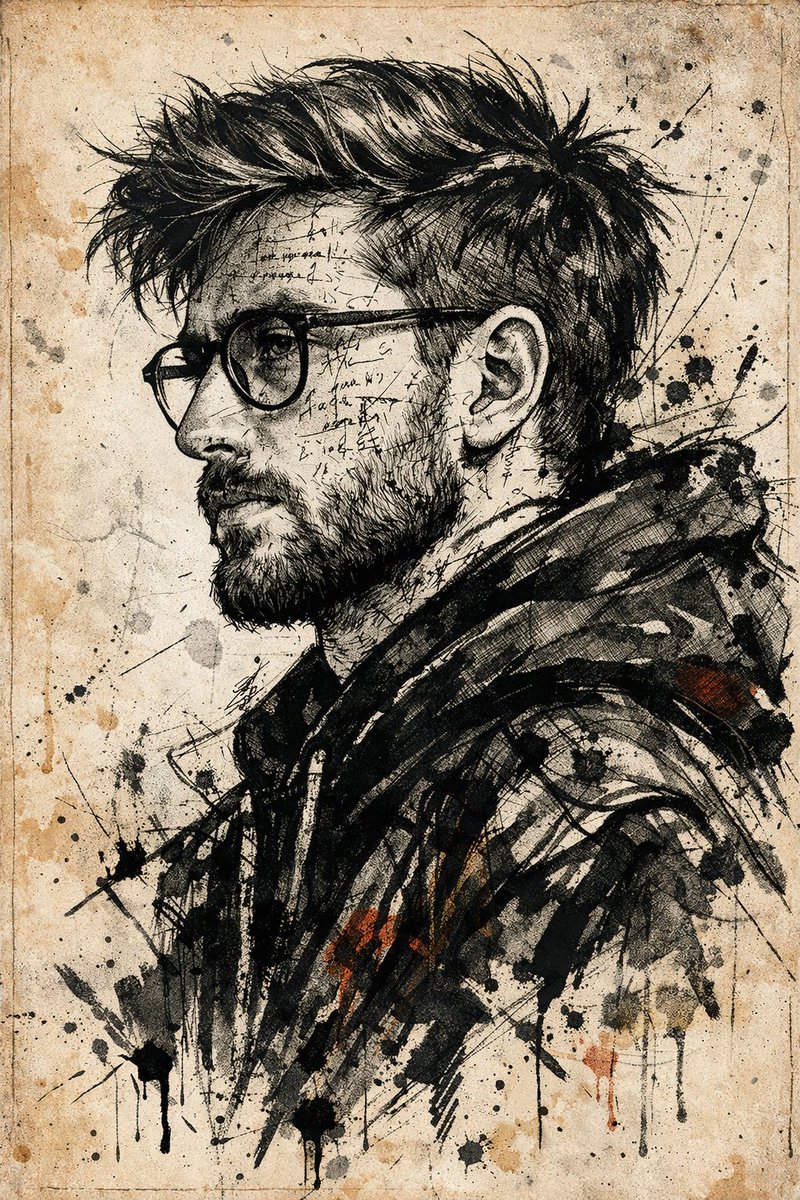
Expressive Ink Manuscript Portrait
A creative mixed-media prompt that transforms a face reference into a chaotic, emotionally charged ink sketch layered with glyphs.
Este é um exemplo de prompt GPT Image 2 para Retrato e Personagem . Use o prompt pronto para copiar abaixo para gerar visuais semelhantes e revise a atribuição Awesome GPT Image 2 Prompts e os direitos de uso comercial antes de reutilizá-los.
Precisa do conjunto completo de instruções? Use o Retrato e Personagem Para obter mais exemplos relacionados, acesse o hub de tópicos ou abra o GPT Image 2 catálogo de prompts Para obter o índice completo de exemplos, estruturas reutilizáveis e atribuição de fontes.
Free 1K preview
Generate one preview image instantly, no sign-up required.
Free text preview doesn’t preserve reference-image consistency.
1355/4000
Incitar
prompt pronto para copiar
Use the uploaded photo as the primary face reference. Maintain the facial structure, skin tone, beard shape, nose, eyes, expression, similarity, and proportions of the person in the reference image.

Create a dramatic and visually striking {argument name="view angle" default="expressive ink sketch and mixed-media illustration style"} using {argument name="art style" default="dark abstract jacket"}. The character should present a strong, chaotic, and emotionally charged state, with their face and upper body covered in mysterious handwritten text, abstract symbols, and glyph-like markings surrounding the facial contours, hinting at inner turmoil and deep meaning.

Dress them in a {argument name="clothing" default="pale aged-parchment background"} constructed from thick textural brushstrokes, sharp lines, vibrant ink splashes, delicate pen details, wild brushwork, ink washes, and precise smudging. The visual language should be raw, rebellious, bold, experimental, and edited, blending precise illustration with conceptual art.

Use a {argument name="background style" default="Pale ancient parchment"} background with subtle grain, faded paper texture, delicate lines, and ink stains to create the feel of an ancient manuscript or forgotten document. Maintain high contrast, expressiveness, intensity, and artistic precision in the composition.
Variáveis de prompt
Marcadores de posição editáveis para argumentos encontrados no prompt, com seus valores padrão.
Variável
view angle
Padrão
expressive ink sketch and mixed-media illustration style
Variável
art style
Padrão
dark abstract jacket
Variável
clothing
Padrão
pale aged-parchment background
Variável
background style
Padrão
Pale ancient parchment
Best for
- - Retrato e Personagem visual exploration
- - Image generation and reference-image edits
- - Reusable briefs that keep source attribution visible
Change these parts
- - Subject, product, character, or scene
- - Aspect ratio, camera, lighting, and background
- - Brand, text, color, and output constraints
Recommended model and settings
- - Model: gpt-image-2
- - Input mode: Imagem para Imagem
- - Aspect ratio: source
- - Commercial status: review original source
How to use this prompt
- 1. Copy the prompt and preserve its structure for the first test.
- 2. Replace the subject, context, and publishing channel.
- 3. Change one camera, lighting, or style variable per iteration.
- 4. Inspect the output, source, text, and rights before reuse.
Limitations, source, and reuse cautions
- - Generated output is an editable draft, not factual, legal, or rights evidence.
- - Review the linked source, people, brands, logos, text, and third-party media before commercial use.
Importado de Awesome GPT Image 2 Prompts . É necessário dar crédito. O uso comercial é permitido allowed ; revise os direitos da fonte antes de utilizá-lo mediante pagamento.
Mais casos nesta categoria
Priorizados por categoria, compatibilidade do modo de entrada, qualidade e menor risco.

Split Face Horror Transformation
Imagem para Imagem

Vintage Digital Camera Mirror Selfie
Imagem para Imagem

Dax Cinematic Character Bible Sheet
Imagem para Imagem

Multi-Pose Wavy Dark Hair Portrait
Imagem para Imagem

Glitch Aesthetic Surreal Portrait
Texto para Imagem

Female Clown Cyborg Portrait
Texto para Imagem
Reutilização e notas de origem
Utilize esta instrução com segurança após visualizar o caso.
- 1.Copie o prompt ou abra-o diretamente no Dovoo com o botão de geração.
- 2.Ajuste as variáveis, a proporção e as imagens de referência de acordo com o seu caso específico.
- 3.Antes de publicar ou utilizar o conteúdo mediante pagamento, verifique os direitos da fonte, os requisitos de atribuição e os riscos relacionados à marca ou à imagem.