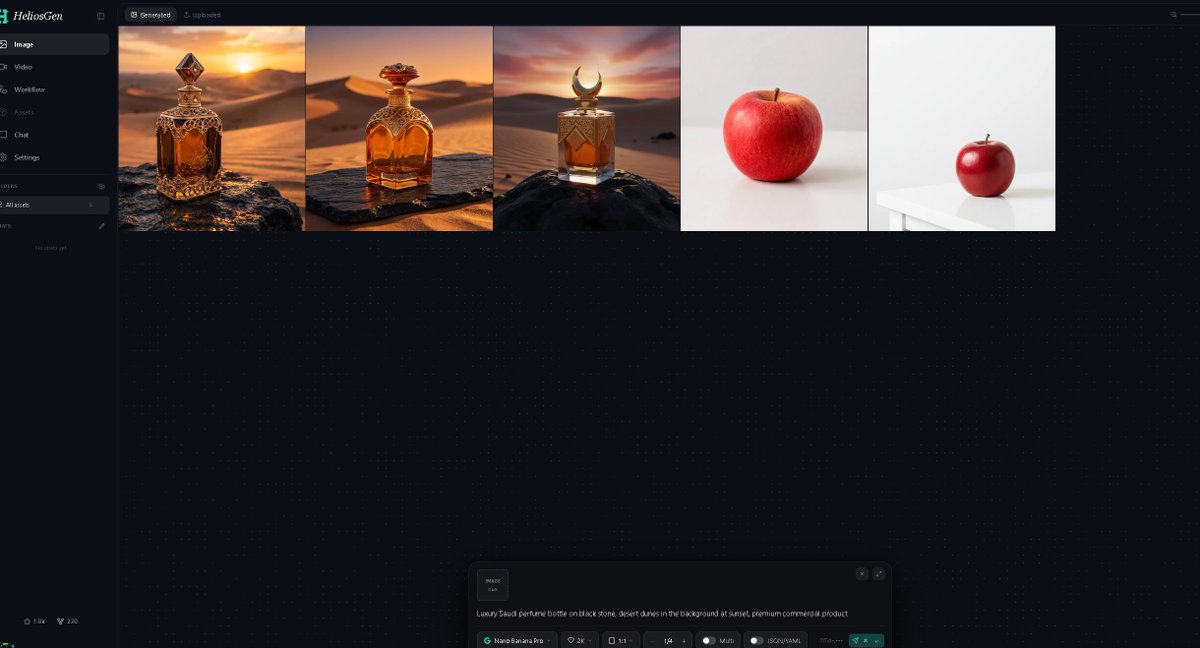
Dark AI Generation Dashboard Screenshot
A wide dark-mode HeliosGen-style dashboard mockup showing generated image thumbnails and an AI prompt control panel for showcasing an image generation workflow.
Este é um exemplo de prompt GPT Image 2 para Gráfico e pôster . Use o prompt pronto para copiar abaixo para gerar visuais semelhantes e revise a atribuição Awesome GPT Image 2 Prompts e os direitos de uso comercial antes de reutilizá-los.
Precisa do conjunto completo de instruções? Use o Gráfico e pôster Para obter mais exemplos relacionados, acesse o hub de tópicos ou abra o GPT Image 2 catálogo de prompts Para obter o índice completo de exemplos, estruturas reutilizáveis e atribuição de fontes.
Free 1K preview
Generate one preview image instantly, no sign-up required.
2576/4000
Incitar
prompt pronto para copiar
Goal: Create a dark-mode desktop web app screenshot for {argument name="app name" default="HeliosGen"}, an AI image/video generation dashboard, shown in a wide 16:9 browser-like canvas.

Canvas: 1200×675 style screenshot, very dark navy/black interface with subtle dotted grid texture across the main workspace. Use a clean modern SaaS UI aesthetic, thin dividers, small muted gray text, and teal accents.

Layout: A narrow left sidebar occupies about 10% of the width, with the main workspace filling the rest. At the top of the main workspace, show two small tabs: “Generated” selected and “Uploaded” inactive. Beneath the tabs, display exactly 5 generated image thumbnails in one horizontal row, aligned along the top, each separated by thin borders.

Sidebar details: Top-left logo text reads “HeliosGen” with a small teal emblem. Include exactly 6 primary navigation items with icons: 1) Image selected, 2) Video, 3) Workflow, 4) Assets, 5) Chat, 6) Settings. Below that, show a small “Folders” section with exactly 1 folder row labeled “All works,” then an empty-state area reading “No chats yet.” At the bottom-left, add two tiny stats/icons resembling “1.8k” and “220.”

Thumbnail row: Show exactly 5 thumbnails from left to right: 1) an ornate amber luxury perfume bottle on a dark rock in a golden desert at sunset, 2) a rounded amber perfume bottle with ornate gold cap on a stone slab in desert dunes at sunset, 3) a square amber perfume bottle with a crescent-shaped cap on a black rock in desert dunes at sunset, 4) a single red apple centered on an off-white studio background, 5) a smaller red apple sitting on a white table in a minimal white studio scene. The first three thumbnails should feel cinematic and warm; the last two should be minimal product-photo tests.

Bottom prompt panel: Near the bottom center of the workspace, include a floating generation control panel with rounded corners. On the left of the panel, show a small square preview tile labeled “IMAGE 1:1.” In the main text area, include the prompt: “{argument name="generation prompt" default="Luxury Saudi perfume bottle on black stone, desert dunes in the background at sunset, premium commercial product"}”. Along the bottom of the panel, show compact controls reading approximately “Nano Banana Pro,” “2K,” “1:1,” “1/4,” “Multi,” and “JSON (4.14k),” plus a teal send/generate button at the right.

Visual style: Crisp UI screenshot, high contrast, minimal glow, fine dotted background, realistic generated-image thumbnails, no browser chrome, no extra popups, no people, no watermark.
Variáveis de prompt
Marcadores de posição editáveis para argumentos encontrados no prompt, com seus valores padrão.
Variável
app name
Padrão
HeliosGen
Variável
generation prompt
Padrão
Luxury Saudi perfume bottle on black stone, desert dunes in the background at sunset, premium commercial product
Best for
- - Gráfico e pôster visual exploration
- - Image generation and reference-image edits
- - Reusable briefs that keep source attribution visible
Change these parts
- - Subject, product, character, or scene
- - Aspect ratio, camera, lighting, and background
- - Brand, text, color, and output constraints
Recommended model and settings
- - Model: gpt-image-2
- - Input mode: Texto para Imagem
- - Aspect ratio: source
- - Commercial status: review original source
How to use this prompt
- 1. Copy the prompt and preserve its structure for the first test.
- 2. Replace the subject, context, and publishing channel.
- 3. Change one camera, lighting, or style variable per iteration.
- 4. Inspect the output, source, text, and rights before reuse.
Limitations, source, and reuse cautions
- - Generated output is an editable draft, not factual, legal, or rights evidence.
- - Review the linked source, people, brands, logos, text, and third-party media before commercial use.
Importado de Awesome GPT Image 2 Prompts . É necessário dar crédito. O uso comercial é permitido allowed ; revise os direitos da fonte antes de utilizá-lo mediante pagamento.
Mais casos nesta categoria
Priorizados por categoria, compatibilidade do modo de entrada, qualidade e menor risco.

Cute Speech Bubble Mascot Profile Icon
Texto para Imagem

Autumn Cozy Casual Outfit Prompt
Texto para Imagem

Matte Black B.AI Keyboard Keycap
Texto para Imagem

Tuxedo Cat Photo and Line Art Diptych
Texto para Imagem

Luxury Travel Fashion Portrait Prompt
Texto para Imagem

Cute Focus Desk Flat Lay and Kawaii Illustration
Texto para Imagem
Reutilização e notas de origem
Utilize esta instrução com segurança após visualizar o caso.
- 1.Copie o prompt ou abra-o diretamente no Dovoo com o botão de geração.
- 2.Ajuste as variáveis, a proporção e as imagens de referência de acordo com o seu caso específico.
- 3.Antes de publicar ou utilizar o conteúdo mediante pagamento, verifique os direitos da fonte, os requisitos de atribuição e os riscos relacionados à marca ou à imagem.