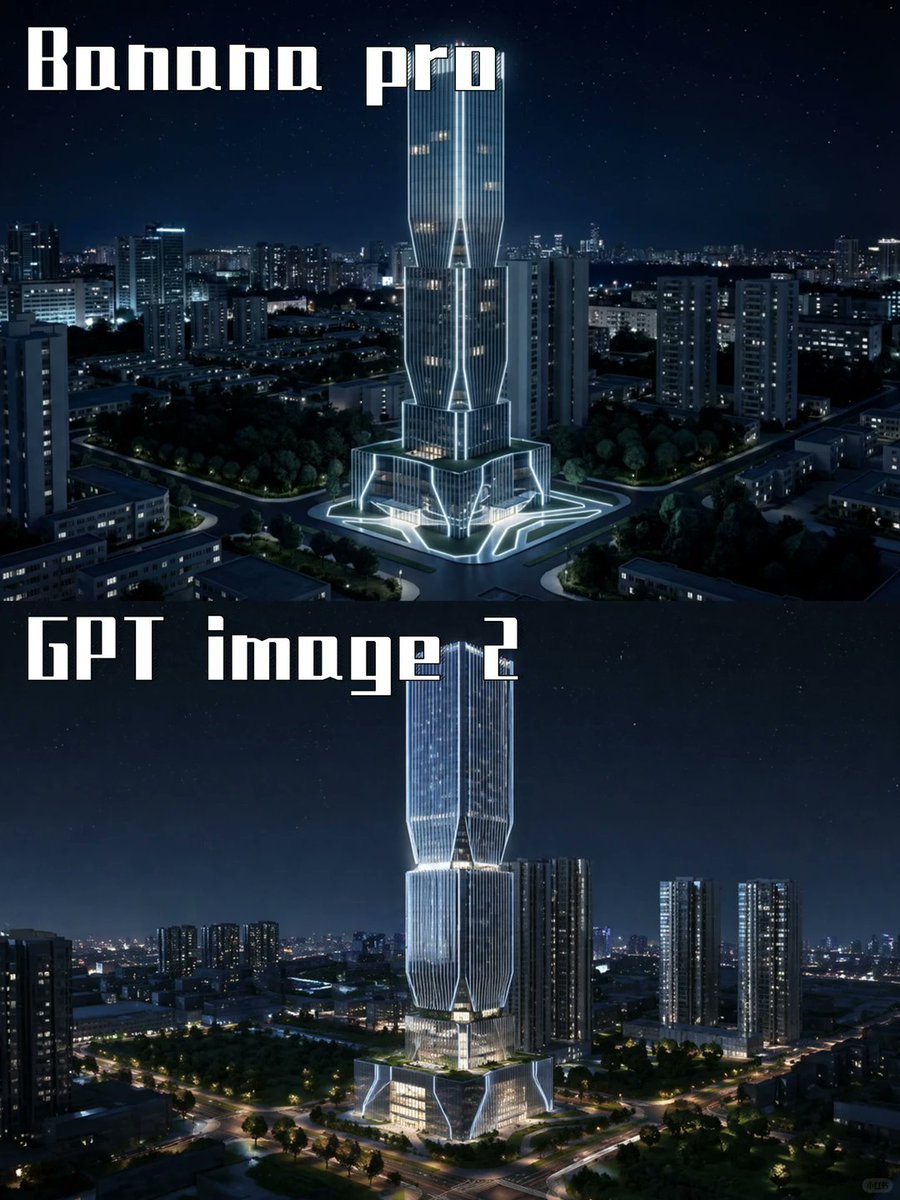
Comparação de modelos de IA para arranha-céus noturnos
Cria uma renderização arquitetônica em dois painéis sobrepostos, comparando duas saídas de modelos de IA com arranha-céus futuristas iluminados em uma cidade noturna.
Este é um exemplo de prompt GPT Image 2 para Interiores e Arquitetura . Use o prompt pronto para copiar abaixo para gerar visuais semelhantes e revise a atribuição Awesome GPT Image 2 Prompts e os direitos de uso comercial antes de reutilizá-los.
Precisa do conjunto completo de instruções? Use o Interiores e Arquitetura Para obter mais exemplos relacionados, acesse o hub de tópicos ou abra o GPT Image 2 catálogo de prompts Para obter o índice completo de exemplos, estruturas reutilizáveis e atribuição de fontes.
Free 1K preview
Generate one preview image instantly, no sign-up required.
2186/4000
Incitar
prompt pronto para copiar
Goal: Create a two-panel vertical comparison image showing the same futuristic skyscraper concept rendered by two different image models at night.

Canvas: Portrait 3:4 aspect ratio, 768×1024 feel, split horizontally into exactly 2 equal stacked panels with no visible border line. Both panels show a dark blue nighttime cityscape with a starry sky and glowing urban lights.

Panel 1: Top half labeled {argument name="top label" default="Banana pro"} in large white blocky stencil/gothic display lettering at the upper left. Show a futuristic illuminated skyscraper centered in a dense city district, surrounded by mid-rise apartment towers, roads, trees, and a plaza. The tower has a tall twin-volume form with vertical ribbed glass, bright white outline lighting, warm lit windows, angular cutouts, and a glowing geometric base/plaza. Camera angle is elevated aerial view, looking slightly downward, crisp cinematic night lighting.

Panel 2: Bottom half labeled {argument name="bottom label" default="GPT image 2"} in the same large white blocky display lettering at the upper left. Show a similar but more refined futuristic skyscraper centered in a nighttime urban landscape, taller and sleeker, with stacked faceted glass sections, luminous vertical lines, bright white edge lighting, warm interior floors, and a glowing multi-level podium. Surround it with high-rise residential towers, tree-lined roads, intersections, and distant city lights. Camera angle is elevated aerial view, cinematic and realistic.

Visual style: Photorealistic architectural visualization, dramatic blue-black night palette, crisp high contrast, cool white neon accents, realistic city depth, subtle stars, polished glass reflections, high detail, no people visible.

Text content: Use exactly 2 visible text labels: {argument name="top label" default="Banana pro"} and {argument name="bottom label" default="GPT image 2"}. Keep the typography large, white, angular, and slightly retro-futuristic.

Constraints: Include exactly 2 comparison panels, exactly 2 central skyscraper subjects, and exactly 2 large labels. Do not add logos, watermarks, captions, UI elements, arrows, or extra explanatory text.
Variáveis de prompt
Marcadores de posição editáveis para argumentos encontrados no prompt, com seus valores padrão.
Variável
top label
Padrão
Banana pro
Variável
bottom label
Padrão
GPT image 2
Best for
- - Interiores e Arquitetura visual exploration
- - Image generation and reference-image edits
- - Reusable briefs that keep source attribution visible
Change these parts
- - Subject, product, character, or scene
- - Aspect ratio, camera, lighting, and background
- - Brand, text, color, and output constraints
Recommended model and settings
- - Model: gpt-image-2
- - Input mode: Texto para Imagem
- - Aspect ratio: source
- - Commercial status: review original source
How to use this prompt
- 1. Copy the prompt and preserve its structure for the first test.
- 2. Replace the subject, context, and publishing channel.
- 3. Change one camera, lighting, or style variable per iteration.
- 4. Inspect the output, source, text, and rights before reuse.
Limitations, source, and reuse cautions
- - Generated output is an editable draft, not factual, legal, or rights evidence.
- - Review the linked source, people, brands, logos, text, and third-party media before commercial use.
Importado de Awesome GPT Image 2 Prompts . É necessário dar crédito. O uso comercial é permitido allowed ; revise os direitos da fonte antes de utilizá-lo mediante pagamento.
Related prompt packs
Mais casos nesta categoria
Priorizados por categoria, compatibilidade do modo de entrada, qualidade e menor risco.

MotoGP POV Cornering Shot
Texto para Imagem

Luxury Travel Fashion Portrait Prompt
Texto para Imagem

Street Selfie with Cat in Matching Cap
Texto para Imagem

Cinematic Blue Backlit Portrait
Texto para Imagem

Orange Rooftop Fashion Photo Prompt
Texto para Imagem

GPT Image 2 Real-Life Character Street Snap
Texto para Imagem
Reutilização e notas de origem
Utilize esta instrução com segurança após visualizar o caso.
- 1.Copie o prompt ou abra-o diretamente no Dovoo com o botão de geração.
- 2.Ajuste as variáveis, a proporção e as imagens de referência de acordo com o seu caso específico.
- 3.Antes de publicar ou utilizar o conteúdo mediante pagamento, verifique os direitos da fonte, os requisitos de atribuição e os riscos relacionados à marca ou à imagem.