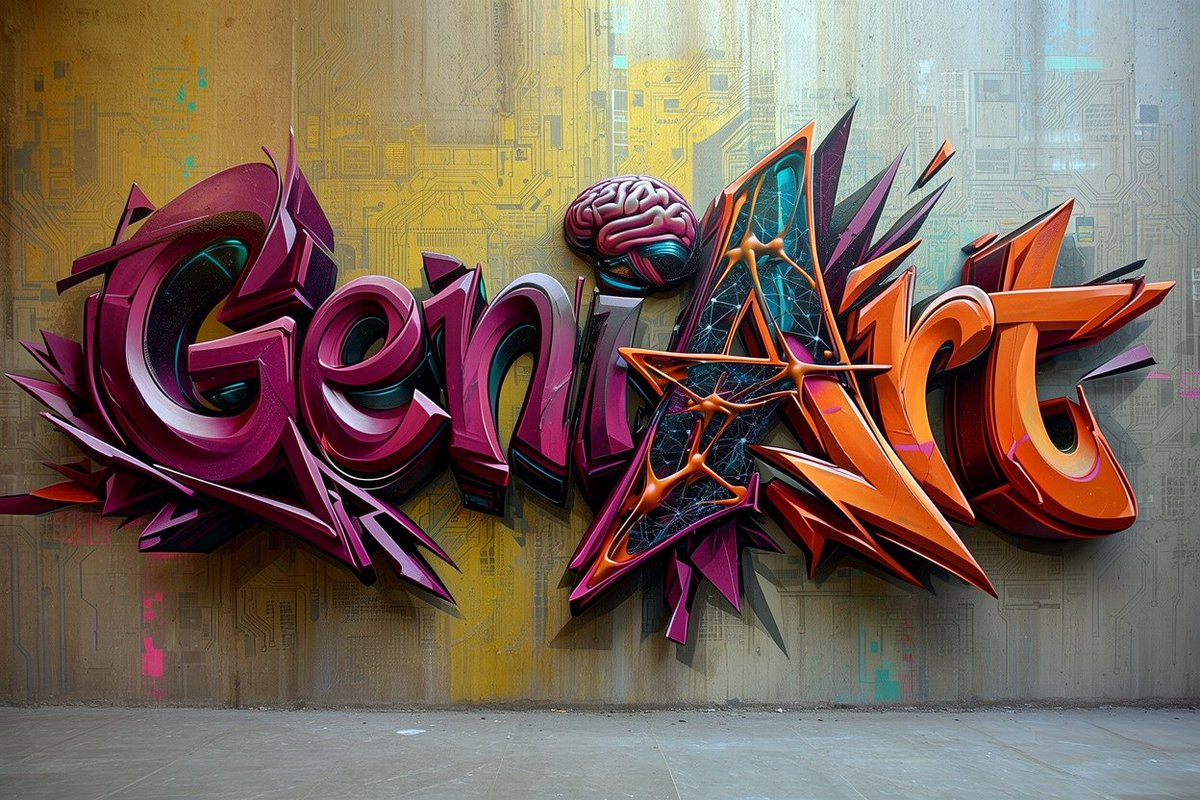
Futuristic 3D Graffiti Mural
A prompt for generating a glossy cyberpunk wildstyle graffiti mural with tech motifs on a textured concrete wall.
Este é um exemplo de prompt GPT Image 2 para Ilustração e Arte . Use o prompt pronto para copiar abaixo para gerar visuais semelhantes e revise a atribuição Awesome GPT Image 2 Prompts e os direitos de uso comercial antes de reutilizá-los.
Precisa do conjunto completo de instruções? Use o Ilustração e Arte Para obter mais exemplos relacionados, acesse o hub de tópicos ou abra o GPT Image 2 catálogo de prompts Para obter o índice completo de exemplos, estruturas reutilizáveis e atribuição de fontes.
Free 1K preview
Generate one preview image instantly, no sign-up required.
1537/4000
Incitar
prompt pronto para copiar
Create a highly detailed photorealistic 3D graffiti mural on a concrete wall, spelling the word {argument name="graffiti text" default="GeniArt"} in huge wildstyle bubble letters. The lettering is split visually into two color families: the left half in glossy deep magenta, burgundy, violet, and black with white rim highlights, and the right half in vivid orange, red-orange, black, and purple with sharp angular extensions. Use thick extruded 3D letterforms with strong shadows cast onto the wall, metallic enamel shine, beveled edges, layered outlines, and dramatic perspective depth. Integrate exactly 3 distinctive tech-art details: one pink brain sitting above the center letters, one triangular black-and-cyan digital panel embedded inside the capital A, and one orange molecular/network structure crossing the A with glowing nodes and connecting rods. Add many aggressive spikes, arrows, shards, and abstract graffiti splinters around the letters, especially purple shards behind the left word and orange shards behind the right word. The background is an indoor urban concrete wall with subtle stains, vertical grime, faint circuit-board patterns, cyan and yellow digital markings, and a muted yellow-to-cool-blue wash of light; the floor is bare gray concrete visible along the bottom. Style should feel like a futuristic cyberpunk street-art installation, ultra sharp, high contrast, cinematic lighting, realistic wall texture, realistic depth and cast shadows, no people, no extra readable words, landscape 16:9 composition.Variáveis de prompt
Marcadores de posição editáveis para argumentos encontrados no prompt, com seus valores padrão.
Variável
graffiti text
Padrão
GeniArt
Best for
- - Ilustração e Arte visual exploration
- - Image generation and reference-image edits
- - Reusable briefs that keep source attribution visible
Change these parts
- - Subject, product, character, or scene
- - Aspect ratio, camera, lighting, and background
- - Brand, text, color, and output constraints
Recommended model and settings
- - Model: gpt-image-2
- - Input mode: Texto para Imagem
- - Aspect ratio: source
- - Commercial status: review original source
How to use this prompt
- 1. Copy the prompt and preserve its structure for the first test.
- 2. Replace the subject, context, and publishing channel.
- 3. Change one camera, lighting, or style variable per iteration.
- 4. Inspect the output, source, text, and rights before reuse.
Limitations, source, and reuse cautions
- - Generated output is an editable draft, not factual, legal, or rights evidence.
- - Review the linked source, people, brands, logos, text, and third-party media before commercial use.
Importado de Awesome GPT Image 2 Prompts . É necessário dar crédito. O uso comercial é permitido allowed ; revise os direitos da fonte antes de utilizá-lo mediante pagamento.
Mais casos nesta categoria
Priorizados por categoria, compatibilidade do modo de entrada, qualidade e menor risco.

Cute Focus Desk Flat Lay and Kawaii Illustration
Texto para Imagem

Tuxedo Cat Photo and Line Art Diptych
Texto para Imagem

MotoGP POV Cornering Shot
Texto para Imagem

Boisterous Shrimpers Entering Pub
Texto para Imagem

Luxury Travel Fashion Portrait Prompt
Texto para Imagem

Cinematic Blue Backlit Portrait
Texto para Imagem
Reutilização e notas de origem
Utilize esta instrução com segurança após visualizar o caso.
- 1.Copie o prompt ou abra-o diretamente no Dovoo com o botão de geração.
- 2.Ajuste as variáveis, a proporção e as imagens de referência de acordo com o seu caso específico.
- 3.Antes de publicar ou utilizar o conteúdo mediante pagamento, verifique os direitos da fonte, os requisitos de atribuição e os riscos relacionados à marca ou à imagem.