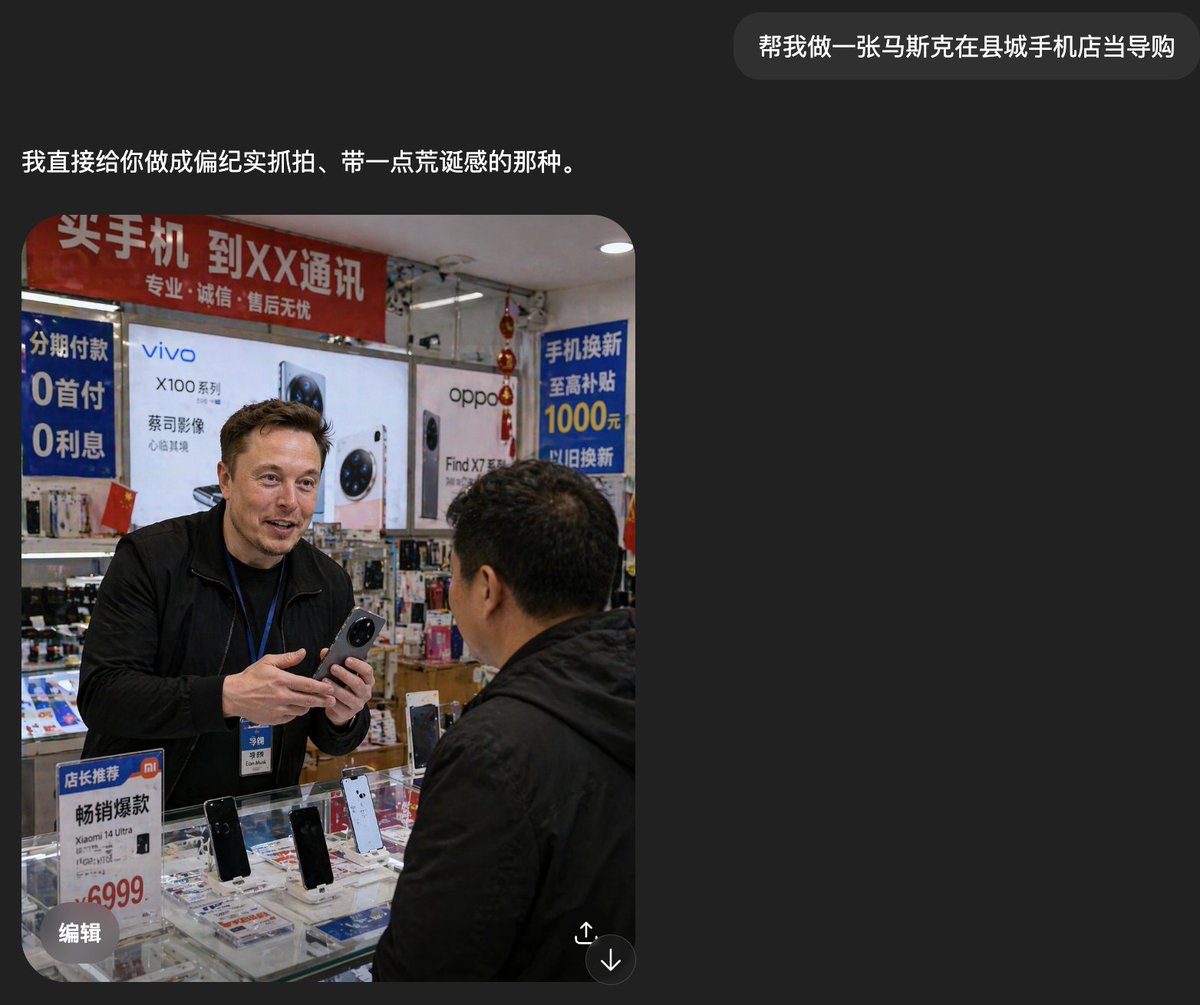
Atendente estrangeiro em loja de telefones do condado
Este comando gera uma foto espontânea e realista de um vendedor estrangeiro vendendo celulares em uma loja de celulares chinesa desorganizada, útil para imagens de estilo documental em redes sociais.
Este é um exemplo de prompt GPT Image 2 para Interiores e Arquitetura . Use o prompt pronto para copiar abaixo para gerar visuais semelhantes e revise a atribuição Awesome GPT Image 2 Prompts e os direitos de uso comercial antes de reutilizá-los.
Precisa do conjunto completo de instruções? Use o Interiores e Arquitetura Para obter mais exemplos relacionados, acesse o hub de tópicos ou abra o GPT Image 2 catálogo de prompts Para obter o índice completo de exemplos, estruturas reutilizáveis e atribuição de fontes.
Free 1K preview
Generate one preview image instantly, no sign-up required.
1695/4000
Incitar
prompt pronto para copiar
A realistic documentary-style smartphone photo inside a small county-town mobile phone shop in China, showing a candid sales interaction at the counter. A tall foreign man, about {argument name="shop clerk nationality" default="Russian"}, stands behind a glass display case wearing a black jacket and a blue employee lanyard with badge, holding a smartphone in both hands as if introducing it to a customer. Show every face clearly with natural, detailed facial features. In the foreground, a middle-aged Chinese male customer in a black jacket is seen from behind and slightly to the side, facing the clerk. The store is cramped, brightly lit, and visually cluttered with authentic retail details. Behind them are large smartphone brand posters and lightbox ads, including 2 major phone brand ads: vivo and oppo. There are 4 prominent Chinese promotional signs visible: a red overhead banner about buying phones and carrier service, a blue vertical installment-payment sign mentioning 0 down payment and 0 interest, a blue trade-in subsidy sign mentioning 1000 yuan, and a small counter sign promoting a Xiaomi model with a 6999 price. The glass counter contains multiple display phones, with 4 clearly visible upright demo phones on stands, plus scattered brochures and accessories beneath the glass. Add dense shelves of boxed accessories and hanging decorations in the background, with slightly messy composition, harsh indoor shop lighting, mild lens distortion, and the rough, unpolished realism of a casually taken phone snapshot. The mood should feel mundane, local, and faintly surreal because the foreign clerk appears completely integrated into an ordinary Chinese mobile phone store.Variáveis de prompt
Marcadores de posição editáveis para argumentos encontrados no prompt, com seus valores padrão.
Variável
shop clerk nationality
Padrão
Russian
Best for
- - Interiores e Arquitetura visual exploration
- - Image generation and reference-image edits
- - Reusable briefs that keep source attribution visible
Change these parts
- - Subject, product, character, or scene
- - Aspect ratio, camera, lighting, and background
- - Brand, text, color, and output constraints
Recommended model and settings
- - Model: gpt-image-2
- - Input mode: Texto para Imagem
- - Aspect ratio: source
- - Commercial status: review original source
How to use this prompt
- 1. Copy the prompt and preserve its structure for the first test.
- 2. Replace the subject, context, and publishing channel.
- 3. Change one camera, lighting, or style variable per iteration.
- 4. Inspect the output, source, text, and rights before reuse.
Limitations, source, and reuse cautions
- - Generated output is an editable draft, not factual, legal, or rights evidence.
- - Review the linked source, people, brands, logos, text, and third-party media before commercial use.
Importado de Awesome GPT Image 2 Prompts . É necessário dar crédito. O uso comercial é permitido allowed ; revise os direitos da fonte antes de utilizá-lo mediante pagamento.
Mais casos nesta categoria
Priorizados por categoria, compatibilidade do modo de entrada, qualidade e menor risco.






Reutilização e notas de origem
Utilize esta instrução com segurança após visualizar o caso.
- 1.Copie o prompt ou abra-o diretamente no Dovoo com o botão de geração.
- 2.Ajuste as variáveis, a proporção e as imagens de referência de acordo com o seu caso específico.
- 3.Antes de publicar ou utilizar o conteúdo mediante pagamento, verifique os direitos da fonte, os requisitos de atribuição e os riscos relacionados à marca ou à imagem.