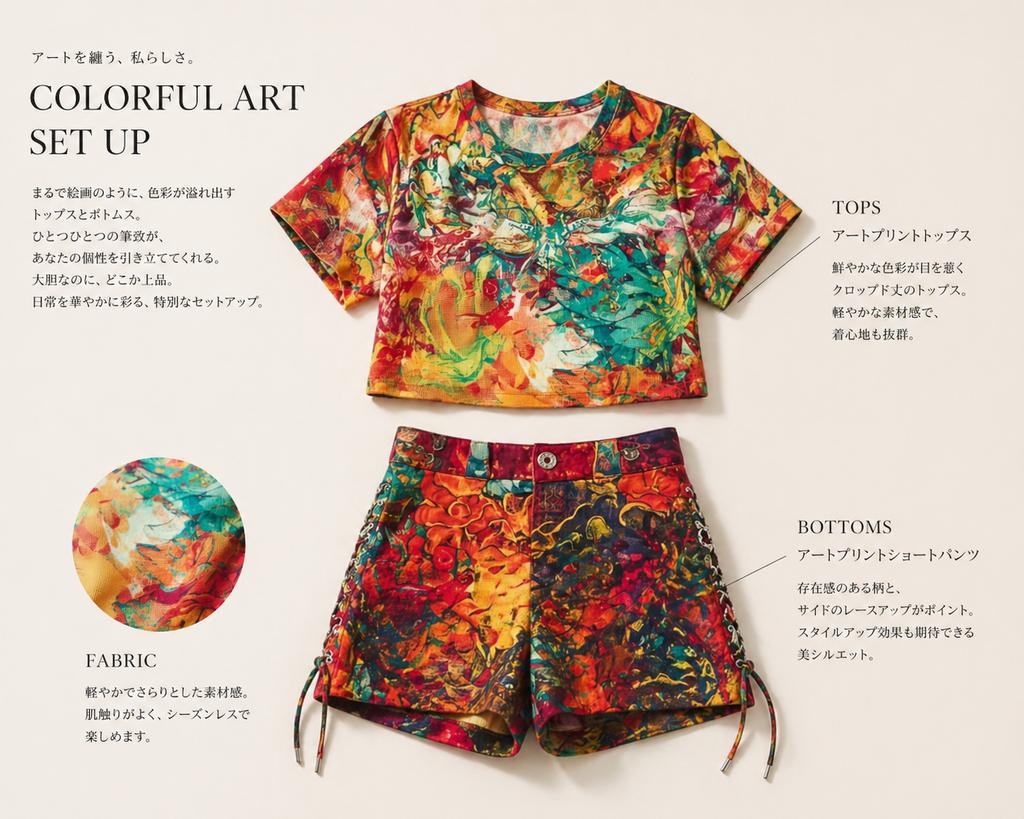
Análise detalhada do look do editorial de moda
Este recurso transforma uma foto de referência de uma roupa em um layout de vestuário sofisticado, no estilo de revista, para apresentação de produtos e protótipos de catálogos.
Este é um exemplo de prompt GPT Image 2 para Moda e Beleza . Use o prompt pronto para copiar abaixo para gerar visuais semelhantes e revise a atribuição Awesome GPT Image 2 Prompts e os direitos de uso comercial antes de reutilizá-los.
Precisa do conjunto completo de instruções? Use o Moda e Beleza Para obter mais exemplos relacionados, acesse o hub de tópicos ou abra o GPT Image 2 catálogo de prompts Para obter o índice completo de exemplos, estruturas reutilizáveis e atribuição de fontes.
Free 1K preview
Generate one preview image instantly, no sign-up required.
1040/4000
Incitar
prompt pronto para copiar
Using REFERENCE_0, extract only the outfit and turn it into a clean fashion magazine product showcase on a light warm-beige background. Remove the person entirely and display the clothing as separate laid-flat items: 1 cropped short-sleeve top centered near the top and 1 pair of shorts centered below it. Preserve the vivid multicolor art print from the reference, but present the garments neatly, as if for an editorial catalog page, with soft studio shadows. Add 1 circular fabric-detail inset at the lower left showing a close-up of the print. Add elegant editorial typography and thin callout lines, with 4 text blocks total: a large headline block at upper left reading “COLORFUL ART SET UP” with small Japanese copy above and below, 1 right-side block labeled “TOPS” with Japanese description, 1 lower-right block labeled “BOTTOMS” with Japanese description, and 1 lower-left block labeled “FABRIC” with short Japanese description. Keep the overall look refined, minimal, premium, and like a clothing introduction page in a magazine.
Best for
- - Moda e Beleza visual exploration
- - Image generation and reference-image edits
- - Reusable briefs that keep source attribution visible
Change these parts
- - Subject, product, character, or scene
- - Aspect ratio, camera, lighting, and background
- - Brand, text, color, and output constraints
Recommended model and settings
- - Model: gpt-image-2
- - Input mode: Texto para Imagem
- - Aspect ratio: source
- - Commercial status: review original source
How to use this prompt
- 1. Copy the prompt and preserve its structure for the first test.
- 2. Replace the subject, context, and publishing channel.
- 3. Change one camera, lighting, or style variable per iteration.
- 4. Inspect the output, source, text, and rights before reuse.
Limitations, source, and reuse cautions
- - Generated output is an editable draft, not factual, legal, or rights evidence.
- - Review the linked source, people, brands, logos, text, and third-party media before commercial use.
Importado de Awesome GPT Image 2 Prompts . É necessário dar crédito. O uso comercial é permitido allowed ; revise os direitos da fonte antes de utilizá-lo mediante pagamento.
Mais casos nesta categoria
Priorizados por categoria, compatibilidade do modo de entrada, qualidade e menor risco.

Fashion Studio Portrait with Blue Rim Lighting
Texto para Imagem

New Chinese-Style Editorial Portrait
Texto para Imagem

Spring Editorial Fashion Collage
Texto para Imagem

Transparent Earbuds on Stone Pedestal
Texto para Imagem

Overhead Pepperoni Pizza Photo
Texto para Imagem

Wet Transparent Earbud Macro
Texto para Imagem
Reutilização e notas de origem
Utilize esta instrução com segurança após visualizar o caso.
- 1.Copie o prompt ou abra-o diretamente no Dovoo com o botão de geração.
- 2.Ajuste as variáveis, a proporção e as imagens de referência de acordo com o seu caso específico.
- 3.Antes de publicar ou utilizar o conteúdo mediante pagamento, verifique os direitos da fonte, os requisitos de atribuição e os riscos relacionados à marca ou à imagem.