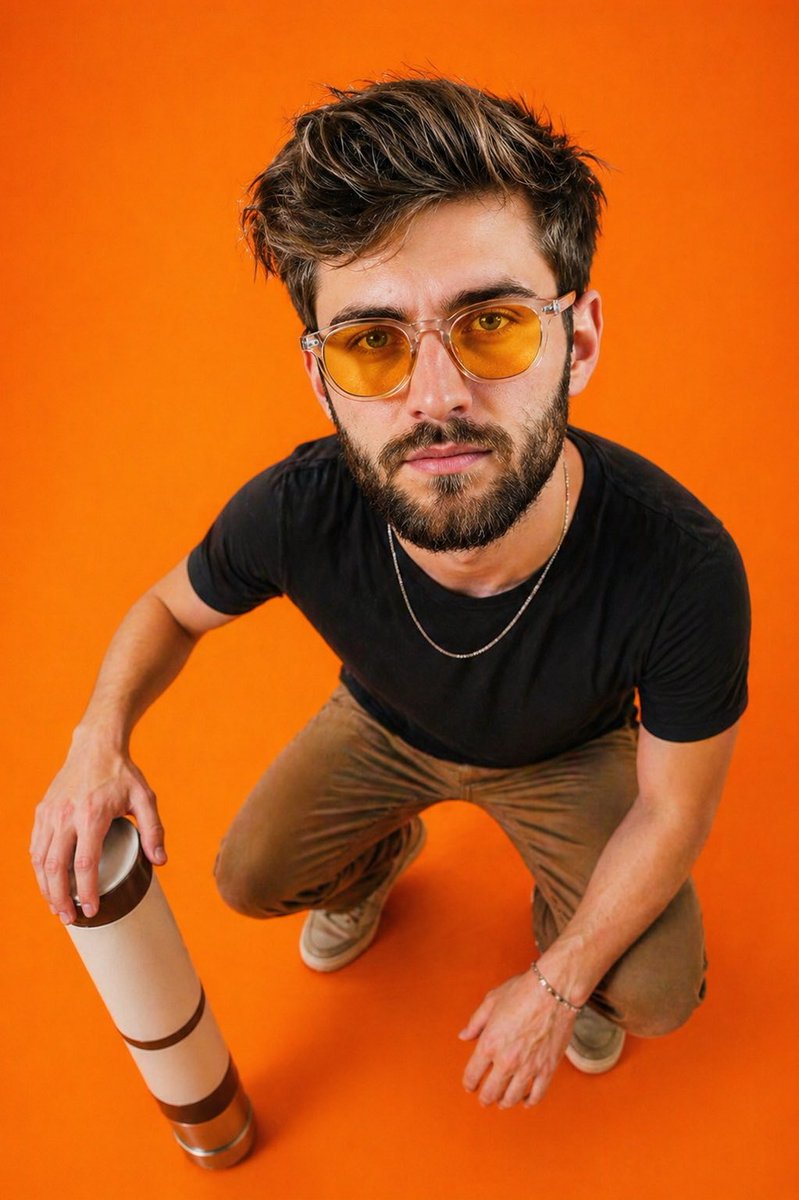
Retrato editorial olho de peixe de cima para baixo
Um desafio para um editorial de moda: um retrato grande angular visto de cima para baixo com distorção olho de peixe sobre um vibrante fundo laranja monocromático.
Este é um exemplo de prompt GPT Image 2 para Moda e Beleza . Use o prompt pronto para copiar abaixo para gerar visuais semelhantes e revise a atribuição Awesome GPT Image 2 Prompts e os direitos de uso comercial antes de reutilizá-los.
Precisa do conjunto completo de instruções? Use o Moda e Beleza Para obter mais exemplos relacionados, acesse o hub de tópicos ou abra o GPT Image 2 catálogo de prompts Para obter o índice completo de exemplos, estruturas reutilizáveis e atribuição de fontes.
Free 1K preview
Generate one preview image instantly, no sign-up required.
1291/4000
Incitar
prompt pronto para copiar
Ultra-realistic portrait of a young man captured from a {argument name="perspective" default="top-down wide-angle perspective (slight fisheye distortion)"}, creating an exaggerated head-to-body ratio. Subject is crouching on a seamless solid {argument name="background color" default="vibrant orange"} background (studio floor and backdrop blended).

Pose: relaxed squat, one arm resting on knee, the other holding a minimal cylindrical object (like a thermos or bottle) placed near the ground. Body slightly angled, head tilted upward looking directly into the camera.

Outfit: {argument name="outfit" default="fitted black t-shirt, neutral-toned pants, casual sneakers"}, minimal accessories (thin chain, bracelet optional).

Styling: yellow-tinted translucent sunglasses with a modern frame.

Lighting: soft but high-contrast studio lighting, evenly illuminating the subject with subtle shadows under arms and legs, vibrant color pop.

Camera: top-down shot, 24–28mm lens feel, slight distortion for editorial effect, sharp focus, high detail.

Mood: confident, minimal, editorial, slightly playful due to perspective distortion.

Background: clean, monochrome orange, no distractions, studio aesthetic.

Style: fashion editorial, high saturation, crisp textures, ultra-detailed, 8k, HDR.
Variáveis de prompt
Marcadores de posição editáveis para argumentos encontrados no prompt, com seus valores padrão.
Variável
perspective
Padrão
top-down wide-angle perspective (slight fisheye distortion)
Variável
background color
Padrão
vibrant orange
Variável
outfit
Padrão
fitted black t-shirt, neutral-toned pants, casual sneakers
Best for
- - Moda e Beleza visual exploration
- - Image generation and reference-image edits
- - Reusable briefs that keep source attribution visible
Change these parts
- - Subject, product, character, or scene
- - Aspect ratio, camera, lighting, and background
- - Brand, text, color, and output constraints
Recommended model and settings
- - Model: gpt-image-2
- - Input mode: Texto para Imagem
- - Aspect ratio: source
- - Commercial status: review original source
How to use this prompt
- 1. Copy the prompt and preserve its structure for the first test.
- 2. Replace the subject, context, and publishing channel.
- 3. Change one camera, lighting, or style variable per iteration.
- 4. Inspect the output, source, text, and rights before reuse.
Limitations, source, and reuse cautions
- - Generated output is an editable draft, not factual, legal, or rights evidence.
- - Review the linked source, people, brands, logos, text, and third-party media before commercial use.
Importado de Awesome GPT Image 2 Prompts . É necessário dar crédito. O uso comercial é permitido allowed ; revise os direitos da fonte antes de utilizá-lo mediante pagamento.
Mais casos nesta categoria
Priorizados por categoria, compatibilidade do modo de entrada, qualidade e menor risco.

Fashion Studio Portrait with Blue Rim Lighting
Texto para Imagem

Spring Editorial Fashion Collage
Texto para Imagem

New Chinese-Style Editorial Portrait
Texto para Imagem

Pink Hijab Mirror Selfie Portrait
Texto para Imagem

Overhead Pepperoni Pizza Photo
Texto para Imagem

Transparent Earbuds on Stone Pedestal
Texto para Imagem
Reutilização e notas de origem
Utilize esta instrução com segurança após visualizar o caso.
- 1.Copie o prompt ou abra-o diretamente no Dovoo com o botão de geração.
- 2.Ajuste as variáveis, a proporção e as imagens de referência de acordo com o seu caso específico.
- 3.Antes de publicar ou utilizar o conteúdo mediante pagamento, verifique os direitos da fonte, os requisitos de atribuição e os riscos relacionados à marca ou à imagem.