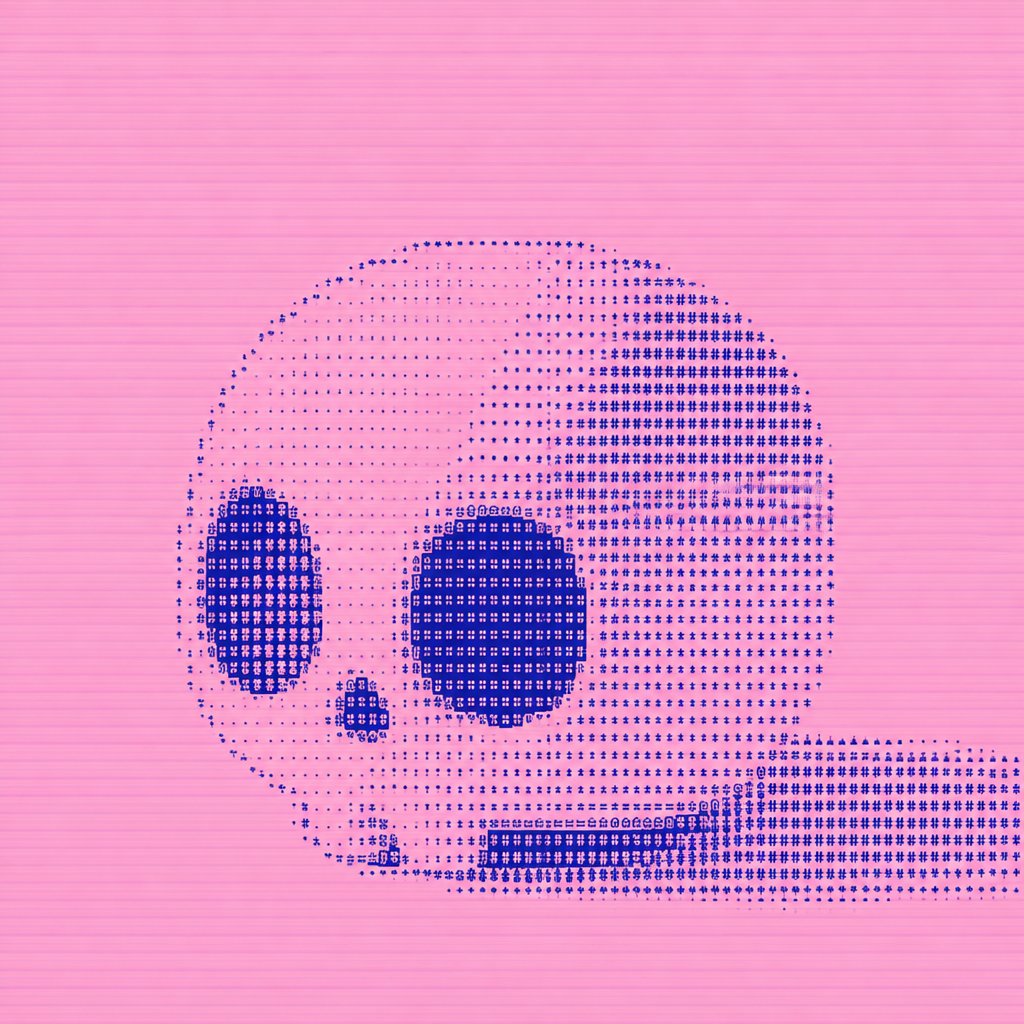
Dithered Pink Skull Pixel Art
A square experimental pixel-art skull rendered with cobalt-blue ASCII-style dithering on a pink scanline background.
Este é um exemplo de prompt GPT Image 2 para Ilustração e Arte . Use o prompt pronto para copiar abaixo para gerar visuais semelhantes e revise a atribuição Awesome GPT Image 2 Prompts e os direitos de uso comercial antes de reutilizá-los.
Precisa do conjunto completo de instruções? Use o Ilustração e Arte Para obter mais exemplos relacionados, acesse o hub de tópicos ou abra o GPT Image 2 catálogo de prompts Para obter o índice completo de exemplos, estruturas reutilizáveis e atribuição de fontes.
Free 1K preview
Generate one preview image instantly, no sign-up required.
1294/4000
Incitar
prompt pronto para copiar
Create a square pixel-art/dither study of a side-view human skull on a flat {argument name="background color" default="bubblegum pink"} background. The skull should face left and sit slightly below center, with a long horizontal lower jaw extending to the right edge. Use an 8-bit halftone ASCII-like dither technique made from tiny dark-blue symbols, dots, crosses, plus signs, and blocky glyph marks rather than smooth shading. The skull is composed of two main tones: pale translucent pink fill and dense {argument name="dither color" default="deep cobalt blue"} stippling. Include exactly 4 prominent dark anatomical features: one tall oval left eye socket, one large round right eye socket, one small rounded triangular nose cavity between and below them, and one rectangular band of teeth along the lower jaw. The cranium is large and rounded, with the right rear area shaded most densely in blue, fading into sparse dots across the upper left forehead. The lower jaw is a long rectangular dotted mass running from the skull toward the right border. Add subtle horizontal scanline texture across the entire image, like CRT or low-resolution print banding. Keep the composition minimal, centered, graphic, and experimental, with no text, no border, no watermark, and no additional objects.Variáveis de prompt
Marcadores de posição editáveis para argumentos encontrados no prompt, com seus valores padrão.
Variável
background color
Padrão
bubblegum pink
Variável
dither color
Padrão
deep cobalt blue
Best for
- - Ilustração e Arte visual exploration
- - Image generation and reference-image edits
- - Reusable briefs that keep source attribution visible
Change these parts
- - Subject, product, character, or scene
- - Aspect ratio, camera, lighting, and background
- - Brand, text, color, and output constraints
Recommended model and settings
- - Model: gpt-image-2
- - Input mode: Texto para Imagem
- - Aspect ratio: source
- - Commercial status: review original source
How to use this prompt
- 1. Copy the prompt and preserve its structure for the first test.
- 2. Replace the subject, context, and publishing channel.
- 3. Change one camera, lighting, or style variable per iteration.
- 4. Inspect the output, source, text, and rights before reuse.
Limitations, source, and reuse cautions
- - Generated output is an editable draft, not factual, legal, or rights evidence.
- - Review the linked source, people, brands, logos, text, and third-party media before commercial use.
Importado de Awesome GPT Image 2 Prompts . É necessário dar crédito. O uso comercial é permitido allowed ; revise os direitos da fonte antes de utilizá-lo mediante pagamento.
Mais casos nesta categoria
Priorizados por categoria, compatibilidade do modo de entrada, qualidade e menor risco.
Reutilização e notas de origem
Utilize esta instrução com segurança após visualizar o caso.
- 1.Copie o prompt ou abra-o diretamente no Dovoo com o botão de geração.
- 2.Ajuste as variáveis, a proporção e as imagens de referência de acordo com o seu caso específico.
- 3.Antes de publicar ou utilizar o conteúdo mediante pagamento, verifique os direitos da fonte, os requisitos de atribuição e os riscos relacionados à marca ou à imagem.