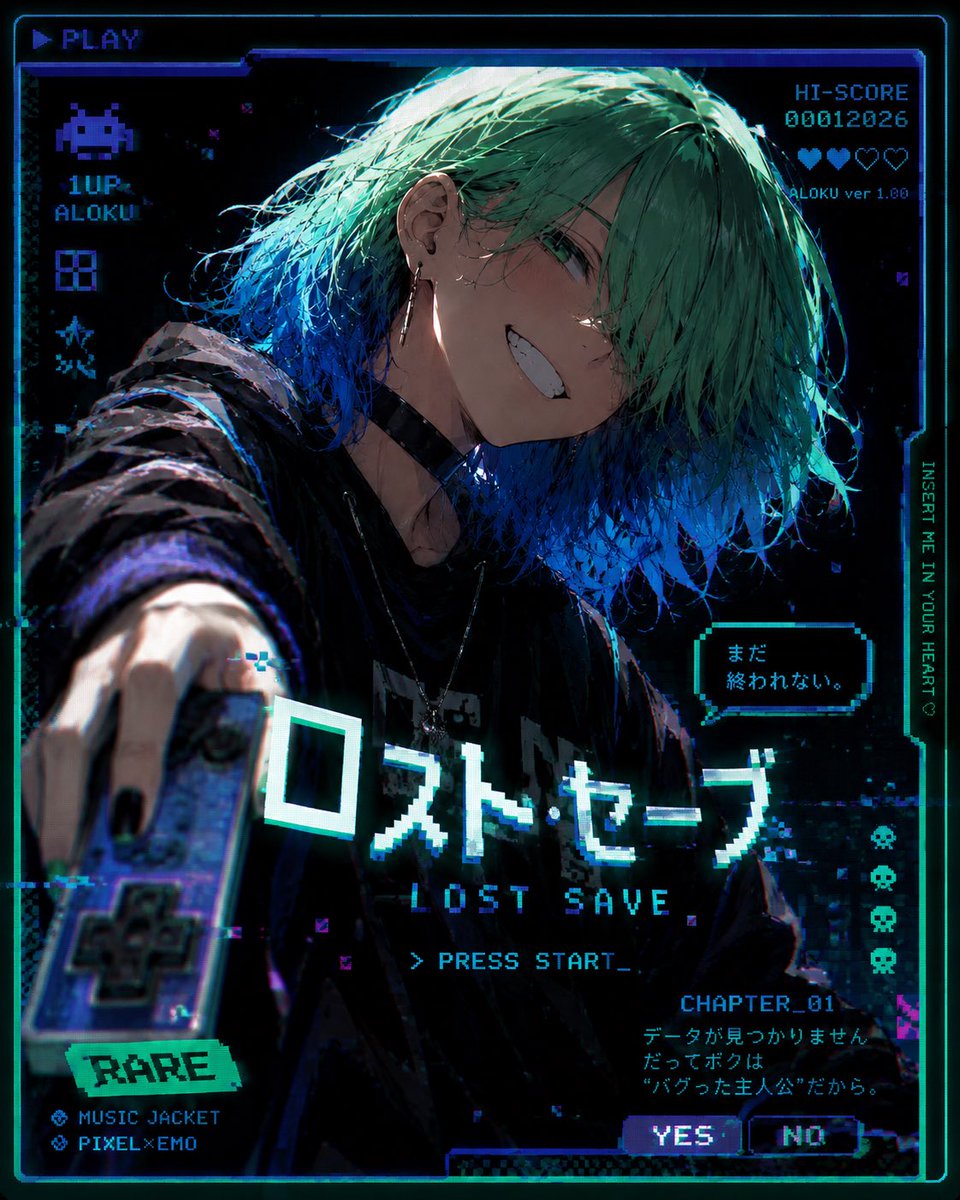
Glitched Lost Save Anime Game Cover
A cyberpunk anime arcade cover prompt featuring a bugged protagonist, retro game HUD overlays, Japanese pixel text, and VHS glitch effects.
Este é um exemplo de prompt GPT Image 2 para Anime e Jogo . Use o prompt pronto para copiar abaixo para gerar visuais semelhantes e revise a atribuição Awesome GPT Image 2 Prompts e os direitos de uso comercial antes de reutilizá-los.
Precisa do conjunto completo de instruções? Use o Anime e Jogo Para obter mais exemplos relacionados, acesse o hub de tópicos ou abra o GPT Image 2 catálogo de prompts Para obter o índice completo de exemplos, estruturas reutilizáveis e atribuição de fontes.
Free 1K preview
Generate one preview image instantly, no sign-up required.
2506/4000
Incitar
prompt pronto para copiar
Goal: Create a dark cyberpunk anime game-cover poster for a fictional retro video game called {argument name="game title" default="ロスト・セーブ"}, with a VHS/CRT glitch aesthetic and pixel-art UI overlays.

Canvas: Square 4:5-ish poster composition, black background with neon cyan, electric blue, violet, and teal highlights. Add a glowing arcade screen border, scanlines, chromatic aberration, pixel noise, corrupted blocks, and thin HUD frames.

Main subject: A close-up dynamic anime illustration of an androgynous young person named {argument name="player name" default="ALOKU"}, leaning toward the viewer with one arm thrust forward holding a retro handheld game controller. They have messy layered {argument name="hair color" default="mint green hair fading into vivid blue tips"} covering one eye, pale skin, a sharp mischievous grin with visible teeth, green eyes, black nail polish, earrings, a black choker, layered necklaces, and an oversized dark hoodie or jacket. Use dramatic rim lighting from cyan and blue, with painterly detailed hair strands and a gritty high-contrast shadowed face.

Layout and visible UI elements: Include exactly 11 major UI/text elements: 1) top-left pixel label “▶ PLAY”; 2) left column pixel alien icon with “1UP” and “ALOKU”; 3) top-right score block reading “HI-SCORE 00012026” with a row of hearts and “ALOKU ver 1.00”; 4) right vertical text “INSERT ME IN YOUR HEART♡”; 5) small speech bubble near the character reading {argument name="game title" default="ロスト・セーブ"}; 6) large central Japanese title “ロスト・セーブ”; 7) English subtitle “LOST SAVE”; 8) command line “> PRESS START_”; 9) bottom-left rarity sticker “RARE” with two feature lines “MUSIC JACKET” and “PIXEL×EMO”; 10) bottom-right chapter block “CHAPTER_01” with Japanese flavor text; 11) two small choice buttons labeled “YES” and “NO”. Also add exactly 4 small pixel skull icons stacked vertically along the right side.

Visual style: High-detail modern anime key visual blended with retro arcade pixel graphics, holographic cyan typography, glitch fragments, datamosh artifacts, old game cartridge mood, emotional “bugged protagonist” atmosphere, dramatic fisheye perspective from the outstretched hand, shallow depth of field on the controller, sharp focus on the face and title.

Constraints: Keep all text legible but intentionally pixelated, do not add extra large titles beyond the listed text, keep the character centered and dominant, emphasize the feeling of a broken save file that refuses to end.
Variáveis de prompt
Marcadores de posição editáveis para argumentos encontrados no prompt, com seus valores padrão.
Variável
game title
Padrão
ロスト・セーブ
Variável
player name
Padrão
ALOKU
Variável
hair color
Padrão
mint green hair fading into vivid blue tips
Best for
- - Anime e Jogo visual exploration
- - Image generation and reference-image edits
- - Reusable briefs that keep source attribution visible
Change these parts
- - Subject, product, character, or scene
- - Aspect ratio, camera, lighting, and background
- - Brand, text, color, and output constraints
Recommended model and settings
- - Model: gpt-image-2
- - Input mode: Texto para Imagem
- - Aspect ratio: source
- - Commercial status: review original source
How to use this prompt
- 1. Copy the prompt and preserve its structure for the first test.
- 2. Replace the subject, context, and publishing channel.
- 3. Change one camera, lighting, or style variable per iteration.
- 4. Inspect the output, source, text, and rights before reuse.
Limitations, source, and reuse cautions
- - Generated output is an editable draft, not factual, legal, or rights evidence.
- - Review the linked source, people, brands, logos, text, and third-party media before commercial use.
Importado de Awesome GPT Image 2 Prompts . É necessário dar crédito. O uso comercial é permitido allowed ; revise os direitos da fonte antes de utilizá-lo mediante pagamento.
Mais casos nesta categoria
Priorizados por categoria, compatibilidade do modo de entrada, qualidade e menor risco.


Reutilização e notas de origem
Utilize esta instrução com segurança após visualizar o caso.
- 1.Copie o prompt ou abra-o diretamente no Dovoo com o botão de geração.
- 2.Ajuste as variáveis, a proporção e as imagens de referência de acordo com o seu caso específico.
- 3.Antes de publicar ou utilizar o conteúdo mediante pagamento, verifique os direitos da fonte, os requisitos de atribuição e os riscos relacionados à marca ou à imagem.