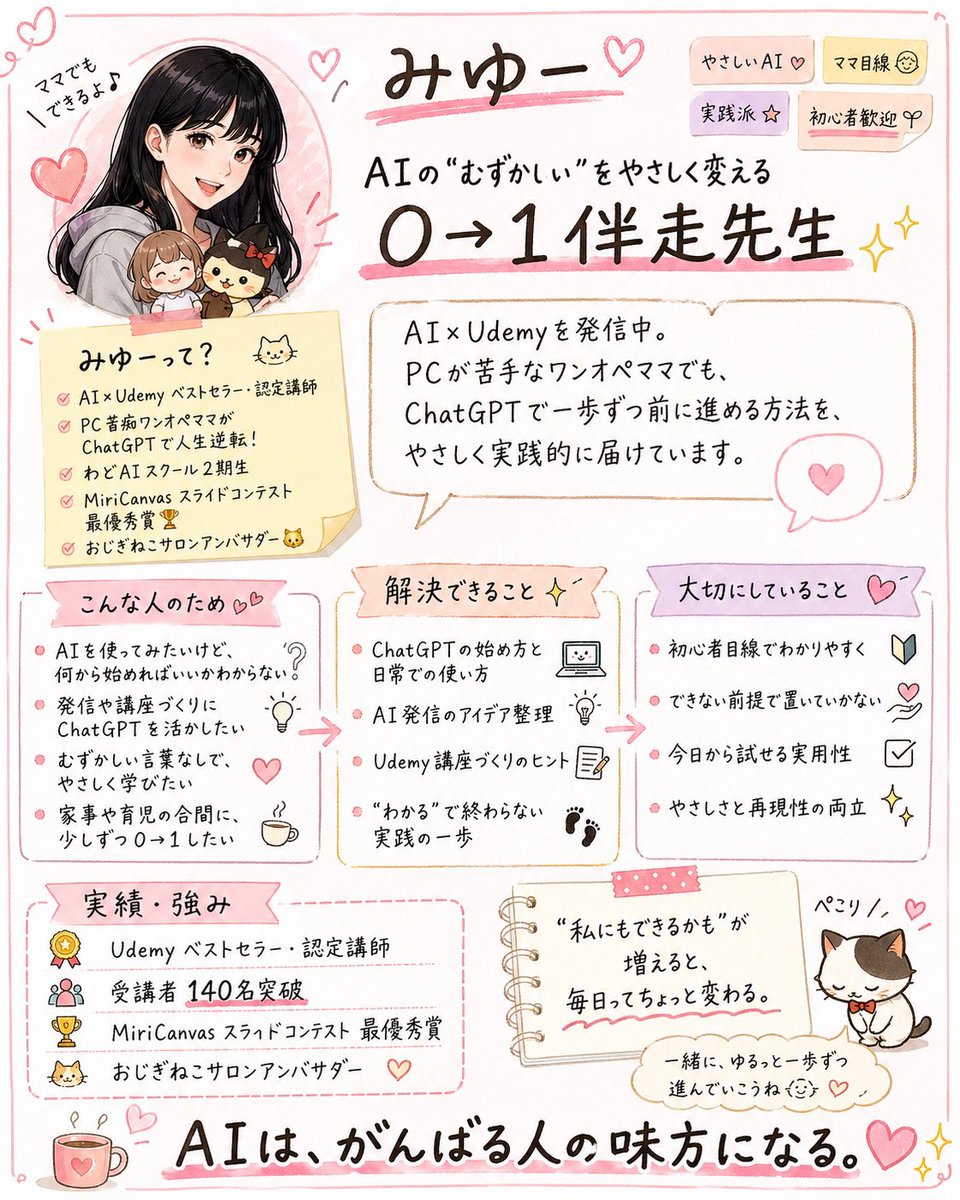
Pôster fofo com resumo de perfil escrito à mão
Essa ferramenta transforma uma captura de tela de um perfil de rede social em um infográfico japonês sofisticado, que resume a marca, o público-alvo, os pontos fortes e as conquistas do criador para promoção nas redes sociais.
Este é um exemplo de prompt GPT Image 2 para Gráfico e pôster . Use o prompt pronto para copiar abaixo para gerar visuais semelhantes e revise a atribuição Awesome GPT Image 2 Prompts e os direitos de uso comercial antes de reutilizá-los.
Precisa do conjunto completo de instruções? Use o Gráfico e pôster Para obter mais exemplos relacionados, acesse o hub de tópicos ou abra o GPT Image 2 catálogo de prompts Para obter o índice completo de exemplos, estruturas reutilizáveis e atribuição de fontes.
Free 1K preview
Generate one preview image instantly, no sign-up required.
Free text preview doesn’t preserve reference-image consistency.
1566/4000
Incitar
prompt pronto para copiar
Using the provided reference image, turn the X/Twitter profile screenshot into a cute handwritten Japanese infographic poster that summarizes the account’s personal brand and offerings. Keep the same person identity, pink feminine tone, AI/Udemy theme, cat motif, and the key achievement of 140 students, but replace the screenshot UI with an illustrated one-page flyer on a clean white background with soft pink doodle borders, hearts, sparkles, and sticky-note styling. Recreate the person as a friendly manga-style portrait in the upper left, still paired with the small chibi companions from the reference. Add a large handwritten headline with the account name and a subheadline about making difficult AI easy and helping beginners go from 0 to 1. Organize the content into 7 clearly separated sections: 1) top title area with short tag stickers, 2) a self-introduction memo card, 3) a speech-bubble profile summary, 4) “who this is for” with 4 bullet points, 5) “what problems can be solved” with 4 bullet points, 6) “core values” with 4 bullet points, 7) “achievements and strengths” with 4 bullet points. Also add 1 small notebook-style motivational quote card near the bottom center and 1 cute cat illustration with a name label at the bottom right. Include a large closing slogan across the bottom stating that AI supports people who are doing their best. Preserve the Japanese language throughout, use legible hand-drawn typography, warm pastel colors, and a polished social-media-friendly layout that feels approachable, practical, and beginner-friendly.
Best for
- - Gráfico e pôster visual exploration
- - Image generation and reference-image edits
- - Reusable briefs that keep source attribution visible
Change these parts
- - Subject, product, character, or scene
- - Aspect ratio, camera, lighting, and background
- - Brand, text, color, and output constraints
Recommended model and settings
- - Model: gpt-image-2
- - Input mode: Imagem para Imagem
- - Aspect ratio: source
- - Commercial status: review original source
How to use this prompt
- 1. Copy the prompt and preserve its structure for the first test.
- 2. Replace the subject, context, and publishing channel.
- 3. Change one camera, lighting, or style variable per iteration.
- 4. Inspect the output, source, text, and rights before reuse.
Limitations, source, and reuse cautions
- - Generated output is an editable draft, not factual, legal, or rights evidence.
- - Review the linked source, people, brands, logos, text, and third-party media before commercial use.
Importado de Awesome GPT Image 2 Prompts . É necessário dar crédito. O uso comercial é permitido allowed ; revise os direitos da fonte antes de utilizá-lo mediante pagamento.
Mais casos nesta categoria
Priorizados por categoria, compatibilidade do modo de entrada, qualidade e menor risco.

Surreal Macro Fashion Illusion
Imagem para Imagem

Split Face Horror Transformation
Imagem para Imagem

Vintage Digital Camera Mirror Selfie
Imagem para Imagem

Multi-Pose Wavy Dark Hair Portrait
Imagem para Imagem

Dax Cinematic Character Bible Sheet
Imagem para Imagem

Grumpy Rhino Storybook Illustration
Texto para Imagem
Reutilização e notas de origem
Utilize esta instrução com segurança após visualizar o caso.
- 1.Copie o prompt ou abra-o diretamente no Dovoo com o botão de geração.
- 2.Ajuste as variáveis, a proporção e as imagens de referência de acordo com o seu caso específico.
- 3.Antes de publicar ou utilizar o conteúdo mediante pagamento, verifique os direitos da fonte, os requisitos de atribuição e os riscos relacionados à marca ou à imagem.