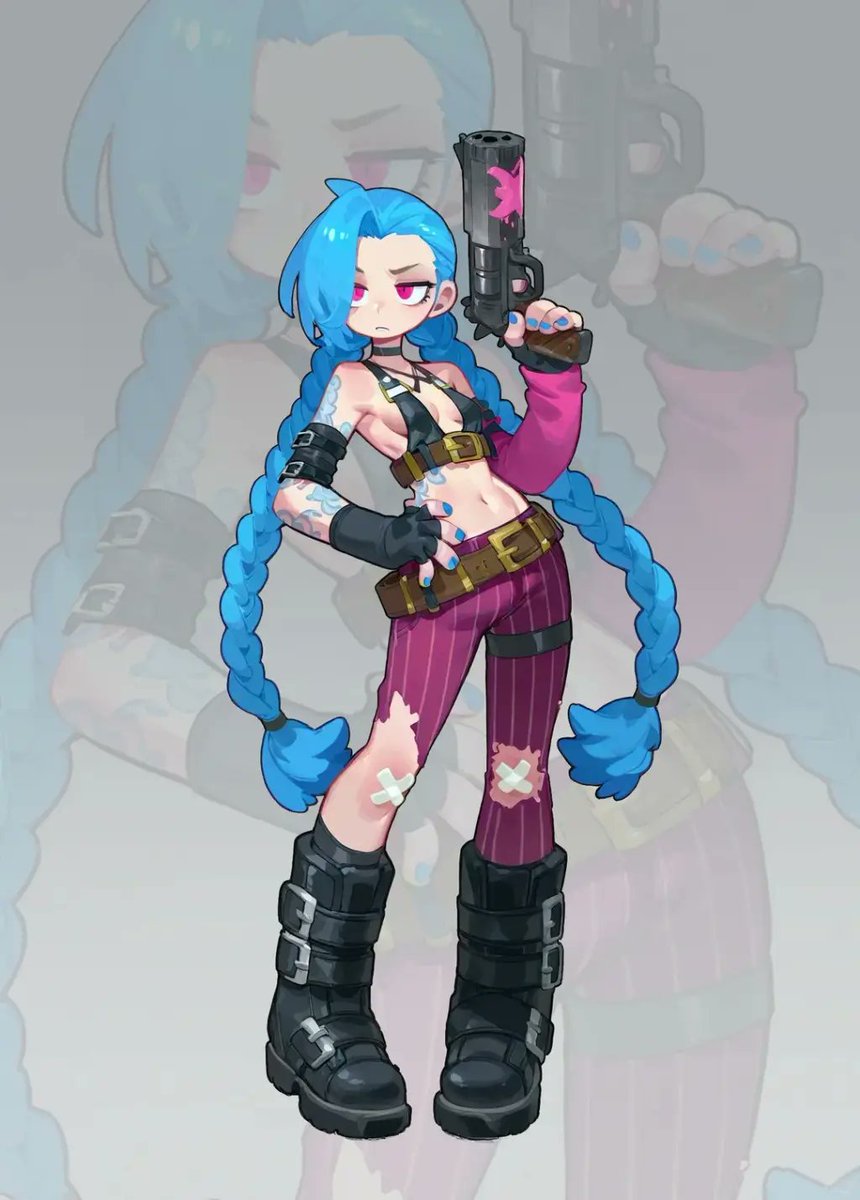
Cosplay to Chibi Game Character
Transforms a cosplay reference photo into a clean chibi anime game-character illustration with a faded silhouette backdrop.
Este é um exemplo de prompt GPT Image 2 para Anime e Jogo . Use o prompt pronto para copiar abaixo para gerar visuais semelhantes e revise a atribuição Awesome GPT Image 2 Prompts e os direitos de uso comercial antes de reutilizá-los.
Precisa do conjunto completo de instruções? Use o Anime e Jogo Para obter mais exemplos relacionados, acesse o hub de tópicos ou abra o GPT Image 2 catálogo de prompts Para obter o índice completo de exemplos, estruturas reutilizáveis e atribuição de fontes.
Free 1K preview
Generate one preview image instantly, no sign-up required.
Free text preview doesn’t preserve reference-image consistency.
1319/4000
Incitar
prompt pronto para copiar
Using the provided reference image as the character base, transform the cosplay photo into a polished 2D chibi game-character illustration. Keep the same recognizable costume, blue twin braids, weapon, tattoos, gloves, belts, torn purple pants with bandage patches, and black boots, but redraw everything as cute stylized anime art with clean linework, simplified proportions, a large head, small body, and glossy cel-shaded coloring. Change the pose from sitting on the floor to a confident full-body standing pose: one hand on the hip and the other hand raised holding the pistol upright. Replace the gritty alley/photo environment with a soft light gray studio background, and add one large, semi-transparent faded silhouette of the same illustrated character behind the main figure as a backdrop. Composition should show exactly 1 main chibi character, 1 raised pistol, and 1 oversized faded background silhouette. Make the image vertical, centered, crisp, high-resolution, and suitable as a character sticker or game asset. Avoid photorealism, avoid extra characters, avoid added text, and do not include a watermark. Optional customization: render in {argument name="art style" default="polished 2D chibi anime game-character style"} with a {argument name="background color" default="soft light gray"} background.Variáveis de prompt
Marcadores de posição editáveis para argumentos encontrados no prompt, com seus valores padrão.
Variável
art style
Padrão
polished 2D chibi anime game-character style
Variável
background color
Padrão
soft light gray
Best for
- - Anime e Jogo visual exploration
- - Image generation and reference-image edits
- - Reusable briefs that keep source attribution visible
Change these parts
- - Subject, product, character, or scene
- - Aspect ratio, camera, lighting, and background
- - Brand, text, color, and output constraints
Recommended model and settings
- - Model: gpt-image-2
- - Input mode: Imagem para Imagem
- - Aspect ratio: source
- - Commercial status: review original source
How to use this prompt
- 1. Copy the prompt and preserve its structure for the first test.
- 2. Replace the subject, context, and publishing channel.
- 3. Change one camera, lighting, or style variable per iteration.
- 4. Inspect the output, source, text, and rights before reuse.
Limitations, source, and reuse cautions
- - Generated output is an editable draft, not factual, legal, or rights evidence.
- - Review the linked source, people, brands, logos, text, and third-party media before commercial use.
Importado de Awesome GPT Image 2 Prompts . É necessário dar crédito. O uso comercial é permitido allowed ; revise os direitos da fonte antes de utilizá-lo mediante pagamento.
Mais casos nesta categoria
Priorizados por categoria, compatibilidade do modo de entrada, qualidade e menor risco.

Anime Girl Heterochromia Portrait
Texto para Imagem

Oversized Head Cartoon Caricature Prompt
Imagem para ImagemRisco médio

Sci-Fi Cyan Lighting Effect
Imagem para Imagem

Stylish Man Street Lamp Portrait
Imagem para Imagem

Hell Hound Character Sheet Infographic
Texto para Imagem

Cute Speech Bubble Mascot Profile Icon
Texto para Imagem
Reutilização e notas de origem
Utilize esta instrução com segurança após visualizar o caso.
- 1.Copie o prompt ou abra-o diretamente no Dovoo com o botão de geração.
- 2.Ajuste as variáveis, a proporção e as imagens de referência de acordo com o seu caso específico.
- 3.Antes de publicar ou utilizar o conteúdo mediante pagamento, verifique os direitos da fonte, os requisitos de atribuição e os riscos relacionados à marca ou à imagem.