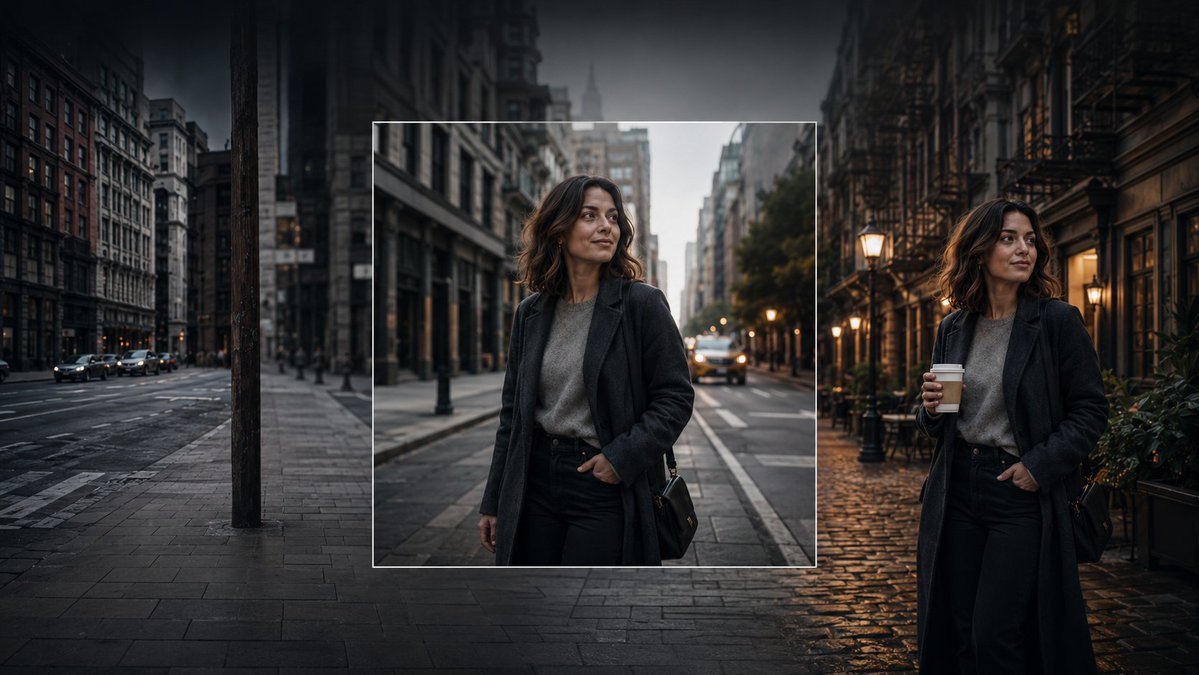
Consistent Character Image Editing Banner
A cinematic photorealistic banner showing a consistent woman character across an original square inset and expanded edited city scenes.
Este é um exemplo de prompt GPT Image 2 para Retrato e Personagem . Use o prompt pronto para copiar abaixo para gerar visuais semelhantes e revise a atribuição Awesome GPT Image 2 Prompts e os direitos de uso comercial antes de reutilizá-los.
Precisa do conjunto completo de instruções? Use o Retrato e Personagem Para obter mais exemplos relacionados, acesse o hub de tópicos ou abra o GPT Image 2 catálogo de prompts Para obter o índice completo de exemplos, estruturas reutilizáveis e atribuição de fontes.
Free 1K preview
Generate one preview image instantly, no sign-up required.
Free text preview doesn’t preserve reference-image consistency.
1551/4000
Incitar
prompt pronto para copiar
Create a cinematic wide banner image demonstrating AI image editing and consistent character generation. The scene is a moody urban street at dusk in a dense old city, with tall buildings on both sides, wet pavement, parked and moving cars, soft streetlights, and a dark vignette. Show exactly three visual zones across one continuous composition: on the left, a dim empty city street with no main person, desaturated and slightly blurred; in the center, a sharp square inset framed by a thin white border containing a realistic portrait of the same woman standing on a city street; on the right, the same woman appears again full-body in a different but matching street setting, holding a takeaway coffee cup. The woman is {argument name="character name" default="an unnamed stylish woman in her early 30s"}: shoulder-length wavy dark brown hair, medium-light skin, natural makeup, calm confident expression, looking slightly to her left, wearing a long dark charcoal overcoat, gray knit sweater, black high-waisted trousers, and a small black shoulder bag. Make the center inset look like the original generated square image, while the left and right sides look like outpainted extensions and a variation of the same character and style. Use photorealistic editorial photography, shallow depth of field, soft evening light, warm lamps on the right contrasting with cool blue-gray shadows on the left, high dynamic range, cinematic color grading, realistic reflections on wet cobblestones and asphalt. No text, no logos, no UI controls, no watermark.Variáveis de prompt
Marcadores de posição editáveis para argumentos encontrados no prompt, com seus valores padrão.
Variável
character name
Padrão
an unnamed stylish woman in her early 30s
Best for
- - Retrato e Personagem visual exploration
- - Image generation and reference-image edits
- - Reusable briefs that keep source attribution visible
Change these parts
- - Subject, product, character, or scene
- - Aspect ratio, camera, lighting, and background
- - Brand, text, color, and output constraints
Recommended model and settings
- - Model: gpt-image-2
- - Input mode: Imagem para Imagem
- - Aspect ratio: source
- - Commercial status: review original source
How to use this prompt
- 1. Copy the prompt and preserve its structure for the first test.
- 2. Replace the subject, context, and publishing channel.
- 3. Change one camera, lighting, or style variable per iteration.
- 4. Inspect the output, source, text, and rights before reuse.
Limitations, source, and reuse cautions
- - Generated output is an editable draft, not factual, legal, or rights evidence.
- - Review the linked source, people, brands, logos, text, and third-party media before commercial use.
Importado de Awesome GPT Image 2 Prompts . É necessário dar crédito. O uso comercial é permitido allowed ; revise os direitos da fonte antes de utilizá-lo mediante pagamento.
Mais casos nesta categoria
Priorizados por categoria, compatibilidade do modo de entrada, qualidade e menor risco.

Stylish Man Street Lamp Portrait
Imagem para Imagem

Sci-Fi Cyan Lighting Effect
Imagem para Imagem

GPT Image 2 Real-Life Character Street Snap
Texto para Imagem

Street Selfie with Cat in Matching Cap
Texto para Imagem

Cinematic Blue Backlit Portrait
Texto para Imagem

Oversized Head Cartoon Caricature Prompt
Imagem para ImagemRisco médio
Reutilização e notas de origem
Utilize esta instrução com segurança após visualizar o caso.
- 1.Copie o prompt ou abra-o diretamente no Dovoo com o botão de geração.
- 2.Ajuste as variáveis, a proporção e as imagens de referência de acordo com o seu caso específico.
- 3.Antes de publicar ou utilizar o conteúdo mediante pagamento, verifique os direitos da fonte, os requisitos de atribuição e os riscos relacionados à marca ou à imagem.