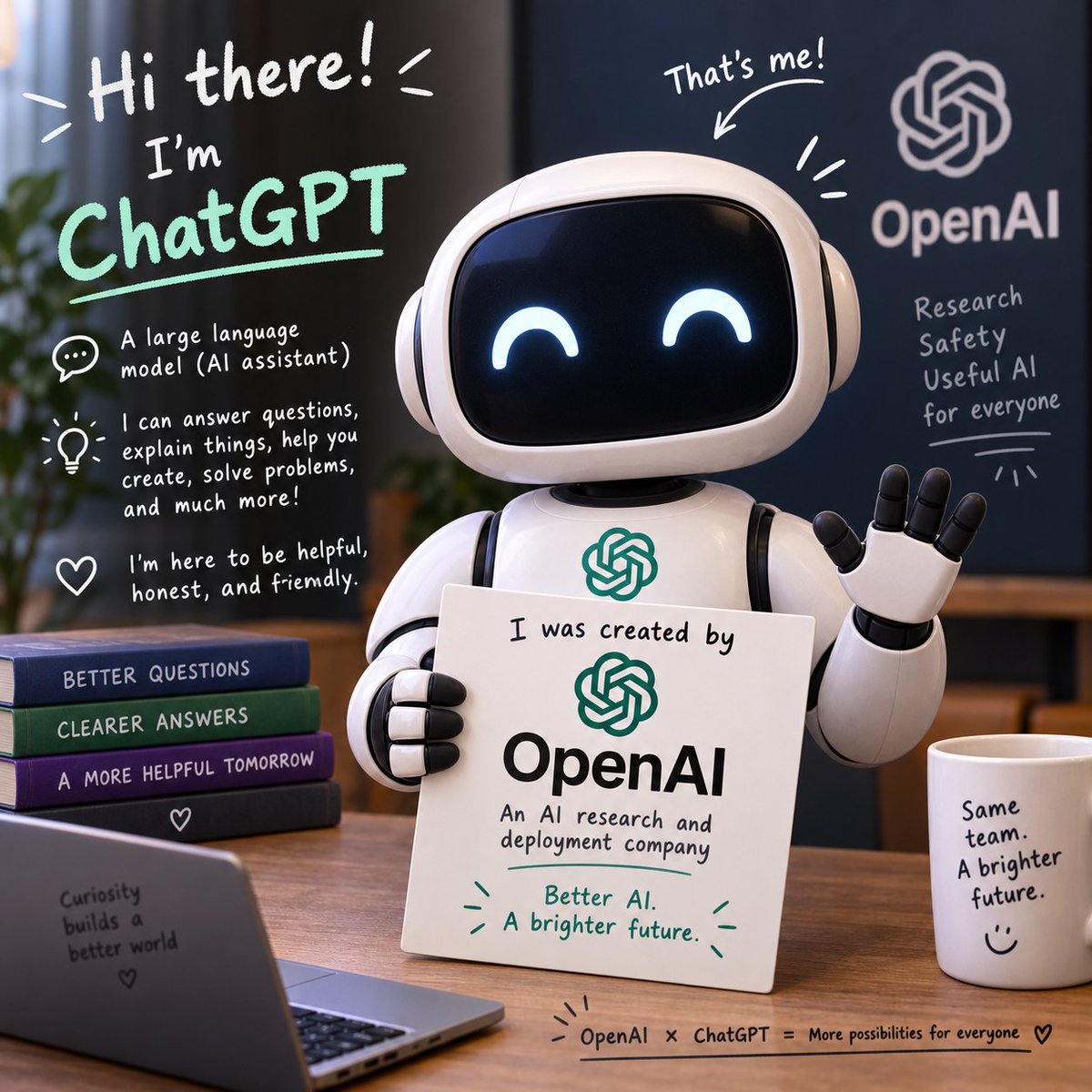
Friendly ChatGPT Robot Intro Scene
A square illustrated promo scene showing a cute ChatGPT robot explaining its OpenAI origin with friendly handwritten annotations.
Este é um exemplo de prompt GPT Image 2 para Ilustração e Arte . Use o prompt pronto para copiar abaixo para gerar visuais semelhantes e revise a atribuição Awesome GPT Image 2 Prompts e os direitos de uso comercial antes de reutilizá-los.
Precisa do conjunto completo de instruções? Use o Ilustração e Arte Para obter mais exemplos relacionados, acesse o hub de tópicos ou abra o GPT Image 2 catálogo de prompts Para obter o índice completo de exemplos, estruturas reutilizáveis e atribuição de fontes.
Free 1K preview
Generate one preview image instantly, no sign-up required.
2997/4000
Incitar
prompt pronto para copiar
Goal: Create a square, polished 3D promotional illustration introducing {argument name="character name" default="ChatGPT"} as a friendly AI assistant made by {argument name="company name" default="OpenAI"}.

Canvas: 1:1 square image, warm indoor office setting, shallow depth of field, soft cinematic lighting, realistic 3D toy-like render with handwritten whiteboard-style annotations overlaid on the scene.

Main subject: Center-right is a cute glossy white robot assistant with a rounded rectangular black screen face, glowing happy crescent eyes, rounded ear-like side pods, segmented arms, and a small OpenAI knot logo on its chest. The robot is waving with its right hand and holding a white placard with its left hand. The placard reads: “I was created by” above a green OpenAI logo, then “OpenAI” in large black type, then “An AI research and deployment company,” and at the bottom in green: “Better AI. A brighter future.” with small decorative emphasis marks.

Layout and objects: Place the robot behind a wooden desk. Include exactly 4 stacked books on the left side of the desk, labeled from top to bottom: “BETTER QUESTIONS,” “CLEARER ANSWERS,” “A MORE HELPFUL TOMORROW,” and a bottom dark book with a small heart icon. In the lower-left foreground, include an open laptop angled toward the viewer with text on its back: “Curiosity builds a better world” plus a small heart. On the right side of the desk, include 1 white coffee mug labeled: “Same team. A brighter future.” with a simple smiley face. Along the bottom edge of the desk, add a small handwritten caption: “OpenAI × ChatGPT = More possibilities for everyone” followed by a heart.

Background: Use a dark navy wall or board on the right with a large white OpenAI knot logo and the word “OpenAI.” Under it, handwritten text reads exactly 4 lines: “Research,” “Safety,” “Useful AI,” “for everyone,” with a small underline and decorative rays. Add a blurred plant on the far left and warm office furniture in the background.

Handwritten annotation overlays: Include a large top-left greeting in white: “Hi there!” with energetic lines. Below it, write “I’m” and then {argument name="headline text" default="ChatGPT"} in large mint-green handwritten letters with an underline. Add exactly 3 explanatory icon callouts down the left side: 1 speech bubble icon with “A large language model (AI assistant)”; 1 lightbulb icon with “I can answer questions, explain things, help you create, solve problems, and much more!”; 1 heart icon with “I’m here to be helpful, honest, and friendly.” Above the robot’s head, add “That’s me!” with an arrow pointing to the robot and a few emphasis strokes.

Visual style: friendly, optimistic, clean tech branding, rounded forms, glossy materials, white and mint-green marker typography, warm wood tones, deep blue background, professional but playful. Keep the OpenAI branding readable, preserve the exact text above, avoid extra logos, avoid misspelled words, and keep all typography legible.
Variáveis de prompt
Marcadores de posição editáveis para argumentos encontrados no prompt, com seus valores padrão.
Variável
character name
Padrão
ChatGPT
Variável
company name
Padrão
OpenAI
Variável
headline text
Padrão
ChatGPT
Best for
- - Ilustração e Arte visual exploration
- - Image generation and reference-image edits
- - Reusable briefs that keep source attribution visible
Change these parts
- - Subject, product, character, or scene
- - Aspect ratio, camera, lighting, and background
- - Brand, text, color, and output constraints
Recommended model and settings
- - Model: gpt-image-2
- - Input mode: Texto para Imagem
- - Aspect ratio: source
- - Commercial status: review original source
How to use this prompt
- 1. Copy the prompt and preserve its structure for the first test.
- 2. Replace the subject, context, and publishing channel.
- 3. Change one camera, lighting, or style variable per iteration.
- 4. Inspect the output, source, text, and rights before reuse.
Limitations, source, and reuse cautions
- - Generated output is an editable draft, not factual, legal, or rights evidence.
- - Review the linked source, people, brands, logos, text, and third-party media before commercial use.
Importado de Awesome GPT Image 2 Prompts . É necessário dar crédito. O uso comercial é permitido allowed ; revise os direitos da fonte antes de utilizá-lo mediante pagamento.
Mais casos nesta categoria
Priorizados por categoria, compatibilidade do modo de entrada, qualidade e menor risco.

Cute Focus Desk Flat Lay and Kawaii Illustration
Texto para Imagem

Boisterous Shrimpers Entering Pub
Texto para Imagem

Tuxedo Cat Photo and Line Art Diptych
Texto para Imagem

Street Selfie with Cat in Matching Cap
Texto para Imagem

Gray Denim Lace-Up Top Prompt for GPT Image 2
Texto para Imagem

Morning Bed Stretching Legs Prompt
Texto para Imagem
Reutilização e notas de origem
Utilize esta instrução com segurança após visualizar o caso.
- 1.Copie o prompt ou abra-o diretamente no Dovoo com o botão de geração.
- 2.Ajuste as variáveis, a proporção e as imagens de referência de acordo com o seu caso específico.
- 3.Antes de publicar ou utilizar o conteúdo mediante pagamento, verifique os direitos da fonte, os requisitos de atribuição e os riscos relacionados à marca ou à imagem.