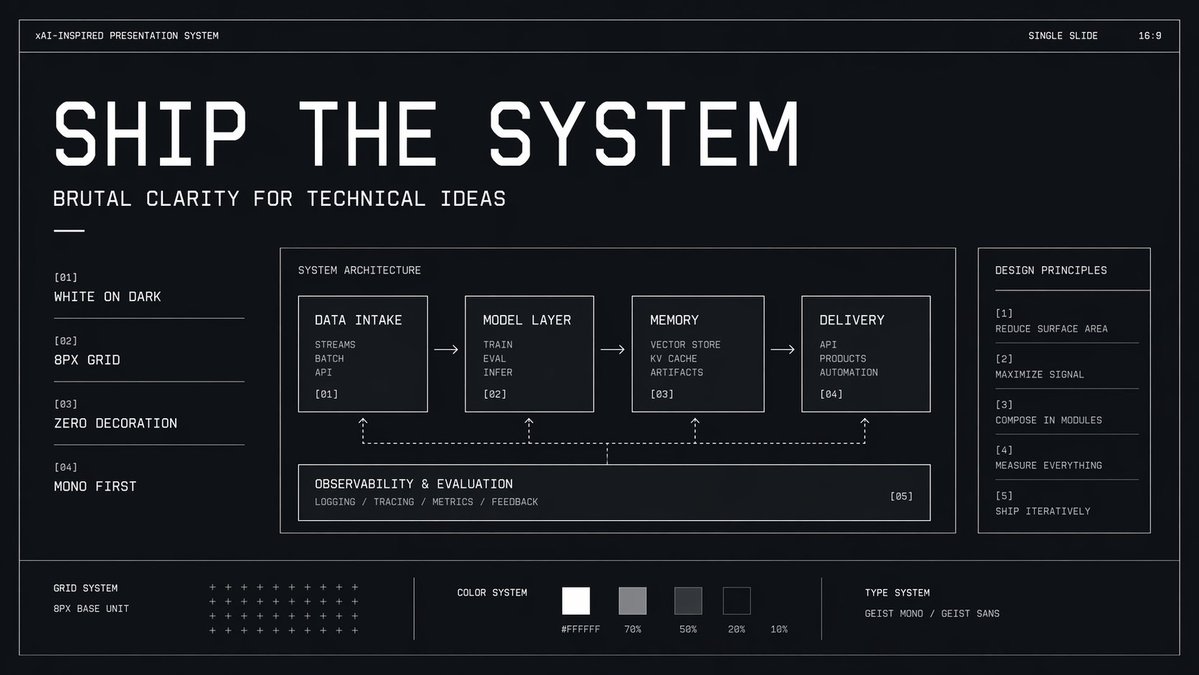
Slide do Sistema Técnico Brutalista
Um slide de apresentação futurista monocromático para apresentações de produtos, IA ou engenharia, que destaca a arquitetura, os princípios e os fundamentos do sistema de design.
Este é um exemplo de prompt GPT Image 2 para Gráfico e pôster . Use o prompt pronto para copiar abaixo para gerar visuais semelhantes e revise a atribuição Awesome GPT Image 2 Prompts e os direitos de uso comercial antes de reutilizá-los.
Precisa do conjunto completo de instruções? Use o Gráfico e pôster Para obter mais exemplos relacionados, acesse o hub de tópicos ou abra o GPT Image 2 catálogo de prompts Para obter o índice completo de exemplos, estruturas reutilizáveis e atribuição de fontes.
Free 1K preview
Generate one preview image instantly, no sign-up required.
4000/4000
Incitar
prompt pronto para copiar
{
  "type": "minimal monochrome presentation slide",
  "style": "high-contrast brutalist technical design, black background with subtle navy tint, thin white wireframe borders, zero decoration, strict grid, mono-first typography, futuristic industrial UI aesthetic",
  "canvas": {
    "aspect_ratio": "16:9",
    "background": "near-black with faint blue undertone and slight vignette"
  },
  "headline": {
    "text": "{argument name=\"headline text\" default=\"SHIP THE SYSTEM\"}",
    "position": "upper left",
    "style": "very large condensed geometric techno sans in white, all caps, widely tracked, dominant hero title"
  },
  "subheadline": {
    "text": "{argument name=\"subheadline text\" default=\"BRUTAL CLARITY FOR TECHNICAL IDEAS\"}",
    "position": "below headline",
    "style": "medium white monospace or mono-inspired sans, all caps"
  },
  "top_bar": {
    "count": 3,
    "items": [
      {
        "text": "xAI-INSPIRED PRESENTATION SYSTEM",
        "position": "upper left"
      },
      {
        "text": "SINGLE SLIDE",
        "position": "top right"
      },
      {
        "text": "16:9",
        "position": "far top right"
      }
    ]
  },
  "layout": {
    "outer_frame": true,
    "sections": [
      {
        "title": "left principles list",
        "position": "left column",
        "count": 4,
        "labels": [
          "[01] WHITE ON DARK",
          "[02] 8PX GRID",
          "[03] ZERO DECORATION",
          "[04] MONO FIRST"
        ]
      },
      {
        "title": "SYSTEM ARCHITECTURE",
        "position": "center large panel",
        "count": 5,
        "labels": [
          "DATA INTAKE",
          "MODEL LAYER",
          "MEMORY",
          "DELIVERY",
          "OBSERVABILITY & EVALUATION"
        ]
      },
      {
        "title": "DESIGN PRINCIPLES",
        "position": "right sidebar panel",
        "count": 5,
        "labels": [
          "[1] REDUCE SURFACE AREA",
          "[2] MAXIMIZE SIGNAL",
          "[3] COMPOSE IN MODULES",
          "[4] MEASURE EVERYTHING",
          "[5] SHIP ITERATIVELY"
        ]
      },
      {
        "title": "bottom system strip",
        "position": "bottom full width",
        "count": 3,
        "labels": [
          "GRID SYSTEM",
          "COLOR SYSTEM",
          "TYPE SYSTEM"
        ]
      }
    ]
  },
  "center_panel": {
    "bordered": true,
    "title": "SYSTEM ARCHITECTURE",
    "flow": {
      "count": 4,
      "boxes": [
        {
          "title": "DATA INTAKE",
          "index": "[01]",
          "lines": [
            "STREAMS",
            "BATCH",
            "API"
          ]
        },
        {
          "title": "MODEL LAYER",
          "index": "[02]",
          "lines": [
            "TRAIN",
            "EVAL",
            "INFER"
          ]
        },
        {
          "title": "MEMORY",
          "index": "[03]",
          "lines": [
            "VECTOR STORE",
            "KV CACHE",
            "ARTIFACTS"
          ]
        },
        {
          "title": "DELIVERY",
          "index": "[04]",
          "lines": [
            "API",
            "PRODUCTS",
            "AUTOMATION"
          ]
        }
      ],
      "connectors": "3 right-pointing arrows between the 4 top boxes"
    },
    "bottom_module": {
      "title": "OBSERVABILITY & EVALUATION",
      "index": "[05]",
      "lines": [
        "LOGGING / TRACING / METRICS / FEEDBACK"
      ],
      "connectors": "dashed feedback line spanning beneath the 4 boxes with 4 upward dotted arrows linking back into each top box"
    }
  },
  "bottom_strip": {
    "left_block": {
      "title": "GRID SYSTEM",
      "subtitle": "8PX BASE UNIT",
      "visual": "dense matrix of small white plus signs arranged in rows"
    },
    "middle_block": {
      "title": "COLOR SYSTEM",
      "swatch_count": 5,
      "swatches": [
        "#FFFFFF",
        "70%",
        "50%",
        "20%",
        "10%"
      ],
      "visual": "five grayscale square swatches from white to very dark gray"
    },
    "right_block": {
      "title": "TYPE SYSTEM",
      "text": "{argument name=\"type label\" default=\"GEIST MONO / GEIST SANS\"}"
    }
  },
  "composition": "clean generous spacing, all elements aligned to an 8px grid, mostly left-aligned text, thin divider lines, no photos, no gradients except extremely subtle background depth, technical pitch-deck cover slide look",
  "rendering": "crisp vector presentation mockup, ultra-sharp typography, polished design system board"
}
Variáveis de prompt
Marcadores de posição editáveis para argumentos encontrados no prompt, com seus valores padrão.
Variável
headline text
Padrão
SHIP THE SYSTEM
Variável
subheadline text
Padrão
BRUTAL CLARITY FOR TECHNICAL IDEAS
Variável
type label
Padrão
GEIST MONO / GEIST SANS
Best for
- - Gráfico e pôster visual exploration
- - Image generation and reference-image edits
- - Reusable briefs that keep source attribution visible
Change these parts
- - Subject, product, character, or scene
- - Aspect ratio, camera, lighting, and background
- - Brand, text, color, and output constraints
Recommended model and settings
- - Model: gpt-image-2
- - Input mode: Texto para Imagem
- - Aspect ratio: source
- - Commercial status: review original source
How to use this prompt
- 1. Copy the prompt and preserve its structure for the first test.
- 2. Replace the subject, context, and publishing channel.
- 3. Change one camera, lighting, or style variable per iteration.
- 4. Inspect the output, source, text, and rights before reuse.
Limitations, source, and reuse cautions
- - Generated output is an editable draft, not factual, legal, or rights evidence.
- - Review the linked source, people, brands, logos, text, and third-party media before commercial use.
Importado de Awesome GPT Image 2 Prompts . É necessário dar crédito. O uso comercial é permitido allowed ; revise os direitos da fonte antes de utilizá-lo mediante pagamento.
Mais casos nesta categoria
Priorizados por categoria, compatibilidade do modo de entrada, qualidade e menor risco.






Reutilização e notas de origem
Utilize esta instrução com segurança após visualizar o caso.
- 1.Copie o prompt ou abra-o diretamente no Dovoo com o botão de geração.
- 2.Ajuste as variáveis, a proporção e as imagens de referência de acordo com o seu caso específico.
- 3.Antes de publicar ou utilizar o conteúdo mediante pagamento, verifique os direitos da fonte, os requisitos de atribuição e os riscos relacionados à marca ou à imagem.