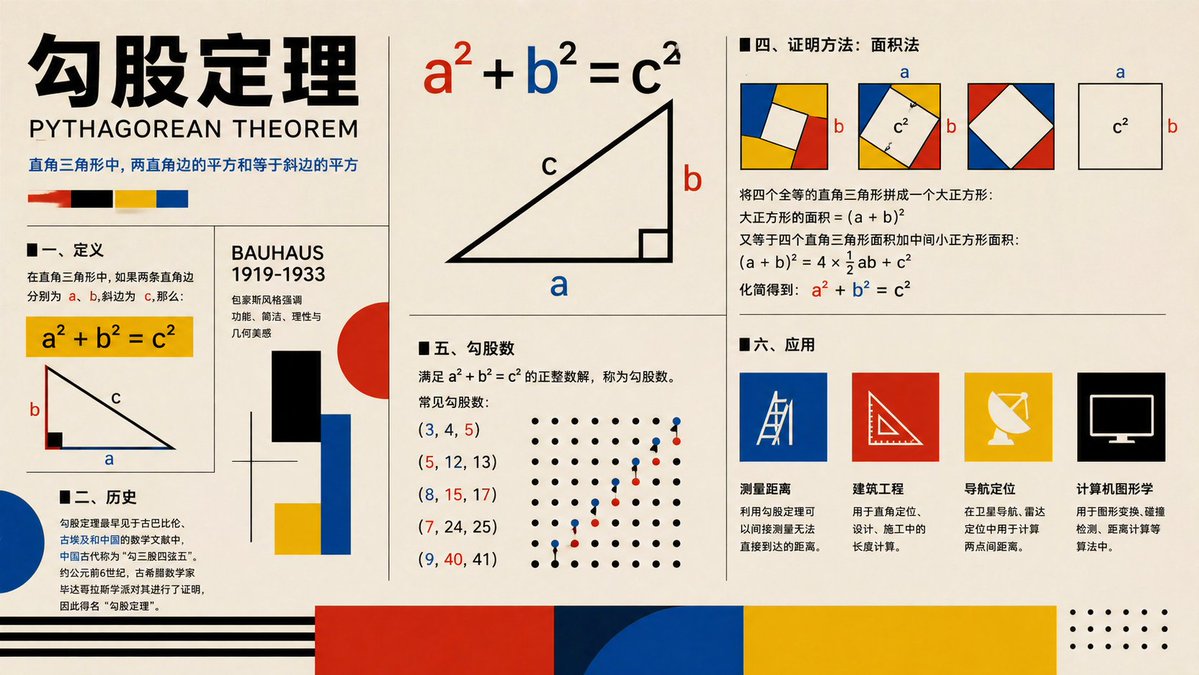
Pôster do Teorema de Pitágoras da Bauhaus
Um pôster infográfico educativo em estilo Bauhaus que explica o teorema de Pitágoras com diagramas, demonstração, história, triplas e aplicações, adequado para uso visual em sala de aula ou conteúdo educativo para a sociedade.
Este é um exemplo de prompt GPT Image 2 para Gráfico e pôster . Use o prompt pronto para copiar abaixo para gerar visuais semelhantes e revise a atribuição Awesome GPT Image 2 Prompts e os direitos de uso comercial antes de reutilizá-los.
Precisa do conjunto completo de instruções? Use o Gráfico e pôster Para obter mais exemplos relacionados, acesse o hub de tópicos ou abra o GPT Image 2 catálogo de prompts Para obter o índice completo de exemplos, estruturas reutilizáveis e atribuição de fontes.
Free 1K preview
Generate one preview image instantly, no sign-up required.
4000/4000
Incitar
prompt pronto para copiar
{
  "type": "educational infographic poster",
  "topic": "{argument name=\"topic\" default=\"Pythagorean theorem\"}",
  "subtitle": "PYTHAGOREAN THEOREM",
  "style": "Bauhaus-inspired mathematical explainer poster, clean editorial grid, cream paper background, bold black typography, primary color palette of red, blue, yellow, black, geometric accents, vector shapes, high-contrast print design",
  "canvas": {
    "orientation": "landscape",
    "aspect_ratio": "16:9"
  },
  "layout": {
    "grid": "multi-panel poster with thin black dividers",
    "sections": [
      {
        "title": "header",
        "position": "top-left spanning two rows",
        "count": 4,
        "labels": [
          "large Chinese title",
          "English subtitle",
          "one-line Chinese theorem summary",
          "4 color swatches"
        ]
      },
      {
        "title": "I. Definition",
        "position": "left-center",
        "count": 3,
        "labels": [
          "section heading",
          "yellow formula box a² + b² = c²",
          "right-triangle diagram labeled a b c"
        ]
      },
      {
        "title": "II. History",
        "position": "bottom-left",
        "count": 3,
        "labels": [
          "section heading",
          "Chinese history paragraph",
          "large blue semicircle accent"
        ]
      },
      {
        "title": "BAUHAUS 1919-1933",
        "position": "center-left vertical panel",
        "count": 6,
        "labels": [
          "panel title",
          "3 short Chinese descriptive lines",
          "black rectangle",
          "red circle with blue and yellow blocks"
        ]
      },
      {
        "title": "main theorem diagram",
        "position": "top-center",
        "count": 3,
        "labels": [
          "large formula a² + b² = c² with a in red b in blue c in black",
          "large right triangle",
          "labels a b c on triangle"
        ]
      },
      {
        "title": "IV. Proof method: Area method",
        "position": "top-right",
        "count": 4,
        "labels": [
          "section heading",
          "3 square dissection diagrams with colored corner triangles and central white square",
          "1 separate c² square diagram with a and b side labels",
          "Chinese proof text with final formula a² + b² = c² highlighted in red and blue"
        ]
      },
      {
        "title": "V. Pythagorean triples",
        "position": "center-bottom",
        "count": 7,
        "labels": [
          "section heading",
          "definition text",
          "(3, 4, 5)",
          "(5, 12, 13)",
          "(8, 15, 17)",
          "(7, 24, 25)",
          "(9, 40, 41)"
        ]
      },
      {
        "title": "dot lattice illustration",
        "position": "right side of Pythagorean triples section",
        "count": 2,
        "labels": [
          "black dot grid",
          "ascending red and blue point pattern"
        ]
      },
      {
        "title": "6. Applications",
        "position": "bottom-right",
        "count": 5,
        "labels": [
          "section heading",
          "Distance measurement",
          "Civil engineering",
          "Navigation and positioning",
          "Computer graphics"
        ]
      },
      {
        "title": "application icons",
        "position": "bottom-right row",
        "count": 4,
        "labels": [
          "blue square with measuring tool line icon",
          "red square with triangle ruler icon",
          "yellow square with satellite dish icon",
          "black square with computer monitor icon"
        ]
      },
      {
        "title": "footer decorations",
        "position": "bottom edge",
        "count": 4,
        "labels": [
          "black horizontal stripes on left",
          "large red block",
          "large blue semicircle overlapping dark blue block",
          "large yellow block with dotted corner motif on far right"
        ]
      }
    ]
  },
  "typography": {
    "title_style": "extra bold oversized Chinese characters in black",
    "subtitle_style": "uppercase sans serif",
    "body_style": "clean sans serif Chinese text, neatly aligned columns"
  },
  "colors": {
    "background": "warm cream",
    "primary": [
      "black",
      "red",
      "blue",
      "yellow"
    ],
    "formula_emphasis": {
      "a": "red",
      "b": "blue",
      "c": "black"
    }
  },
  "rendering": "flat vector infographic, crisp lines, print-poster aesthetic, balanced negative space, museum graphic design feel"
}
Variáveis de prompt
Marcadores de posição editáveis para argumentos encontrados no prompt, com seus valores padrão.
Variável
topic
Padrão
Pythagorean theorem
Best for
- - Gráfico e pôster visual exploration
- - Image generation and reference-image edits
- - Reusable briefs that keep source attribution visible
Change these parts
- - Subject, product, character, or scene
- - Aspect ratio, camera, lighting, and background
- - Brand, text, color, and output constraints
Recommended model and settings
- - Model: gpt-image-2
- - Input mode: Texto para Imagem
- - Aspect ratio: source
- - Commercial status: review original source
How to use this prompt
- 1. Copy the prompt and preserve its structure for the first test.
- 2. Replace the subject, context, and publishing channel.
- 3. Change one camera, lighting, or style variable per iteration.
- 4. Inspect the output, source, text, and rights before reuse.
Limitations, source, and reuse cautions
- - Generated output is an editable draft, not factual, legal, or rights evidence.
- - Review the linked source, people, brands, logos, text, and third-party media before commercial use.
Importado de Awesome GPT Image 2 Prompts . É necessário dar crédito. O uso comercial é permitido allowed ; revise os direitos da fonte antes de utilizá-lo mediante pagamento.
Mais casos nesta categoria
Priorizados por categoria, compatibilidade do modo de entrada, qualidade e menor risco.

Pink Hijab Mirror Selfie Portrait
Texto para Imagem

Spring Editorial Fashion Collage
Texto para Imagem

Grumpy Rhino Storybook Illustration
Texto para Imagem

Martial Arts Legend Character Bible Sheet
Texto para Imagem

Surreal 3D Chess Match Artwork
Texto para Imagem

Manga Desert Radio Telescope Road Trip
Texto para Imagem
Reutilização e notas de origem
Utilize esta instrução com segurança após visualizar o caso.
- 1.Copie o prompt ou abra-o diretamente no Dovoo com o botão de geração.
- 2.Ajuste as variáveis, a proporção e as imagens de referência de acordo com o seu caso específico.
- 3.Antes de publicar ou utilizar o conteúdo mediante pagamento, verifique os direitos da fonte, os requisitos de atribuição e os riscos relacionados à marca ou à imagem.