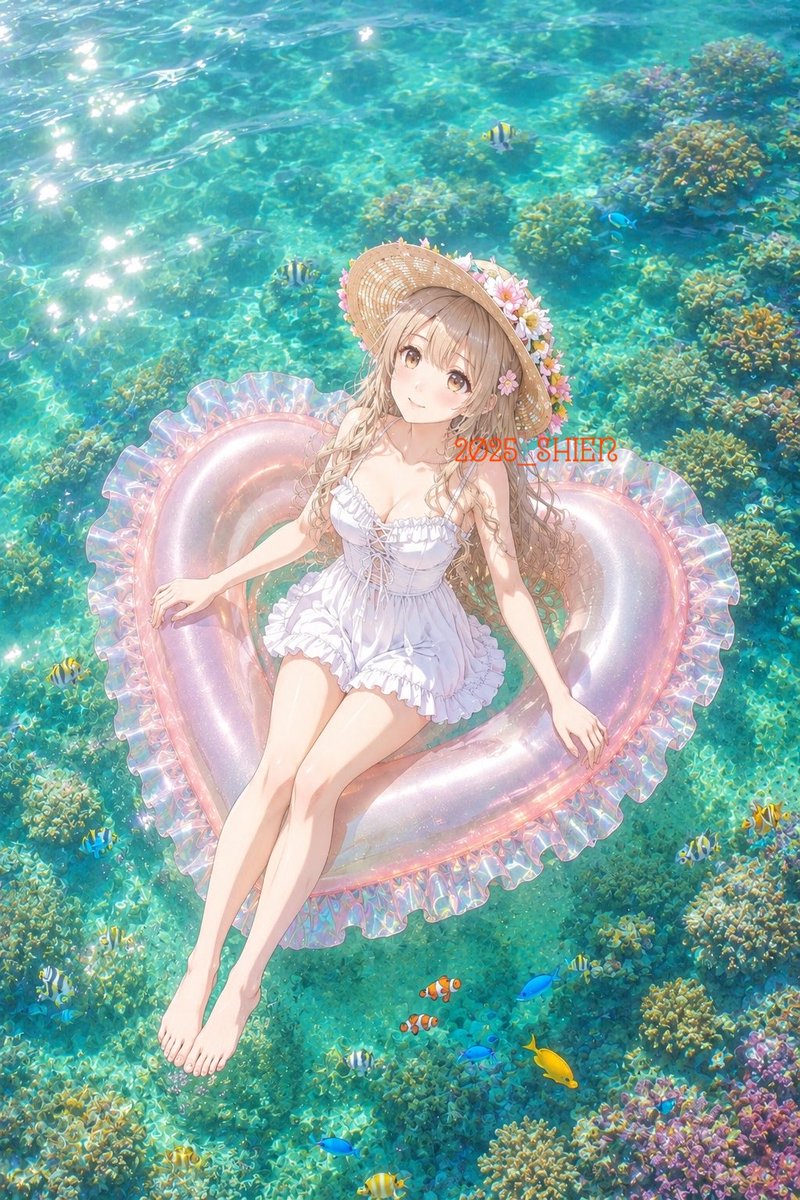
Anime Girl on Heart Float
A luminous vertical anime summer scene of a girl floating over a clear coral reef, useful for serene vacation-themed illustration generation.
Este é um exemplo de prompt GPT Image 2 para Anime e Jogo . Use o prompt pronto para copiar abaixo para gerar visuais semelhantes e revise a atribuição Awesome GPT Image 2 Prompts e os direitos de uso comercial antes de reutilizá-los.
Precisa do conjunto completo de instruções? Use o Anime e Jogo Para obter mais exemplos relacionados, acesse o hub de tópicos ou abra o GPT Image 2 catálogo de prompts Para obter o índice completo de exemplos, estruturas reutilizáveis e atribuição de fontes.
Free 1K preview
Generate one preview image instantly, no sign-up required.
1555/4000
Incitar
prompt pronto para copiar
Create a dreamy anime-style summer illustration viewed from high above, showing a young woman relaxing on a translucent heart-shaped inflatable float in shallow tropical seawater. The scene should feel like a calm early-summer day: brilliant turquoise water, strong sun sparkles on the upper left, visible rippling caustics, and detailed coral reef formations beneath the clear surface. The girl has long light ash-blonde hair, soft brown eyes, fair skin, and a gentle peaceful smile; she wears a ruffled white one-piece swimsuit with lace-up details and a wide straw sunhat decorated with pink and white flowers. Her body is reclined diagonally on the float, head near the upper center, bare legs extended toward the lower left, one hand resting on the float edge and the other relaxed to the side. The float is pearly transparent pink with iridescent highlights and a frilled ruffle rim, shaped like a heart. Include exactly 15 visible fish around the reef: 6 small yellow-and-black striped tropical fish, 5 bright blue fish, 2 orange-and-white clownfish, 1 solid yellow tang-like fish, and 1 tiny dark fish. Add abundant coral clusters in green, gold, teal, and violet, especially along the right and bottom edges. Place small semi-transparent red overlay text reading {argument name="overlay text" default="2025_SHIE?"} across the upper-right area of the float. Use luminous pastel coloring, delicate linework, soft anime rendering, high detail, romantic vacation mood, vertical 2:3 composition, no border, no extra characters, and no additional text.Variáveis de prompt
Marcadores de posição editáveis para argumentos encontrados no prompt, com seus valores padrão.
Variável
overlay text
Padrão
2025_SHIE?
Best for
- - Anime e Jogo visual exploration
- - Image generation and reference-image edits
- - Reusable briefs that keep source attribution visible
Change these parts
- - Subject, product, character, or scene
- - Aspect ratio, camera, lighting, and background
- - Brand, text, color, and output constraints
Recommended model and settings
- - Model: gpt-image-2
- - Input mode: Texto para Imagem
- - Aspect ratio: source
- - Commercial status: review original source
How to use this prompt
- 1. Copy the prompt and preserve its structure for the first test.
- 2. Replace the subject, context, and publishing channel.
- 3. Change one camera, lighting, or style variable per iteration.
- 4. Inspect the output, source, text, and rights before reuse.
Limitations, source, and reuse cautions
- - Generated output is an editable draft, not factual, legal, or rights evidence.
- - Review the linked source, people, brands, logos, text, and third-party media before commercial use.
Importado de Awesome GPT Image 2 Prompts . É necessário dar crédito. O uso comercial é permitido allowed ; revise os direitos da fonte antes de utilizá-lo mediante pagamento.
Mais casos nesta categoria
Priorizados por categoria, compatibilidade do modo de entrada, qualidade e menor risco.

Anime Girl Heterochromia Portrait
Texto para Imagem

MotoGP POV Cornering Shot
Texto para Imagem

Autumn Cozy Casual Outfit Prompt
Texto para Imagem

Cute Focus Desk Flat Lay and Kawaii Illustration
Texto para Imagem

Street Selfie with Cat in Matching Cap
Texto para Imagem

Morning Bed Stretching Legs Prompt
Texto para Imagem
Reutilização e notas de origem
Utilize esta instrução com segurança após visualizar o caso.
- 1.Copie o prompt ou abra-o diretamente no Dovoo com o botão de geração.
- 2.Ajuste as variáveis, a proporção e as imagens de referência de acordo com o seu caso específico.
- 3.Antes de publicar ou utilizar o conteúdo mediante pagamento, verifique os direitos da fonte, os requisitos de atribuição e os riscos relacionados à marca ou à imagem.