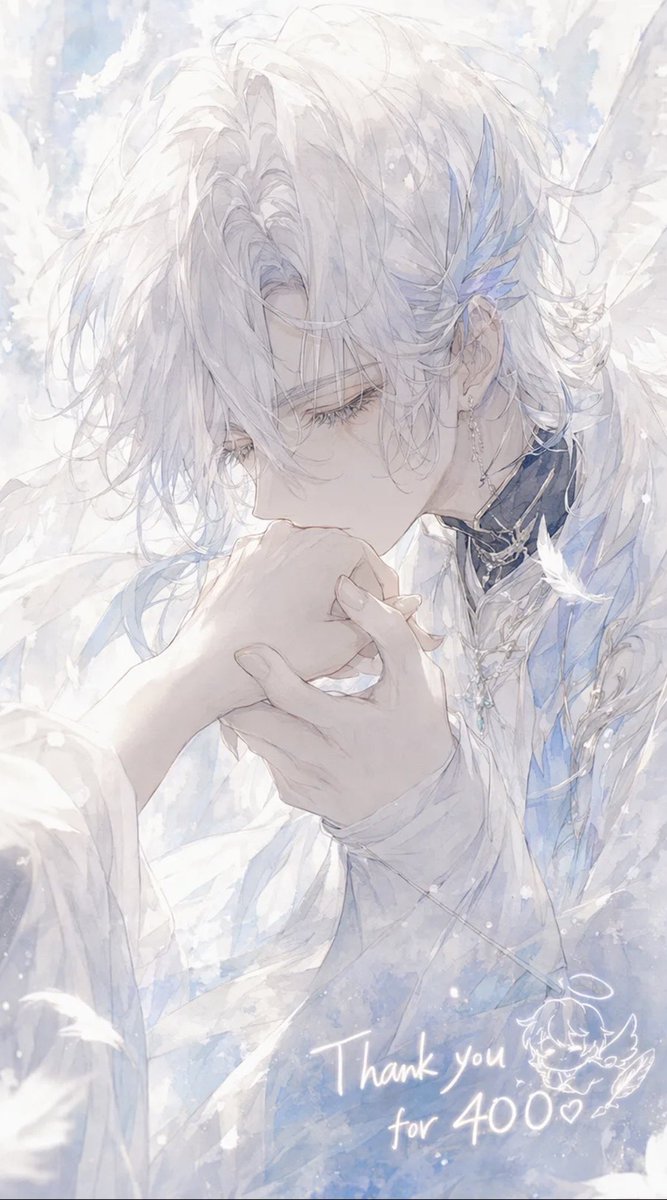
Ethereal Angel Thank You Illustration
A soft pastel anime portrait of an angelic male character kissing a hand, ideal for follower milestone or thank-you artwork.
Este é um exemplo de prompt GPT Image 2 para Anime e Jogo . Use o prompt pronto para copiar abaixo para gerar visuais semelhantes e revise a atribuição Awesome GPT Image 2 Prompts e os direitos de uso comercial antes de reutilizá-los.
Precisa do conjunto completo de instruções? Use o Anime e Jogo Para obter mais exemplos relacionados, acesse o hub de tópicos ou abra o GPT Image 2 catálogo de prompts Para obter o índice completo de exemplos, estruturas reutilizáveis e atribuição de fontes.
Free 1K preview
Generate one preview image instantly, no sign-up required.
1418/4000
Incitar
prompt pronto para copiar
Create a delicate vertical anime-style illustration of {argument name="character name" default="Celestin"}, an ethereal angelic young man with very pale skin and soft, messy {argument name="hair color" default="snow-white"} hair falling over his eyes, shown in close-up three-quarter profile as he gently kisses the back of someone’s hand. His expression is calm, reverent, and slightly melancholic, with long eyelashes and downcast eyes. He wears layered white ceremonial clothing with translucent fabric, pale blue accents, ornate silver jewelry, a dark high collar with metallic trim, dangling earrings, and blue crystal-feather ornaments near one ear. Large soft white wings and drifting feathers surround him, filling the background with a dreamy heavenly atmosphere. Use a luminous watercolor and pencil-sketch aesthetic, very soft pastel whites, icy blues, pearly grays, high-key lighting, airy brush textures, sparkling snow-like particles, and a romantic shoujo manga composition. The foreground hand should be gracefully held in both of his hands as he kisses it, with elegant slender fingers. Add handwritten glowing white text near the lower right reading {argument name="thank you message" default="Thank you for 400♡"}, plus a small cute doodle of a winged chibi face or angel mascot beside it. Canvas should be vertical 9:16, intimate cropped portrait, no hard outlines, no modern objects, no watermark.Variáveis de prompt
Marcadores de posição editáveis para argumentos encontrados no prompt, com seus valores padrão.
Variável
character name
Padrão
Celestin
Variável
hair color
Padrão
snow-white
Variável
thank you message
Padrão
Thank you for 400♡
Best for
- - Anime e Jogo visual exploration
- - Image generation and reference-image edits
- - Reusable briefs that keep source attribution visible
Change these parts
- - Subject, product, character, or scene
- - Aspect ratio, camera, lighting, and background
- - Brand, text, color, and output constraints
Recommended model and settings
- - Model: gpt-image-2
- - Input mode: Texto para Imagem
- - Aspect ratio: source
- - Commercial status: review original source
How to use this prompt
- 1. Copy the prompt and preserve its structure for the first test.
- 2. Replace the subject, context, and publishing channel.
- 3. Change one camera, lighting, or style variable per iteration.
- 4. Inspect the output, source, text, and rights before reuse.
Limitations, source, and reuse cautions
- - Generated output is an editable draft, not factual, legal, or rights evidence.
- - Review the linked source, people, brands, logos, text, and third-party media before commercial use.
Importado de Awesome GPT Image 2 Prompts . É necessário dar crédito. O uso comercial é permitido allowed ; revise os direitos da fonte antes de utilizá-lo mediante pagamento.
Mais casos nesta categoria
Priorizados por categoria, compatibilidade do modo de entrada, qualidade e menor risco.

Anime Girl Heterochromia Portrait
Texto para Imagem

Cute Focus Desk Flat Lay and Kawaii Illustration
Texto para Imagem

Cute Speech Bubble Mascot Profile Icon
Texto para Imagem

Tuxedo Cat Photo and Line Art Diptych
Texto para Imagem

Street Selfie with Cat in Matching Cap
Texto para Imagem

Hell Hound Character Sheet Infographic
Texto para Imagem
Reutilização e notas de origem
Utilize esta instrução com segurança após visualizar o caso.
- 1.Copie o prompt ou abra-o diretamente no Dovoo com o botão de geração.
- 2.Ajuste as variáveis, a proporção e as imagens de referência de acordo com o seu caso específico.
- 3.Antes de publicar ou utilizar o conteúdo mediante pagamento, verifique os direitos da fonte, os requisitos de atribuição e os riscos relacionados à marca ou à imagem.