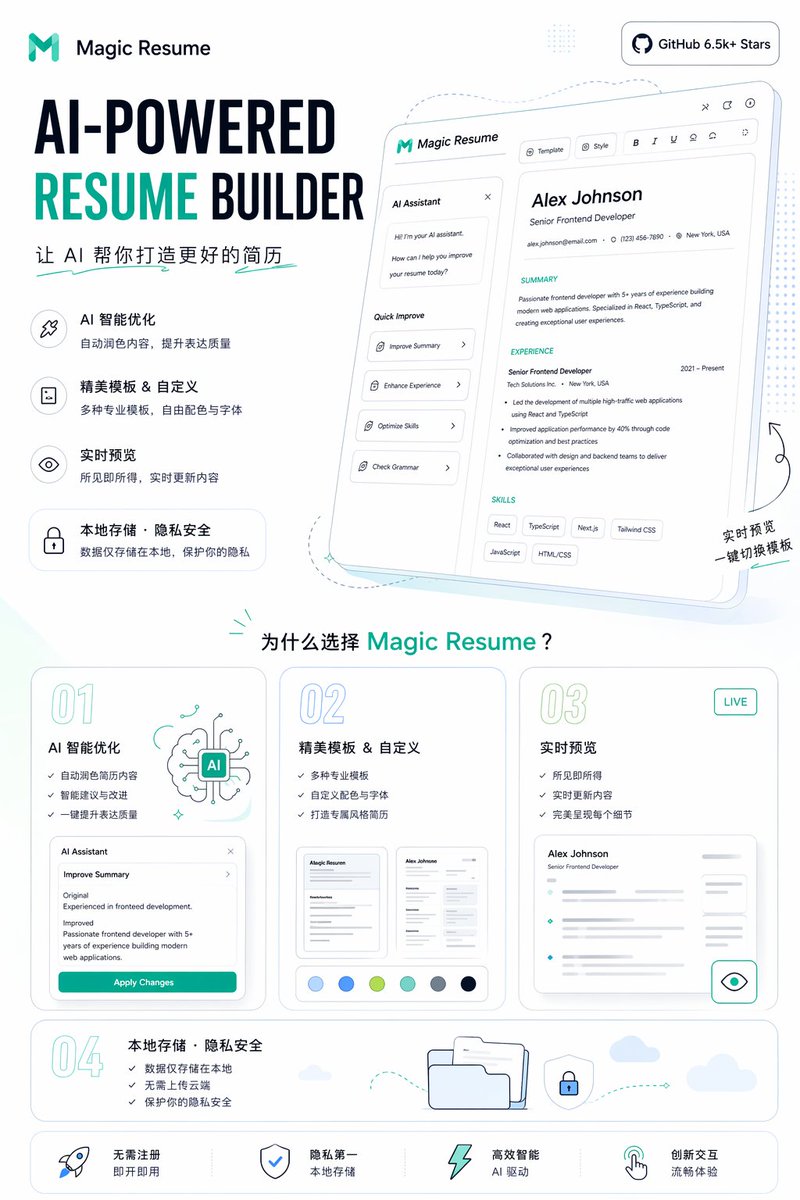
Pôster promocional do criador de currículos com IA
Um pôster de marketing SaaS limpo, apresentando uma página de destino para criação de currículos com inteligência artificial, ideal para promoção de produtos, mídias sociais e como imagem principal em sites.
Este é um exemplo de prompt GPT Image 2 para Gráfico e pôster . Use o prompt pronto para copiar abaixo para gerar visuais semelhantes e revise a atribuição Awesome GPT Image 2 Prompts e os direitos de uso comercial antes de reutilizá-los.
Precisa do conjunto completo de instruções? Use o Gráfico e pôster Para obter mais exemplos relacionados, acesse o hub de tópicos ou abra o GPT Image 2 catálogo de prompts Para obter o índice completo de exemplos, estruturas reutilizáveis e atribuição de fontes.
Free 1K preview
Generate one preview image instantly, no sign-up required.
4000/4000
Incitar
prompt pronto para copiar
{
  "type": "Landing Page Product Promotion Poster",
  "product": {
    "name": "{argument name=\"product name\" default=\"Magic Resume\"}",
    "category": "AI Resume Generator Website",
    "brand_style": "Concise modern SaaS style, minimalism, white background, accented with cyan and dark blue, rounded cards, thin gray outlines, soft pastel shadows"
  },
  "canvas": {
    "orientation": "Vertical screen",
    "aspect_ratio": "9:16"
  },
  "headline_block": {
    "position": "Top left corner",
    "logo": "Abstract cyan M logo and text identification",
    "headline": "AI-powered resume generator",
    "subheadline": "Let AI help you create a better resume",
    "style": "Extra large, bold sans-serif heading, RESUME in bright cyan, other text in dark blue"
  },
  "top_right_badge": {
    "text": "GitHub 6.5k+ Stars",
    "style": "Rounded white capsule badge, dark text and GitHub icon"
  },
  "hero_section": {
    "position": "Top right corner",
    "main_visual": "Tilted large web application model card, showing the resume editor UI",
    "screen_contents": {
      "left_panel": {
        "title": "AI Assistant",
        "chat_lines_count": 3,
        "quick_actions_count": 4,
        "quick_actions": [
          "Optimization Summary",
          "Enhance Work Experience",
          "Optimize Skills",
          "Grammar Check"
        ]
      },
      "top_toolbar_count": 7,
      "top_toolbar_items": [
        "Template",
        "Style",
        "Bold",
        "Italic",
        "Underline",
        "Align/Set Icon",
        "Share/Export Icon"
      ],
      "resume_preview": {
        "name": "{argument name=\"sample candidate name\" default=\"Alex Johnson\"}",
        "role": "Senior Frontend Development Engineer",
        "contact_count": 3,
        "contact_items": [
          "Email",
          "Phone",
          "Address"
        ],
        "sections_count": 3,
        "sections": [
          "Personal Summary",
          "Work Experience",
          "Skills"
        ],
        "skill_tags_count": 6,
        "skill_tags": [
          "React",
          "TypeScript",
          "Next.js",
          "Tailwind CSS",
          "JavaScript",
          "HTML/CSS"
        ]
      }
    },
    "decorations": "Soft blue projection, dashed line guides, tiny sparkles, handwritten-style annotation in the bottom right corner: Real-time Preview One-click Template Switching"
  },
  "feature_list": {
    "position": "Left-center",
    "count": 4,
    "items": [
      {
        "title": "AI Intelligent Optimization",
        "description": "Automatically refine content to improve expression quality",
        "icon": "Wand or sparkle icon within a rounded square"
      },
      {
        "title": "Exquisite templates & customization",
        "description": "A variety of professional templates, free color and font selection",
        "icon": "Document icon within a rounded square"
      },
      {
        "title": "Live Preview",
        "description": "What you see is what you get, content updates in real time",
        "icon": "Eye icon within a rounded square"
      },
      {
        "title": "Local Storage · Privacy & Security",
        "description": "Data is stored locally only, protecting your privacy",
        "icon": "Rounded capsule card with a lock icon"
      }
    ]
  },
  "why_section": {
    "position": "Middle-bottom",
    "title": "Why choose {argument name=\"product name\" default=\"Magic Resume\"}?",
    "cards_count": 4,
    "cards": [
      {
        "number": "01",
        "title": "AI Intelligent Optimization",
        "bullet_count": 3,
        "bullets": [
          "Automatically refine resume content",
          "Intelligent suggestions and improvements",
          "One-click improvement of expression quality"
        ],
        "visual": "AI brain illustration and a mini Agent panel with an “Apply Changes” button"
      },
      {
        "number": "02",
        "title": "Exquisite templates & customization",
        "bullet_count": 3,
        "bullets": [
          "Variety of professional templates",
          "Custom color schemes and fonts",
          "Create a uniquely styled resume"
        ],
        "visual": "2 resume thumbnails and 6 color palettes"
      },
      {
        "number": "03",
        "title": "Live Preview",
        "badge": "LIVE",
        "bullet_count": 3,
        "bullets": [
          "What you see is what you get",
          "Real-time content updates",
          "Perfectly presents every detail"
        ],
        "visual": "Blurred resume preview card with an eye icon button"
      },
      {
        "number": "04",
        "title": "Local Storage · Privacy & Security",
        "bullet_count": 3,
        "bullets": [
          "Data is only stored locally",
          "No cloud upload required",
          "Protect your privacy and security"
        ],
        "visual": "Folder, shield lock, dashed arrow path, small cloud"
      }
    ]
  },
  "bottom_bar": {
    "position": "Bottom",
    "count": 4,
    "items": [
      "No registration required, ready to use",
      "Privacy first, local storage",
      "Highly intelligent AI-powered",
      "Innovative interaction, smooth experience"
    ],
    "icons_count": 4,
    "icons": [
      "Rocket",
      "Shield",
      "Lightning",
      "hand gesture pointer"
    ]
  },
  "style": {
    "typography": "bold geometric sans-serif font mixed with simple Chinese sans-serif font",
    "rendering": "High-fidelity marketing graphics, crisp vector-level UI, subtle gradients, soft teal highlights, spacious layout",
    "palette": {
      "background": "White",
      "primary": "Cyan",
      "secondary": "Dark blue",
      "accent": "Light aqua and pale blue"
    }
  }
}
Variáveis de prompt
Marcadores de posição editáveis para argumentos encontrados no prompt, com seus valores padrão.
Variável
product name
Padrão
Magic Resume
Variável
sample candidate name
Padrão
Alex Johnson
Best for
- - Gráfico e pôster visual exploration
- - Image generation and reference-image edits
- - Reusable briefs that keep source attribution visible
Change these parts
- - Subject, product, character, or scene
- - Aspect ratio, camera, lighting, and background
- - Brand, text, color, and output constraints
Recommended model and settings
- - Model: gpt-image-2
- - Input mode: Texto para Imagem
- - Aspect ratio: source
- - Commercial status: review original source
How to use this prompt
- 1. Copy the prompt and preserve its structure for the first test.
- 2. Replace the subject, context, and publishing channel.
- 3. Change one camera, lighting, or style variable per iteration.
- 4. Inspect the output, source, text, and rights before reuse.
Limitations, source, and reuse cautions
- - Generated output is an editable draft, not factual, legal, or rights evidence.
- - Review the linked source, people, brands, logos, text, and third-party media before commercial use.
Importado de Awesome GPT Image 2 Prompts . É necessário dar crédito. O uso comercial é permitido allowed ; revise os direitos da fonte antes de utilizá-lo mediante pagamento.
Mais casos nesta categoria
Priorizados por categoria, compatibilidade do modo de entrada, qualidade e menor risco.

Spring Editorial Fashion Collage
Texto para Imagem

Transparent Earbuds on Stone Pedestal
Texto para Imagem

Grumpy Rhino Storybook Illustration
Texto para Imagem

Martial Arts Legend Character Bible Sheet
Texto para Imagem

Surreal 3D Chess Match Artwork
Texto para Imagem

Pink Hijab Mirror Selfie Portrait
Texto para Imagem
Reutilização e notas de origem
Utilize esta instrução com segurança após visualizar o caso.
- 1.Copie o prompt ou abra-o diretamente no Dovoo com o botão de geração.
- 2.Ajuste as variáveis, a proporção e as imagens de referência de acordo com o seu caso específico.
- 3.Antes de publicar ou utilizar o conteúdo mediante pagamento, verifique os direitos da fonte, os requisitos de atribuição e os riscos relacionados à marca ou à imagem.