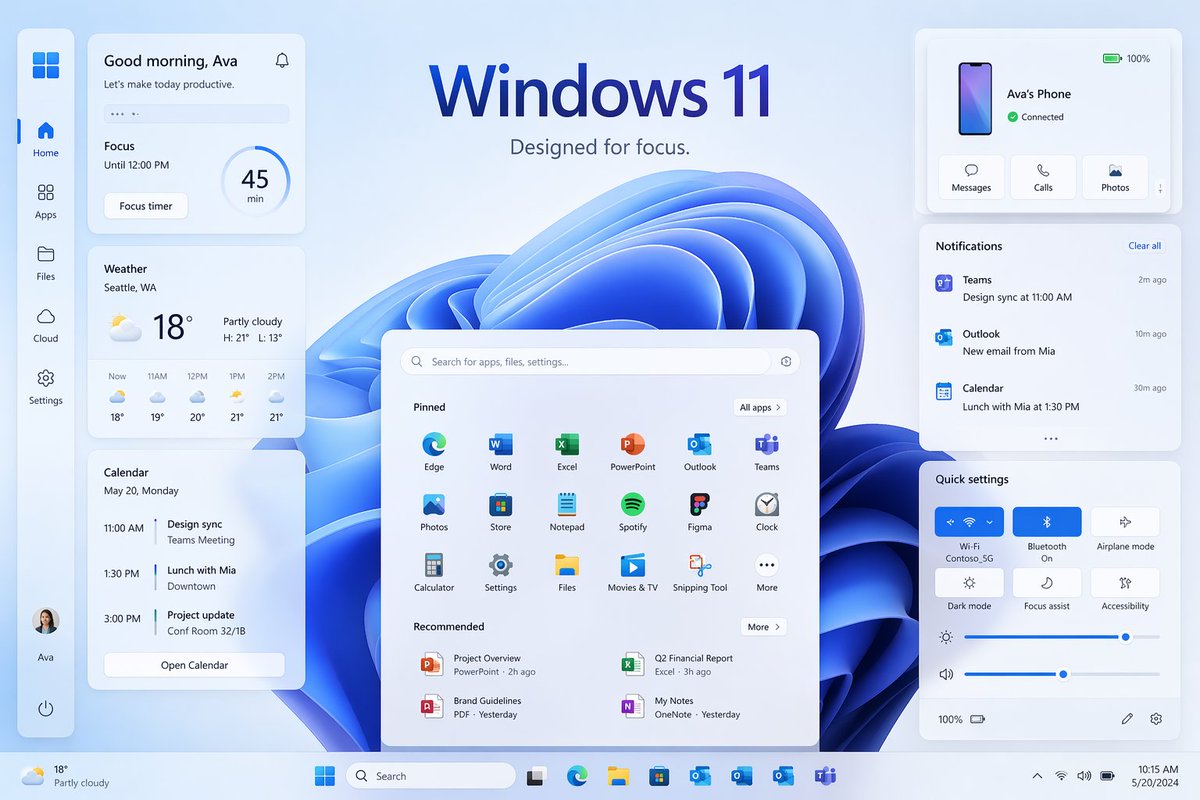
Prezentacja interfejsu użytkownika systemu Windows 11 Focus
Dopracowana makieta pulpitu promocyjnego w stylu Windows 11 z wieloma widżetami i panelami, idealna do odtworzenia nowoczesnej wizualizacji marketingowej systemu operacyjnego.
To jest przykładowy przykład GPT Image 2 dla Produkt i handel . Skorzystaj z poniższego przykładu gotowego do skopiowania, aby wygenerować podobne materiały wizualne i sprawdź atrybucję Awesome GPT Image 2 Prompts oraz prawa do użytku komercyjnego przed ponownym wykorzystaniem.
Potrzebujesz pełnego zestawu podpowiedzi? Użyj Produkt i handel aby uzyskać więcej powiązanych przykładów, odwiedź centrum tematyczne lub otwórz GPT Image 2 szybki katalog aby zobaczyć pełny przykładowy indeks, struktury wielokrotnego użytku i informacje o źródle.
Free 1K preview
Generate one preview image instantly, no sign-up required.
4000/4000
Opis
Monit o przygotowanie do kopiowania
{
  "type": "Windows 11 promotional UI mockup",
  "style": "clean modern product marketing render, soft glassmorphism cards, subtle shadows, rounded corners, light blue and white palette, crisp vector-like interface, polished presentation slide aesthetic",
  "scene": {
    "background": "pale icy blue gradient background with a large abstract Windows 11 blue ribbon swirl wallpaper centered behind the interface",
    "headline": {
      "text": "{argument name=\"headline text\" default=\"Windows 11\"}",
      "subtext": "{argument name=\"tagline\" default=\"Designed for focus.\"}",
      "position": "top center"
    }
  },
  "layout": {
    "type": "desktop UI showcase",
    "sections": [
      {
        "title": "left sidebar",
        "position": "far left vertical dock",
        "count": 8,
        "labels": [
          "Windows logo",
          "Home",
          "Apps",
          "Files",
          "Cloud",
          "Settings",
          "Ava profile",
          "Power"
        ]
      },
      {
        "title": "productivity widgets",
        "position": "left column cards",
        "count": 3,
        "labels": [
          "Good morning, Ava",
          "Weather",
          "Calendar"
        ]
      },
      {
        "title": "center start menu",
        "position": "lower center",
        "count": 3,
        "labels": [
          "Search bar",
          "Pinned",
          "Recommended"
        ]
      },
      {
        "title": "right column cards",
        "position": "upper and middle and lower right",
        "count": 3,
        "labels": [
          "Ava's Phone",
          "Notifications",
          "Quick settings"
        ]
      },
      {
        "title": "taskbar",
        "position": "bottom full width",
        "count": 10,
        "labels": [
          "Weather summary",
          "Start",
          "Search",
          "Task View",
          "Microsoft Edge",
          "File Explorer",
          "Microsoft Store",
          "Outlook",
          "OneDrive",
          "Teams"
        ]
      }
    ],
    "centerpiece": "large Windows 11 Start menu floating in front of the blue abstract wallpaper"
  },
  "widgets": {
    "greeting_card": {
      "title": "Good morning, Ava",
      "subtitle": "Let's make today productive.",
      "focus_block": {
        "label": "Focus",
        "time": "Until 12:00 PM",
        "timer": "45 min",
        "button": "Focus timer"
      }
    },
    "weather_card": {
      "location": "{argument name=\"weather location\" default=\"Seattle, WA\"}",
      "temperature": "18°",
      "condition": "Partly cloudy",
      "range": "H: 21°  L: 13°",
      "forecast_count": 5,
      "forecast_labels": [
        "Now 18°",
        "11AM 19°",
        "12PM 20°",
        "1PM 21°",
        "2PM 21°"
      ]
    },
    "calendar_card": {
      "date": "May 20, Monday",
      "events_count": 3,
      "event_labels": [
        "11:00 AM Design sync, Teams Meeting",
        "1:30 PM Lunch with Mia, Downtown",
        "3:00 PM Project update, Conf Room 32/1B"
      ],
      "button": "Open Calendar"
    },
    "phone_card": {
      "device_name": "{argument name=\"device name\" default=\"Ava's Phone\"}",
      "status": "Connected",
      "actions_count": 3,
      "action_labels": [
        "Messages",
        "Calls",
        "Photos"
      ],
      "battery": "100%"
    },
    "notifications_card": {
      "title": "Notifications",
      "action": "Clear all",
      "items_count": 3,
      "item_labels": [
        "Teams — Design sync at 11:00 AM — 2m ago",
        "Outlook — New email from Mia — 10m ago",
        "Calendar — Lunch with Mia at 1:30 PM — 30m ago"
      ]
    },
    "quick_settings_card": {
      "title": "Quick settings",
      "toggles_count": 6,
      "toggle_labels": [
        "Wi‑Fi",
        "Bluetooth",
        "Airplane mode",
        "Dark mode",
        "Focus assist",
        "Accessibility"
      ],
      "active_toggles": [
        "Wi‑Fi",
        "Bluetooth"
      ],
      "sliders_count": 2,
      "slider_labels": [
        "Brightness",
        "Volume"
      ],
      "wifi_network": "Contoso_5G"
    },
    "start_menu": {
      "search_placeholder": "Search for apps, files, settings...",
      "pinned_count": 18,
      "pinned_labels": [
        "Edge",
        "Word",
        "Excel",
        "PowerPoint",
        "Outlook",
        "Teams",
        "Photos",
        "Store",
        "Notepad",
        "Spotify",
        "Figma",
        "Clock",
        "Calculator",
        "Settings",
        "Files",
        "Movies & TV",
        "Snipping Tool",
        "More"
      ],
      "recommended_count": 4,
      "recommended_labels": [
        "Project Overview",
        "Q2 Financial Report",
        "Brand Guidelines",
        "My Notes"
      ]
    }
  },
  "composition": "symmetrical product showcase with the Start menu centered, three stacked cards on the left, three cards on the right, generous spacing, all elements floating slightly above the background, bottom taskbar spanning edge to edge",
  "rendering": "high-resolution UI concept art for a desktop operating system launch page, immaculate typography, Microsoft-inspired iconography without extra branding clutter"
}
Zmienne monitujące
Edytowalne symbole zastępcze argumentów znalezione w monicie, wraz z ich wartościami domyślnymi.
Zmienny
headline text
Domyślny
Windows 11
Zmienny
tagline
Domyślny
Designed for focus.
Zmienny
weather location
Domyślny
Seattle, WA
Zmienny
device name
Domyślny
Ava's Phone
Best for
- - Produkt i handel visual exploration
- - Image generation and reference-image edits
- - Reusable briefs that keep source attribution visible
Change these parts
- - Subject, product, character, or scene
- - Aspect ratio, camera, lighting, and background
- - Brand, text, color, and output constraints
Recommended model and settings
- - Model: gpt-image-2
- - Input mode: Tekst na obraz
- - Aspect ratio: source
- - Commercial status: review original source
How to use this prompt
- 1. Copy the prompt and preserve its structure for the first test.
- 2. Replace the subject, context, and publishing channel.
- 3. Change one camera, lighting, or style variable per iteration.
- 4. Inspect the output, source, text, and rights before reuse.
Limitations, source, and reuse cautions
- - Generated output is an editable draft, not factual, legal, or rights evidence.
- - Review the linked source, people, brands, logos, text, and third-party media before commercial use.
Zaimportowano z Awesome GPT Image 2 Prompts . Wymagane jest podanie źródła. Status do użytku komercyjnego to allowed ; przed płatnym użyciem sprawdź prawa autorskie do źródła.
Więcej przypadków w tej kategorii
Priorytety według kategorii, zgodności trybu wprowadzania, jakości i niższego ryzyka.






Ponowne wykorzystanie i źródło notatek
Użyj tego monitu bezpiecznie po zapoznaniu się ze sprawą.
- 1.Skopiuj monit lub otwórz go bezpośrednio w Dovoo za pomocą przycisku generowania.
- 2.Dostosuj zmienne, proporcje obrazu i obrazy referencyjne do własnego przypadku użycia.
- 3.Przed publikacją lub płatnym wykorzystaniem należy sprawdzić prawa autorskie do źródła, wymogi dotyczące atrybucji oraz ryzyko związane z marką lub podobizną.