Voxel AI Website Building Infographic
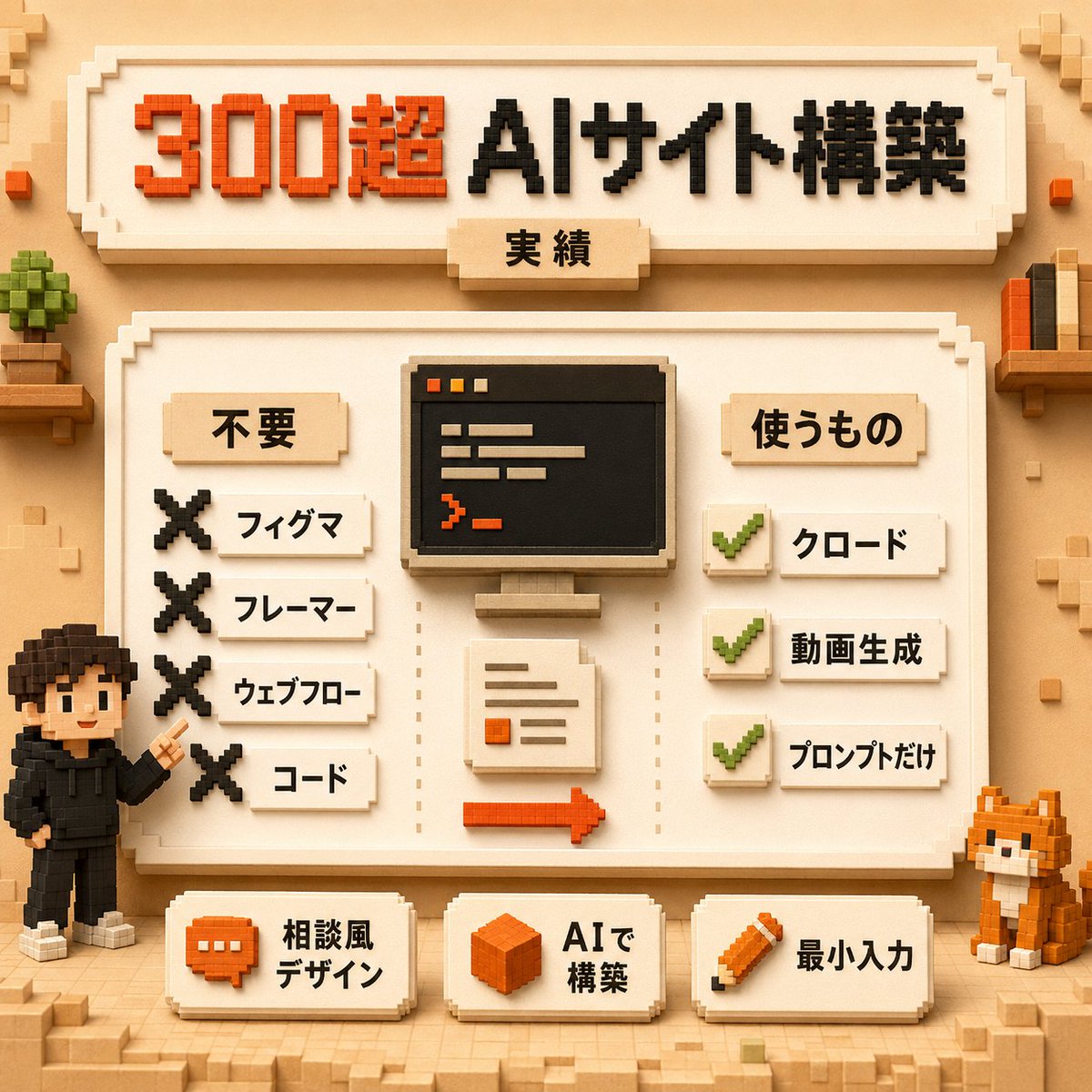
A square Japanese voxel-style infographic showing an AI website-building workflow with rejected tools, required tools, and minimal-input feature cards.
To jest przykładowy przykład GPT Image 2 dla Grafika i plakat . Skorzystaj z poniższego przykładu gotowego do skopiowania, aby wygenerować podobne materiały wizualne i sprawdź atrybucję Awesome GPT Image 2 Prompts oraz prawa do użytku komercyjnego przed ponownym wykorzystaniem.
Potrzebujesz pełnego zestawu podpowiedzi? Użyj Grafika i plakat aby uzyskać więcej powiązanych przykładów, odwiedź centrum tematyczne lub otwórz GPT Image 2 szybki katalog aby zobaczyć pełny przykładowy indeks, struktury wielokrotnego użytku i informacje o źródle.
Free 1K preview
Generate one preview image instantly, no sign-up required.
3168/4000
Opis
Monit o przygotowanie do kopiowania
Goal: Create a square voxel-art Japanese infographic poster about building many AI websites with minimal tools, using a warm beige Minecraft-like block aesthetic.

Canvas: 1:1 square composition, 768x768 style, soft studio lighting, tan paper-and-wood background, subtle voxel blocks in the corners, crisp isometric pixel/voxel edges, shallow shadows, no photorealism.

Main headline area: At the top, place a large cream beveled signboard with blocky Japanese text reading {argument name="headline text" default="300超 AIサイト構築"}. Make “300超” bright orange-red and “AIサイト構築” black. Under the headline, attach a small centered beige tab label reading {argument name="subtitle text" default="実績: Achievements, track record"}. Use thick extruded voxel lettering.

Central layout: Below the headline, create one large cream framed panel with a decorative stepped border. Inside it, divide the content into three vertical zones: left checklist, center workflow illustration, right checklist. Use dotted vertical divider lines between the zones.

Left checklist: Title label reads {argument name="left section title" default="不要: Unnecessary, not needed"}. Show exactly 4 rejected items, each with a large black voxel X icon on the left and a small cream label on the right. The 4 labels, top to bottom, are: 「フィグマ」, 「フレーマー」, 「ウェブフロー」, 「コード」.

Center workflow illustration: Show exactly 3 main elements stacked vertically: 1) a black computer monitor with a simple code/editor window using orange and beige lines, 2) a cream document sheet with a few text lines and one orange square, 3) an orange right-pointing arrow along the bottom. Keep everything blocky and voxel-built.

Right checklist: Title label reads {argument name="right section title" default="使うもの"}. Show exactly 3 approved items, each with a green voxel checkmark icon on a cream square and a small cream label to the right. The 3 labels, top to bottom, are: 「クロード」, 「動画生成」, 「プロンプトだけ」.

Bottom row: Place exactly 3 separate cream beveled cards across the bottom of the main panel. Card 1 has an orange chat bubble icon and text 「相談風 デザイン」. Card 2 has an orange cube icon and text 「AIで 構築」. Card 3 has an orange pencil icon and text 「最小入力」.

Characters and decorative objects: Add exactly 2 voxel characters/mascots: on the lower left, a small black-haired person in a black hoodie pointing upward toward the panel; on the lower right, an orange-and-white voxel cat sitting beside the panel. Add a small potted blocky plant on a shelf at upper left and a small shelf with upright books at upper right. Include scattered tiny beige and orange cubes for decoration, but keep the poster clean and readable.

Visual style: High-quality 3D voxel diorama, blocky extruded Japanese typography, warm cream, tan, orange, black, and green palette, soft ambient occlusion, orthographic front view, friendly educational tech infographic, neatly aligned labels, crisp readable Japanese text.

Constraints: Use exactly 4 X-mark rejected items, exactly 3 checkmark approved items, exactly 3 bottom feature cards, and exactly 2 mascot figures. Do not add extra sections, extra checklists, logos, watermarks, or English text.
Zmienne monitujące
Edytowalne symbole zastępcze argumentów znalezione w monicie, wraz z ich wartościami domyślnymi.
Zmienny
headline text
Domyślny
300超 AIサイト構築
Zmienny
subtitle text
Domyślny
実績: Achievements, track record
Zmienny
left section title
Domyślny
不要: Unnecessary, not needed
Zmienny
right section title
Domyślny
使うもの
Best for
- - Grafika i plakat visual exploration
- - Image generation and reference-image edits
- - Reusable briefs that keep source attribution visible
Change these parts
- - Subject, product, character, or scene
- - Aspect ratio, camera, lighting, and background
- - Brand, text, color, and output constraints
Recommended model and settings
- - Model: gpt-image-2
- - Input mode: Tekst na obraz
- - Aspect ratio: source
- - Commercial status: review original source
How to use this prompt
- 1. Copy the prompt and preserve its structure for the first test.
- 2. Replace the subject, context, and publishing channel.
- 3. Change one camera, lighting, or style variable per iteration.
- 4. Inspect the output, source, text, and rights before reuse.
Limitations, source, and reuse cautions
- - Generated output is an editable draft, not factual, legal, or rights evidence.
- - Review the linked source, people, brands, logos, text, and third-party media before commercial use.
Zaimportowano z Awesome GPT Image 2 Prompts . Wymagane jest podanie źródła. Status do użytku komercyjnego to allowed ; przed płatnym użyciem sprawdź prawa autorskie do źródła.
Więcej przypadków w tej kategorii
Priorytety według kategorii, zgodności trybu wprowadzania, jakości i niższego ryzyka.






Ponowne wykorzystanie i źródło notatek
Użyj tego monitu bezpiecznie po zapoznaniu się ze sprawą.
- 1.Skopiuj monit lub otwórz go bezpośrednio w Dovoo za pomocą przycisku generowania.
- 2.Dostosuj zmienne, proporcje obrazu i obrazy referencyjne do własnego przypadku użycia.
- 3.Przed publikacją lub płatnym wykorzystaniem należy sprawdzić prawa autorskie do źródła, wymogi dotyczące atrybucji oraz ryzyko związane z marką lub podobizną.