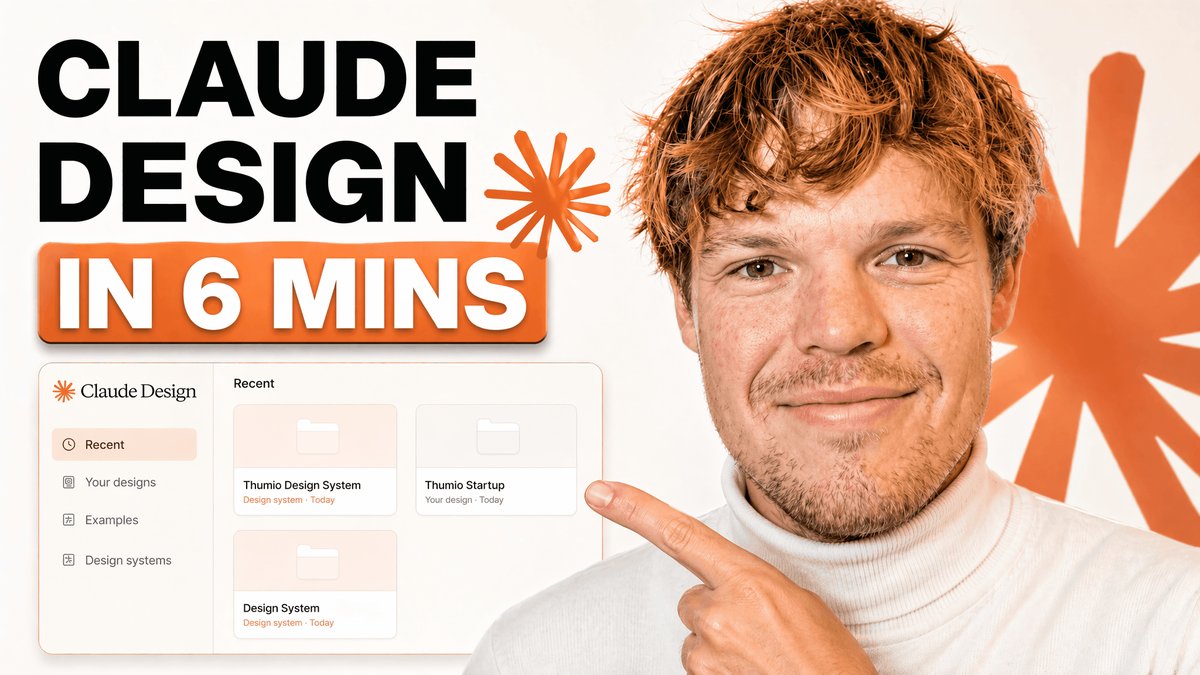
Miniatura samouczka technicznego z makietą interfejsu użytkownika
Wyrazista miniatura w stylu YouTube zawierająca nagłówek samouczka, makietę pulpitu nawigacyjnego aplikacji projektowej oraz prezentera wskazującego na interfejs w celu wyświetlenia treści związanych z marką lub systemem projektowania.
To jest przykładowy przykład GPT Image 2 dla Grafika i plakat . Skorzystaj z poniższego przykładu gotowego do skopiowania, aby wygenerować podobne materiały wizualne i sprawdź atrybucję Awesome GPT Image 2 Prompts oraz prawa do użytku komercyjnego przed ponownym wykorzystaniem.
Free 1K preview
Generate one preview image instantly, no sign-up required.
Opis
Monit o przygotowanie do kopiowania
A clean modern YouTube thumbnail on a bright white background, split visually between bold text on the left and a cropped presenter on the right. On the left, place a massive stacked headline in heavy black sans-serif uppercase reading {argument name="headline text" default="CLAUDE DESIGN"}, aligned top-left across two lines. Below it, add a large rounded rectangular orange banner with a subtle drop shadow containing bold white uppercase text with an orange outline that reads {argument name="subheadline text" default="IN 6 MINS"}. Near the headline, include 2 orange starburst spark shapes, one small beside the text and one much larger in the far right background. In the lower-left quadrant, show a floating app interface mockup for a design tool dashboard with a soft off-white panel, thin borders, rounded corners, and a faint shadow. The interface should have a left sidebar with 4 menu items labeled exactly: "Recent", "Your designs", "Examples", and "Design systems". The main panel header should say "Recent" and contain 3 project cards arranged in a grid, labeled exactly: "Thumio Design System", "Thumio Startup", and "Design System". On the right half, show a cropped photorealistic young adult man from chest up wearing a white turtleneck sweater, with messy light brown hair and light facial hair, positioned close to camera. Show every face clearly with natural, detailed facial features. He points with one hand toward the interface panel on the left, finger extended. Use a warm orange and white brand palette, high contrast, minimal clutter, polished creator-economy thumbnail styling, subtle shadows, and a composition designed for tech tutorial content.Zmienne monitujące
Edytowalne symbole zastępcze argumentów znalezione w monicie, wraz z ich wartościami domyślnymi.
Best for
- - Grafika i plakat visual exploration
- - Image generation and reference-image edits
- - Reusable briefs that keep source attribution visible
Change these parts
- - Subject, product, character, or scene
- - Aspect ratio, camera, lighting, and background
- - Brand, text, color, and output constraints
Recommended model and settings
- - Model: gpt-image-2
- - Input mode: Tekst na obraz
- - Aspect ratio: source
- - Commercial status: review original source
How to use this prompt
- 1. Copy the prompt and preserve its structure for the first test.
- 2. Replace the subject, context, and publishing channel.
- 3. Change one camera, lighting, or style variable per iteration.
- 4. Inspect the output, source, text, and rights before reuse.
Limitations, source, and reuse cautions
- - Generated output is an editable draft, not factual, legal, or rights evidence.
- - Review the linked source, people, brands, logos, text, and third-party media before commercial use.
Więcej przypadków w tej kategorii
Priorytety według kategorii, zgodności trybu wprowadzania, jakości i niższego ryzyka.






Ponowne wykorzystanie i źródło notatek
Użyj tego monitu bezpiecznie po zapoznaniu się ze sprawą.
- 1.Skopiuj monit lub otwórz go bezpośrednio w Dovoo za pomocą przycisku generowania.
- 2.Dostosuj zmienne, proporcje obrazu i obrazy referencyjne do własnego przypadku użycia.
- 3.Przed publikacją lub płatnym wykorzystaniem należy sprawdzić prawa autorskie do źródła, wymogi dotyczące atrybucji oraz ryzyko związane z marką lub podobizną.