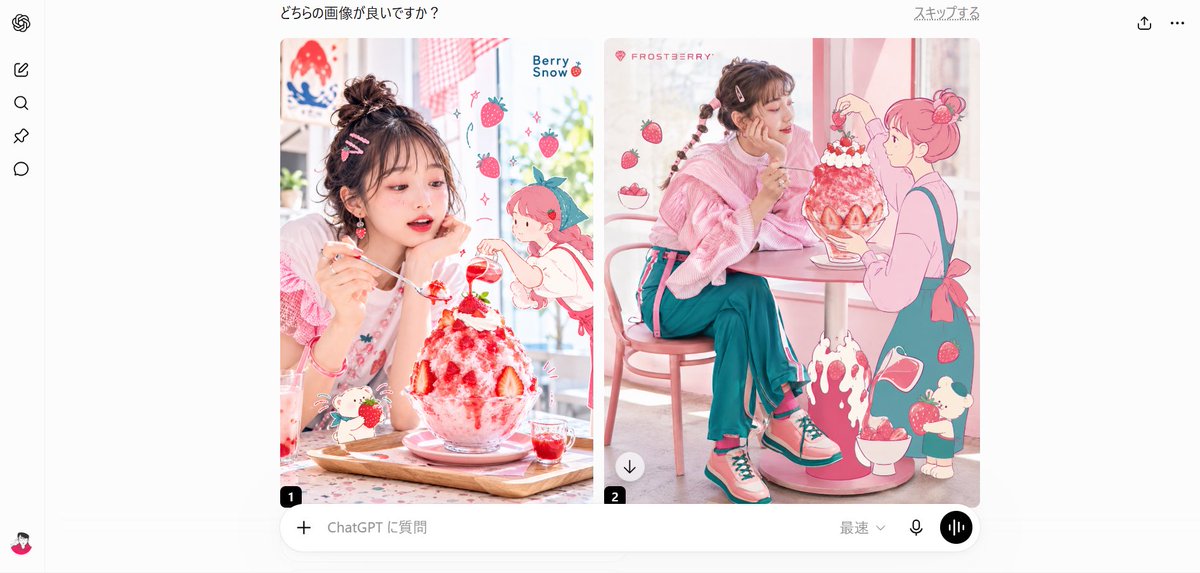
Strawberry Café A/B Comparison UI
Creates a ChatGPT-style side-by-side image evaluation screen featuring pastel strawberry dessert fashion editorials with kawaii illustration overlays.
To jest przykładowy przykład GPT Image 2 dla Grafika i plakat . Skorzystaj z poniższego przykładu gotowego do skopiowania, aby wygenerować podobne materiały wizualne i sprawdź atrybucję Awesome GPT Image 2 Prompts oraz prawa do użytku komercyjnego przed ponownym wykorzystaniem.
Ten monit jest przeznaczony dla wielu obrazów referencyjnych. Otworzymy Dovoo z tym monitem i dostępnym obrazem podglądu; przed wygenerowaniem dodamy pozostałe odniesienia w Dovoo.
Free 1K preview
Generate one preview image instantly, no sign-up required.
Free text preview doesn’t preserve reference-image consistency.
Opis
Monit o przygotowanie do kopiowania
Goal: Create a clean desktop web-app A/B comparison screen showing two generated fashion-food images side by side, as if inside a ChatGPT image evaluation interface.

Canvas: Wide 16:9 screenshot, white background, light gray app chrome, centered content. Include a narrow left sidebar and a large central comparison area.

Layout: At the top center, show the Japanese question text 「どちらの画像が良いですか?」. At the top right, show the small Japanese link 「スキップする」 plus two simple icons: share/upload and three-dot menu. On the far left, include a vertical toolbar with exactly 6 visible items: the OpenAI swirl logo at the top, then 4 simple black outline navigation icons stacked below it, and a small user avatar at the bottom.

Main comparison area: Place exactly 2 rounded-corner image cards side by side with a narrow white gap between them. The left card is labeled with a small black rounded square containing “1” at the lower-left corner. The right card is labeled with a small black rounded square containing “2” at the lower-left corner and has a small circular download button overlay near its lower-left area.

Left card subject: A pastel strawberry dessert café image featuring {argument name="main subject" default="a young woman with messy dark brown hair in a high bun, pink hair clips, rosy makeup, and a soft pink outfit"}. She sits at a table, holding a spoon and looking at a huge strawberry shaved-ice parfait in a glass bowl. The dessert has white whipped cream, bright red strawberry syrup, whole strawberries, and a small decorative green garnish. Add kawaii illustrated overlays: exactly 5 floating strawberries, exactly 1 chibi strawberry-headed character on the right, exactly 1 small bunny-like dessert mascot near the bottom, tiny sparkles, and the English text “Berry Snow” near the upper right. The overall palette is white, blush pink, strawberry red, and soft teal.

Right card subject: A pastel strawberry café image featuring the same young woman seated sideways at a small round café table, wearing a fluffy pink sweater, teal wide-leg pants, pink socks, and pink-and-teal sneakers. Her hair is braided with small clips. She faces a giant strawberry shaved-ice dessert on the table. Add a large pink line-art anime girl on the right side as if interacting with the dessert. Include exactly 6 floating strawberries, exactly 1 strawberry bowl near the lower right, exactly 1 splashing strawberry syrup illustration at the bottom center, exactly 1 small cream-topped mascot near the lower right, and the pink brand text “FROSTBERRY” near the upper left.

Bottom input bar: Under the two image cards, draw a rounded ChatGPT prompt bar spanning the comparison width. Include exactly 5 visible controls/text items: a plus icon on the left, placeholder text 「ChatGPT に質問」, a small dropdown labeled 「最速」, a microphone icon, and a black circular voice-wave button on the far right.

Visual style: Photorealistic fashion editorial mixed with flat kawaii strawberry illustrations, bright window light, soft pastel pink café interior, high-key exposure, glossy dessert textures, crisp UI screenshot styling. Keep the two image cards polished and vivid while the surrounding app interface remains minimal and white.

Constraints: Preserve the Japanese interface text exactly as shown. Use exactly 2 comparison images, exactly 6 left-sidebar items, exactly 2 numbered labels, and exactly 5 bottom input controls. Avoid extra popups, watermarks, browser bars, or unrelated text.
Zmienne monitujące
Edytowalne symbole zastępcze argumentów znalezione w monicie, wraz z ich wartościami domyślnymi.
Best for
- - Grafika i plakat visual exploration
- - Image generation and reference-image edits
- - Reusable briefs that keep source attribution visible
Change these parts
- - Subject, product, character, or scene
- - Aspect ratio, camera, lighting, and background
- - Brand, text, color, and output constraints
Recommended model and settings
- - Model: gpt-image-2
- - Input mode: Wiele obrazów do obrazów
- - Aspect ratio: source
- - Commercial status: review original source
How to use this prompt
- 1. Copy the prompt and preserve its structure for the first test.
- 2. Replace the subject, context, and publishing channel.
- 3. Change one camera, lighting, or style variable per iteration.
- 4. Inspect the output, source, text, and rights before reuse.
Limitations, source, and reuse cautions
- - Generated output is an editable draft, not factual, legal, or rights evidence.
- - Review the linked source, people, brands, logos, text, and third-party media before commercial use.
Więcej przypadków w tej kategorii
Priorytety według kategorii, zgodności trybu wprowadzania, jakości i niższego ryzyka.






Ponowne wykorzystanie i źródło notatek
Użyj tego monitu bezpiecznie po zapoznaniu się ze sprawą.
- 1.Skopiuj monit lub otwórz go bezpośrednio w Dovoo za pomocą przycisku generowania.
- 2.Dostosuj zmienne, proporcje obrazu i obrazy referencyjne do własnego przypadku użycia.
- 3.Przed publikacją lub płatnym wykorzystaniem należy sprawdzić prawa autorskie do źródła, wymogi dotyczące atrybucji oraz ryzyko związane z marką lub podobizną.