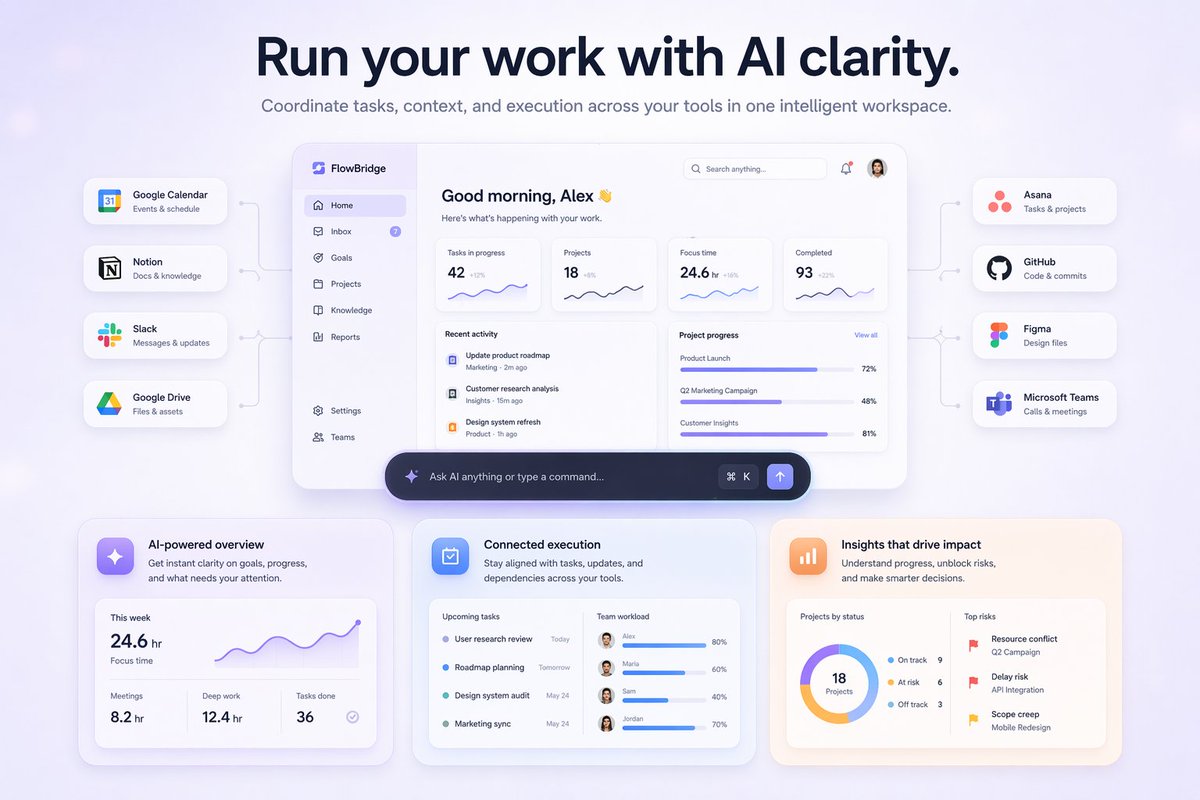
Strona docelowa pulpitu nawigacyjnego SaaS AI
Generuje nowoczesną makietę strony docelowej SaaS zawierającą centralny panel AI połączony z różnymi zintegrowanymi narzędziami i szczegółowymi kartami z wyróżnionymi funkcjami.
To jest przykładowy przykład GPT Image 2 dla Inna inspiracja . Skorzystaj z poniższego przykładu gotowego do skopiowania, aby wygenerować podobne materiały wizualne i sprawdź atrybucję Awesome GPT Image 2 Prompts oraz prawa do użytku komercyjnego przed ponownym wykorzystaniem.
Potrzebujesz pełnego zestawu podpowiedzi? Użyj Inna inspiracja aby uzyskać więcej powiązanych przykładów, odwiedź centrum tematyczne lub otwórz GPT Image 2 szybki katalog aby zobaczyć pełny przykładowy indeks, struktury wielokrotnego użytku i informacje o źródle.
Free 1K preview
Generate one preview image instantly, no sign-up required.
2447/4000
Opis
Monit o przygotowanie do kopiowania
{
  "type": "SaaS landing page hero graphic",
  "style": "Modern UI/UX, light theme, soft shadows, glassmorphism, {argument name=\"primary theme color\" default=\"purple and blue gradients\"}",
  "header": {
    "headline": "{argument name=\"main headline\" default=\"Run your work with AI clarity.\"}",
    "subheadline": "Coordinate tasks, context, and execution across your tools in one intelligent workspace."
  },
  "layout": {
    "center_dashboard": {
      "app_name": "{argument name=\"app name\" default=\"FlowBridge\"}",
      "greeting": "{argument name=\"user greeting\" default=\"Good morning, Alex 👋\"}",
      "sidebar_links": 8,
      "top_metrics_cards": 4,
      "recent_activity_items": 3,
      "project_progress_bars": 3,
      "floating_action_bar": "{argument name=\"floating bar text\" default=\"Ask AI anything or type a command...\"}"
    },
    "left_integrations": {
      "count": 4,
      "style": "pill-shaped cards connected by thin lines to the center dashboard",
      "labels": [
        "Google Calendar: Events & schedule",
        "Notion: Docs & knowledge",
        "Slack: Messages & updates",
        "Google Drive: Files & assets"
      ]
    },
    "right_integrations": {
      "count": 4,
      "style": "pill-shaped cards connected by thin lines to the center dashboard",
      "labels": [
        "Asana: Tasks & projects",
        "GitHub: Code & commits",
        "Figma: Design files",
        "Microsoft Teams: Calls & meetings"
      ]
    },
    "bottom_feature_cards": {
      "count": 3,
      "style": "rectangular cards with soft shadows",
      "cards": [
        {
          "title": "AI-powered overview",
          "description": "Get instant clarity on goals, progress, and what needs your attention.",
          "visuals": "Line chart showing 24.6 hr focus time, and 3 bottom metrics (Meetings, Deep work, Tasks done)"
        },
        {
          "title": "Connected execution",
          "description": "Stay aligned with tasks, updates, and dependencies across your tools.",
          "visuals": "List of 4 upcoming tasks and 4 team workload progress bars with user avatars"
        },
        {
          "title": "Insights that drive impact",
          "description": "Understand progress, unblock risks, and make smarter decisions.",
          "visuals": "Donut chart showing 18 projects by status, and a list of 3 top risks with red flag icons"
        }
      ]
    }
  }
}
Zmienne monitujące
Edytowalne symbole zastępcze argumentów znalezione w monicie, wraz z ich wartościami domyślnymi.
Zmienny
primary theme color
Domyślny
purple and blue gradients
Zmienny
main headline
Domyślny
Run your work with AI clarity.
Zmienny
app name
Domyślny
FlowBridge
Zmienny
user greeting
Domyślny
Good morning, Alex 👋
Zmienny
floating bar text
Domyślny
Ask AI anything or type a command...
Best for
- - Inna inspiracja visual exploration
- - Image generation and reference-image edits
- - Reusable briefs that keep source attribution visible
Change these parts
- - Subject, product, character, or scene
- - Aspect ratio, camera, lighting, and background
- - Brand, text, color, and output constraints
Recommended model and settings
- - Model: gpt-image-2
- - Input mode: Tekst na obraz
- - Aspect ratio: source
- - Commercial status: review original source
How to use this prompt
- 1. Copy the prompt and preserve its structure for the first test.
- 2. Replace the subject, context, and publishing channel.
- 3. Change one camera, lighting, or style variable per iteration.
- 4. Inspect the output, source, text, and rights before reuse.
Limitations, source, and reuse cautions
- - Generated output is an editable draft, not factual, legal, or rights evidence.
- - Review the linked source, people, brands, logos, text, and third-party media before commercial use.
Zaimportowano z Awesome GPT Image 2 Prompts . Wymagane jest podanie źródła. Status do użytku komercyjnego to allowed ; przed płatnym użyciem sprawdź prawa autorskie do źródła.
Więcej przypadków w tej kategorii
Priorytety według kategorii, zgodności trybu wprowadzania, jakości i niższego ryzyka.






Ponowne wykorzystanie i źródło notatek
Użyj tego monitu bezpiecznie po zapoznaniu się ze sprawą.
- 1.Skopiuj monit lub otwórz go bezpośrednio w Dovoo za pomocą przycisku generowania.
- 2.Dostosuj zmienne, proporcje obrazu i obrazy referencyjne do własnego przypadku użycia.
- 3.Przed publikacją lub płatnym wykorzystaniem należy sprawdzić prawa autorskie do źródła, wymogi dotyczące atrybucji oraz ryzyko związane z marką lub podobizną.