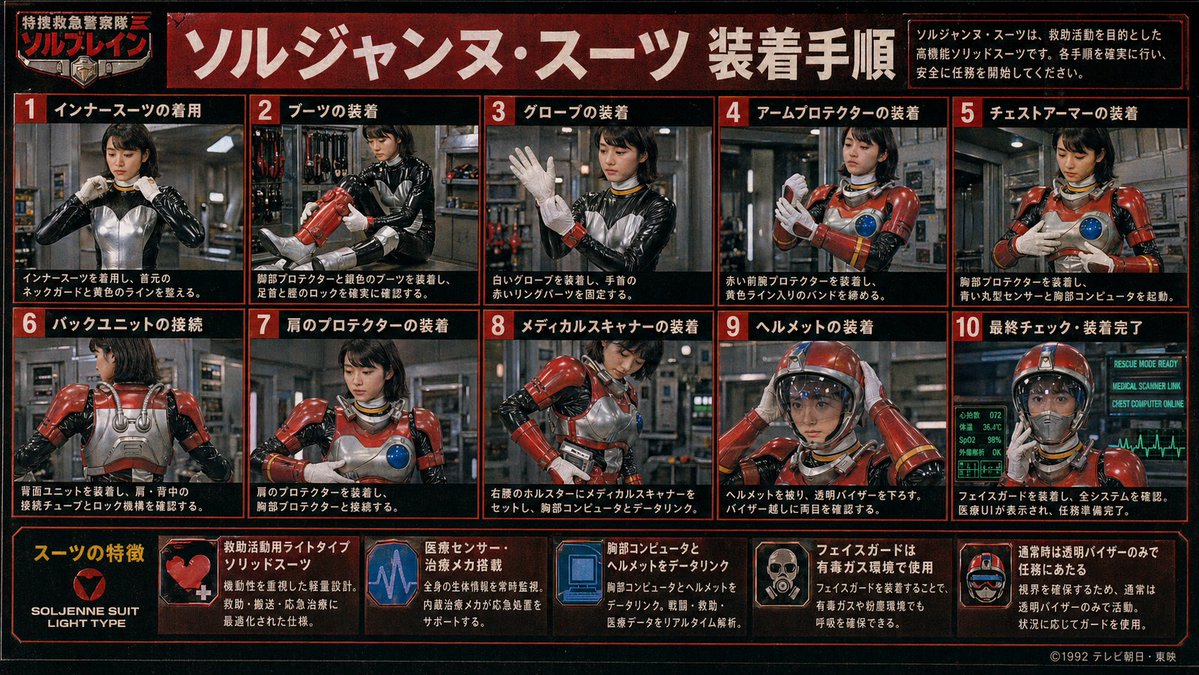
Plakat z procedurą kostiumową Tokusatsu w stylu retro
Gęsty, klasyczny plakat z japońskiej serii o bohaterach, przedstawiający ratowniczkę zakładającą krok po kroku czerwony kombinezon pancerny. Idealny do odtwarzania starych instrukcji tokusatsu i fikcyjnych grafik rekwizytów telewizyjnych.
To jest przykładowy przykład GPT Image 2 dla Grafika i plakat . Skorzystaj z poniższego przykładu gotowego do skopiowania, aby wygenerować podobne materiały wizualne i sprawdź atrybucję Awesome GPT Image 2 Prompts oraz prawa do użytku komercyjnego przed ponownym wykorzystaniem.
Free 1K preview
Generate one preview image instantly, no sign-up required.
Opis
Monit o przygotowanie do kopiowania
{
  "type": "retro Japanese tokusatsu instruction poster",
  "theme": "1980s-1990s emergency hero equipment manual",
  "subject": {
    "character": "female rescue operative in a glossy black undersuit with metallic silver torso panel, red armored rescue suit components, yellow accent lines, blue circular chest sensor, white gloves, red helmet with clear visor",
    "franchise_style": "fictional TV hero series promotional board",
    "organization_name": "特捜救急警察隊 ソルブレイン",
    "suit_name": "{argument name=\"suit name\" default=\"ソルジャンヌ・スーツ\"}"
  },
  "style": {
    "print": "aged TV magazine or studio prop display board",
    "color_palette": [
      "black",
      "deep red",
      "orange-red borders",
      "white Japanese text",
      "steel gray",
      "emergency red armor",
      "blue monitor glow"
    ],
    "texture": "heavy film grain, mild blur, low-resolution analog broadcast look, slight vignette, worn poster surface",
    "lighting": "industrial indoor lighting with metallic reflections"
  },
  "layout": {
    "format": "landscape poster with red border grid",
    "header": {
      "title": "{argument name=\"headline text\" default=\"ソルジャンヌ・スーツ 装着手順\"}",
      "left_badge": "特捜救急警察隊 ソルブレイン",
      "right_note": "ソルジャンヌ・スーツは、救助活動を目的とした高機能ソリッドスーツです。各手順を確実に行い、安全に任務を開始してください。"
    },
    "sections": [
      {
        "title": "Installation Procedure",
        "position": "upper and middle area in a 2-row grid",
        "count": 10,
        "panels": [
          {
            "number": 1,
            "label": "インナースーツの着用",
            "scene": "front view, operative adjusts the collar/neck guard of the black and silver inner suit"
          },
          {
            "number": 2,
            "label": "ブーツの装着",
            "scene": "operative fitting red armored boots and checking shin and ankle locks"
          },
          {
            "number": 3,
            "label": "グローブの装着",
            "scene": "operative raises one hand while putting on white gloves and securing red wrist ring parts"
          },
          {
            "number": 4,
            "label": "アームプロテクターの装着",
            "scene": "operative fastening red forearm protectors and tightening yellow striped bands"
          },
          {
            "number": 5,
            "label": "チェストアーマーの装着",
            "scene": "operative attaching chest armor, blue circular sensor visible on the breastplate"
          },
          {
            "number": 6,
            "label": "バックユニットの接続",
            "scene": "rear view showing silver back unit, shoulder tubes, and connection locks"
          },
          {
            "number": 7,
            "label": "肩のプロテクターの装着",
            "scene": "front three-quarter view, red shoulder armor being mounted and aligned to chest armor"
          },
          {
            "number": 8,
            "label": "メディカルスキャナーの装着",
            "scene": "operative setting a medical scanner device into a right-waist holster and linking it to the chest computer"
          },
          {
            "number": 9,
            "label": "ヘルメットの装着",
            "scene": "operative placing red helmet on her head and lowering the transparent visor"
          },
          {
            "number": 10,
            "label": "最終チェック・装着完了",
            "scene": "fully suited operative facing forward with glowing diagnostic monitors behind her indicating readiness"
          }
        ]
      },
      {
        "title": "スーツの特徴",
        "position": "bottom strip",
        "count": 6,
        "items": [
          {
            "label": "SOLJENNE SUIT LIGHT TYPE",
            "icon": "heart-like red emblem on black background"
          },
          {
            "label": "救助活動用ライトタイプソリッドスーツ",
            "icon": "red armor close-up with white medical cross"
          },
          {
            "label": "医療センサー・治療メカ搭載",
            "icon": "purple-blue heartbeat monitor graphic"
          },
          {
            "label": "胸部コンピュータとヘルメットをデータリンク",
            "icon": "blue computer display graphic"
          },
          {
            "label": "フェイスガードは有毒ガス環境で使用",
            "icon": "small portrait showing face guard deployment"
          },
          {
            "label": "通常時は透明バイザーのみで任務にあたる",
            "icon": "helmet diagram with clear visor"
          }
        ]
      }
    ],
    "footer": {
      "left": "feature strip integrated into bottom row",
      "right": "{argument name=\"copyright text\" default=\"©1992 テレビ朝日・東映\"}"
    }
  },
  "environment": {
    "main_panels": "industrial equipment room or rescue base interior with pipes, lockers, tools, and metallic walls",
    "final_panel": "green-blue medical and system status monitors with ECG line and status text such as RESCUE MODE READY"
  },
  "composition_notes": "all 10 procedure panels show the same operative step by step; face is soft, low-detail, and partially blurred like a vintage printed guide; each panel framed with thick red borders on black background; bold white Japanese text with red numbered boxes; dense infographic layout filling the entire image",
  "generation_notes": "create a convincing Japanese practical-effects superhero manual poster, not modern clean vector design; prioritize photographic tokusatsu stills arranged as an instruction chart, with authentic period typography and prop-like realism"
}
Zmienne monitujące
Edytowalne symbole zastępcze argumentów znalezione w monicie, wraz z ich wartościami domyślnymi.
Best for
- - Grafika i plakat visual exploration
- - Image generation and reference-image edits
- - Reusable briefs that keep source attribution visible
Change these parts
- - Subject, product, character, or scene
- - Aspect ratio, camera, lighting, and background
- - Brand, text, color, and output constraints
Recommended model and settings
- - Model: gpt-image-2
- - Input mode: Tekst na obraz
- - Aspect ratio: source
- - Commercial status: review original source
How to use this prompt
- 1. Copy the prompt and preserve its structure for the first test.
- 2. Replace the subject, context, and publishing channel.
- 3. Change one camera, lighting, or style variable per iteration.
- 4. Inspect the output, source, text, and rights before reuse.
Limitations, source, and reuse cautions
- - Generated output is an editable draft, not factual, legal, or rights evidence.
- - Review the linked source, people, brands, logos, text, and third-party media before commercial use.
Więcej przypadków w tej kategorii
Priorytety według kategorii, zgodności trybu wprowadzania, jakości i niższego ryzyka.






Ponowne wykorzystanie i źródło notatek
Użyj tego monitu bezpiecznie po zapoznaniu się ze sprawą.
- 1.Skopiuj monit lub otwórz go bezpośrednio w Dovoo za pomocą przycisku generowania.
- 2.Dostosuj zmienne, proporcje obrazu i obrazy referencyjne do własnego przypadku użycia.
- 3.Przed publikacją lub płatnym wykorzystaniem należy sprawdzić prawa autorskie do źródła, wymogi dotyczące atrybucji oraz ryzyko związane z marką lub podobizną.