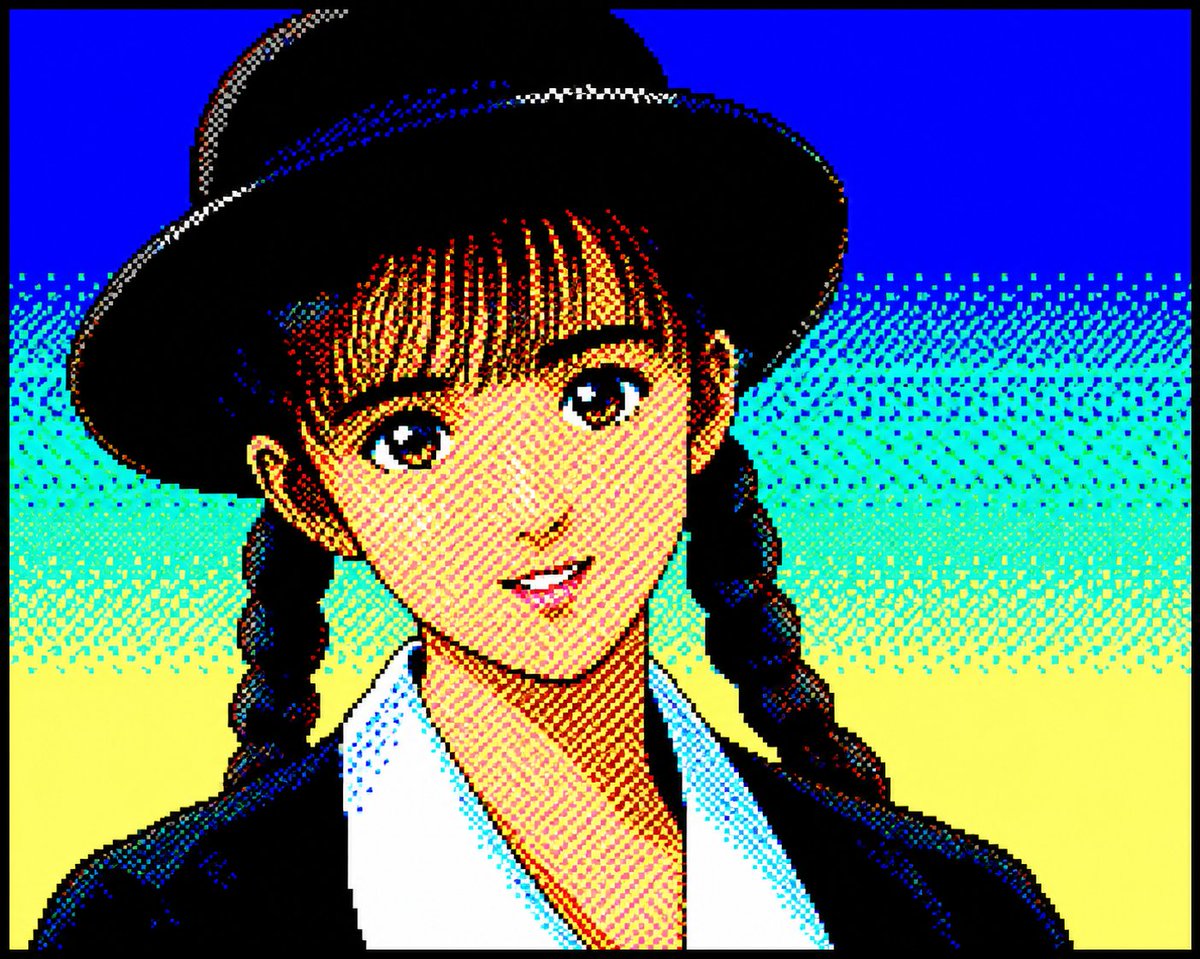
Retro PC-88 8-Bit Anime Portrait
Converts portrait photos into authentic late-1980s Japanese PC-88 pixel art using a strict 8-color RGB palette and dithered shading.
To jest przykładowy przykład GPT Image 2 dla Portret i charakter . Skorzystaj z poniższego przykładu gotowego do skopiowania, aby wygenerować podobne materiały wizualne i sprawdź atrybucję Awesome GPT Image 2 Prompts oraz prawa do użytku komercyjnego przed ponownym wykorzystaniem.
Potrzebujesz pełnego zestawu podpowiedzi? Użyj Portret i charakter aby uzyskać więcej powiązanych przykładów, odwiedź centrum tematyczne lub otwórz GPT Image 2 szybki katalog aby zobaczyć pełny przykładowy indeks, struktury wielokrotnego użytku i informacje o źródle.
Free 1K preview
Generate one preview image instantly, no sign-up required.
930/4000
Opis
Monit o przygotowanie do kopiowania
Convert the attached portrait photo into anime artwork while preserving recognizability.

Preserve:

- facial proportions
- hairstyle silhouette
- expression
- recognizability
- clothing silhouette

PC-88 RGB rules:

- use only 8-color RGB palette
- black, blue, red, magenta, green, cyan, yellow, white
- no gradients
- no antialiasing
- strong dithering
- checkerboard shading
- 640x200 appearance
- large color blocks
- hard outlines
- slight CRT feeling

Character rendering:

- simplified facial construction
- reduce facial detail lines
- large hair highlight areas
- fewer shading layers
- preserve likeness over redesign

Composition:

- character-focused
- simple supporting background
- empty space around character
- 4:3 feeling

Avoid:

- game UI
- dialogue boxes
- excessive background density
- modern anime rendering

Goal:

Authentic late-1980s Japanese PC88 character artwork while preserving the original person.
Best for
- - Portret i charakter visual exploration
- - Image generation and reference-image edits
- - Reusable briefs that keep source attribution visible
Change these parts
- - Subject, product, character, or scene
- - Aspect ratio, camera, lighting, and background
- - Brand, text, color, and output constraints
Recommended model and settings
- - Model: gpt-image-2
- - Input mode: Tekst na obraz
- - Aspect ratio: source
- - Commercial status: review original source
How to use this prompt
- 1. Copy the prompt and preserve its structure for the first test.
- 2. Replace the subject, context, and publishing channel.
- 3. Change one camera, lighting, or style variable per iteration.
- 4. Inspect the output, source, text, and rights before reuse.
Limitations, source, and reuse cautions
- - Generated output is an editable draft, not factual, legal, or rights evidence.
- - Review the linked source, people, brands, logos, text, and third-party media before commercial use.
Zaimportowano z Awesome GPT Image 2 Prompts . Wymagane jest podanie źródła. Status do użytku komercyjnego to allowed ; przed płatnym użyciem sprawdź prawa autorskie do źródła.
Więcej przypadków w tej kategorii
Priorytety według kategorii, zgodności trybu wprowadzania, jakości i niższego ryzyka.

Cute Speech Bubble Mascot Profile Icon
Tekst na obraz

GPT Image 2 Real-Life Character Street Snap
Tekst na obraz

Studio Portrait of Woman with Sunglasses
Tekst na obraz

Street Selfie with Cat in Matching Cap
Tekst na obraz

Morning Bed Stretching Legs Prompt
Tekst na obraz
GPT Image 2 Prompt for Mirror Selfie with Flowers
Tekst na obraz
Ponowne wykorzystanie i źródło notatek
Użyj tego monitu bezpiecznie po zapoznaniu się ze sprawą.
- 1.Skopiuj monit lub otwórz go bezpośrednio w Dovoo za pomocą przycisku generowania.
- 2.Dostosuj zmienne, proporcje obrazu i obrazy referencyjne do własnego przypadku użycia.
- 3.Przed publikacją lub płatnym wykorzystaniem należy sprawdzić prawa autorskie do źródła, wymogi dotyczące atrybucji oraz ryzyko związane z marką lub podobizną.