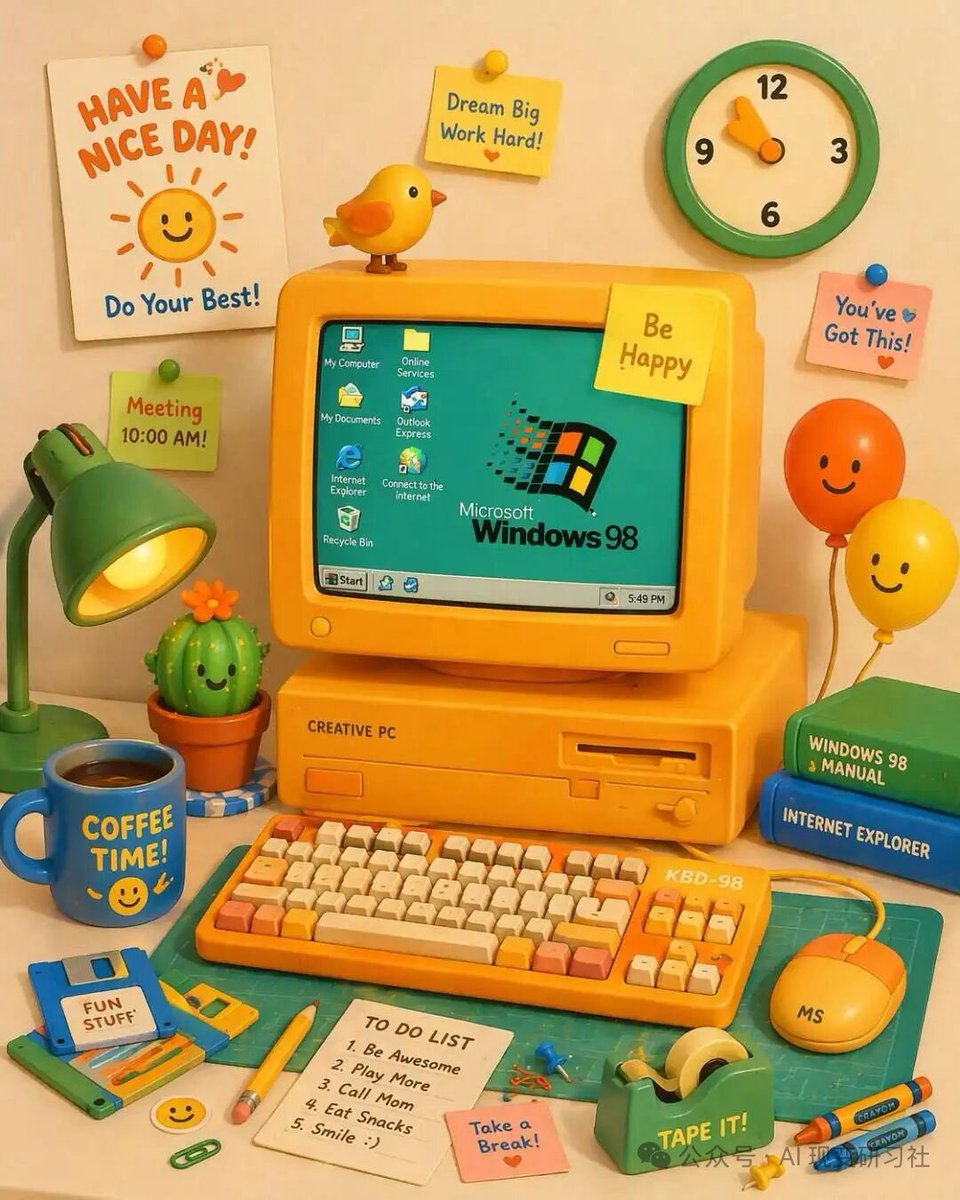
Retro 3D Claymation Desk Setup
Generuje niezwykle szczegółową, ładną ilustrację 3D retro biurka komputerowego z możliwością dostosowania elementów tekstowych.
To jest przykładowy przykład GPT Image 2 dla Ilustracja i sztuka . Skorzystaj z poniższego przykładu gotowego do skopiowania, aby wygenerować podobne materiały wizualne i sprawdź atrybucję Awesome GPT Image 2 Prompts oraz prawa do użytku komercyjnego przed ponownym wykorzystaniem.
Potrzebujesz pełnego zestawu podpowiedzi? Użyj Ilustracja i sztuka aby uzyskać więcej powiązanych przykładów, odwiedź centrum tematyczne lub otwórz GPT Image 2 szybki katalog aby zobaczyć pełny przykładowy indeks, struktury wielokrotnego użytku i informacje o źródle.
Free 1K preview
Generate one preview image instantly, no sign-up required.
1766/4000
Opis
Monit o przygotowanie do kopiowania
A vibrant, cute 3D claymation-style illustration of a retro yellow desktop computer setup on a desk. The central yellow CRT monitor displays a teal screen with the {argument name="OS logo text" default="Microsoft Windows 98"} logo and 7 desktop icons labeled 'My Computer', 'Online Services', 'My Documents', 'Outlook Express', 'Internet Explorer', 'Connect to the Internet', and 'Recycle Bin', plus a bottom taskbar with a 'Start' button and a clock reading '5:49 PM'. The monitor has a yellow sticky note reading '{argument name="monitor sticky note" default="Be Happy"}' and a small yellow bird perched on top. The computer base is labeled 'CREATIVE PC'. In front is a yellow mechanical keyboard labeled 'KBD-98' with orange and cream keys, and a yellow mouse labeled 'MS'. To the left is a green desk lamp, a smiling potted cactus, a blue floppy disk labeled '{argument name="floppy disk label" default="FUN STUFF"}', and a blue mug reading '{argument name="mug text" default="COFFEE TIME!"}' with a smiley face. To the right are 2 stacked books (green 'WINDOWS 98 MANUAL', blue 'INTERNET EXPLORER') and 2 smiling balloons (orange and yellow). The foreground features a green cutting mat, a yellow pencil, a green tape dispenser labeled 'TAPE IT!', 2 crayons, a pink sticky note reading 'Take a Break!', and a white notepad with a 5-item 'TO DO LIST': '1. Be Awesome', '2. Play More', '3. Call Mom', '4. Eat Snacks', '5. Smile :)'. The background wall has a green and cream clock, a white poster reading '{argument name="poster text" default="HAVE A NICE DAY!"}' with a smiling sun and 'Do Your Best!', and 3 additional sticky notes: a yellow one reading 'Dream Big Work Hard!', a pink one reading 'You've Got This!', and a green one reading 'Meeting 10:00 AM!'.Zmienne monitujące
Edytowalne symbole zastępcze argumentów znalezione w monicie, wraz z ich wartościami domyślnymi.
Zmienny
OS logo text
Domyślny
Microsoft Windows 98
Zmienny
monitor sticky note
Domyślny
Be Happy
Zmienny
floppy disk label
Domyślny
FUN STUFF
Zmienny
mug text
Domyślny
COFFEE TIME!
Zmienny
poster text
Domyślny
HAVE A NICE DAY!
Best for
- - Ilustracja i sztuka visual exploration
- - Image generation and reference-image edits
- - Reusable briefs that keep source attribution visible
Change these parts
- - Subject, product, character, or scene
- - Aspect ratio, camera, lighting, and background
- - Brand, text, color, and output constraints
Recommended model and settings
- - Model: gpt-image-2
- - Input mode: Tekst na obraz
- - Aspect ratio: source
- - Commercial status: review original source
How to use this prompt
- 1. Copy the prompt and preserve its structure for the first test.
- 2. Replace the subject, context, and publishing channel.
- 3. Change one camera, lighting, or style variable per iteration.
- 4. Inspect the output, source, text, and rights before reuse.
Limitations, source, and reuse cautions
- - Generated output is an editable draft, not factual, legal, or rights evidence.
- - Review the linked source, people, brands, logos, text, and third-party media before commercial use.
Zaimportowano z Awesome GPT Image 2 Prompts . Wymagane jest podanie źródła. Status do użytku komercyjnego to allowed ; przed płatnym użyciem sprawdź prawa autorskie do źródła.
Więcej przypadków w tej kategorii
Priorytety według kategorii, zgodności trybu wprowadzania, jakości i niższego ryzyka.






Ponowne wykorzystanie i źródło notatek
Użyj tego monitu bezpiecznie po zapoznaniu się ze sprawą.
- 1.Skopiuj monit lub otwórz go bezpośrednio w Dovoo za pomocą przycisku generowania.
- 2.Dostosuj zmienne, proporcje obrazu i obrazy referencyjne do własnego przypadku użycia.
- 3.Przed publikacją lub płatnym wykorzystaniem należy sprawdzić prawa autorskie do źródła, wymogi dotyczące atrybucji oraz ryzyko związane z marką lub podobizną.