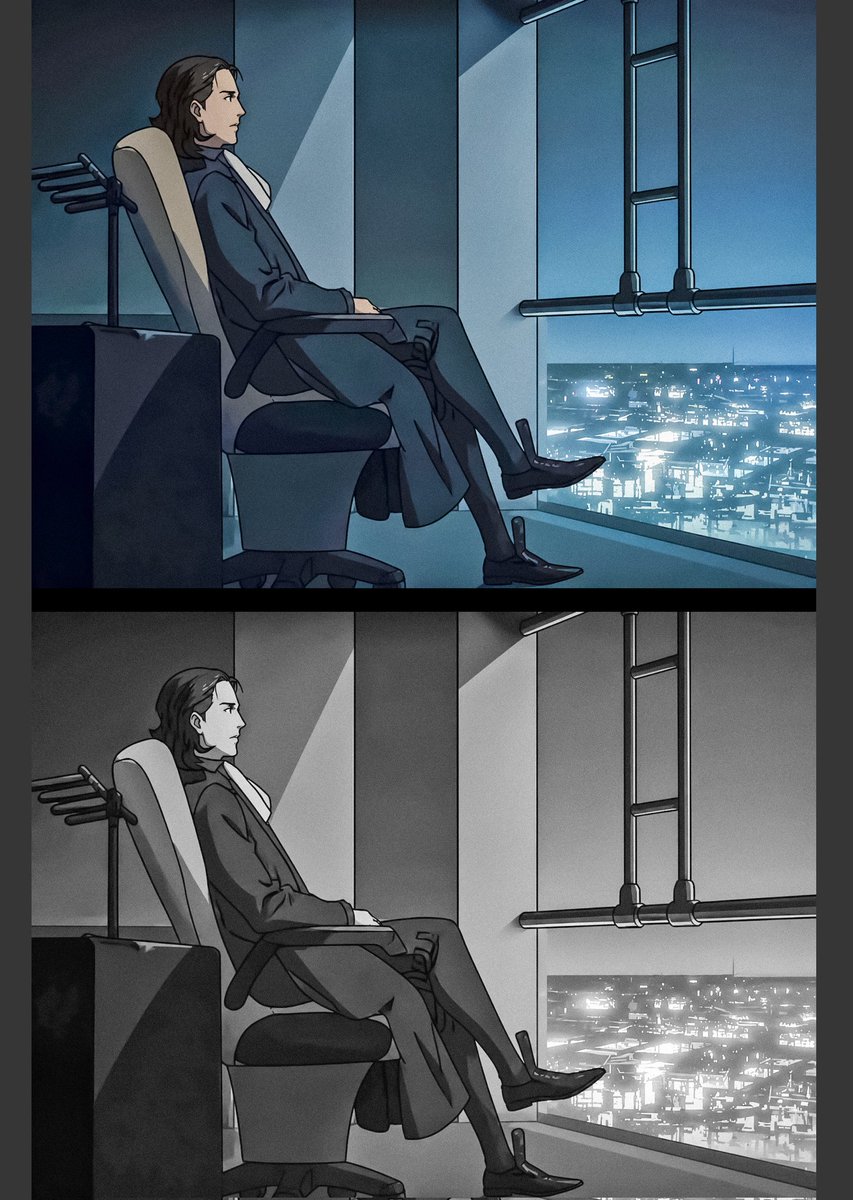
Raul Creed Office Redraw
Generates a two-panel anime-style Ergo Proxy office redraw with a color version above a grayscale version for comparison posts.
To jest przykładowy przykład GPT Image 2 dla Anime i gry . Skorzystaj z poniższego przykładu gotowego do skopiowania, aby wygenerować podobne materiały wizualne i sprawdź atrybucję Awesome GPT Image 2 Prompts oraz prawa do użytku komercyjnego przed ponownym wykorzystaniem.
Potrzebujesz pełnego zestawu podpowiedzi? Użyj Anime i gry aby uzyskać więcej powiązanych przykładów, odwiedź centrum tematyczne lub otwórz GPT Image 2 szybki katalog aby zobaczyć pełny przykładowy indeks, struktury wielokrotnego użytku i informacje o źródle.
Free 1K preview
Generate one preview image instantly, no sign-up required.
2676/4000
Opis
Monit o przygotowanie do kopiowania
Goal: Create a two-panel anime redraw comparison of {argument name="character name" default="Raul Creed"} from Ergo Proxy, showing the same office scene twice: the top panel in cool blue color and the bottom panel in monochrome grayscale.

Canvas: Vertical image, approximately 3:4 aspect ratio, with a thick black horizontal divider separating exactly 2 stacked panels. Add narrow dark margins on the left and right edges.

Layout: The image contains exactly 2 panels: 1) top panel, full-color blue cyberpunk version; 2) bottom panel, identical composition in black-and-white grayscale. In both panels, place the character in profile on the left half of the frame, seated in a reclining office chair facing right, with a large floor-to-ceiling window on the right overlooking a glowing futuristic city at night.

Subject details: The character is an adult man with medium-length dark brown hair swept back, wearing a dark formal suit, white shirt, long trousers, and polished black dress shoes. He sits relaxed but serious, leaning back in the chair with one leg crossed over the other, hands resting near the chair arms. Show every face clearly with natural, detailed facial features, preserving the head silhouette but hiding facial features.

Environment: A dim executive office or command-room interior with teal-blue ambient lighting in the top panel. Include a high-backed ergonomic chair with a pale headrest, dark armrests, a visible pedestal base, and a small dark desk or cabinet at the far left. Behind the chair, add a small coat-rack-like fixture with four short horizontal pegs. The right side has tall vertical wall panels, a bright diagonal shaft of light on the wall, and a large window showing a dense futuristic cityscape filled with tiny white and cyan lights. Add dark industrial ceiling or window pipes on the upper right: exactly 2 vertical pipes connected by exactly 3 horizontal rungs, plus one long horizontal pipe running across the window area.

Visual style: Mature 2000s psychological sci-fi anime style, clean cel-shaded linework, moody noir atmosphere, cinematic composition, subdued shadows, crisp outlines, subtle film grain, high contrast between the dark office and luminous city. Top panel palette: deep teal, cyan, navy, black, and cool white. Bottom panel: identical drawing converted to grayscale, with the city lights still bright.

Constraints: Preserve the exact two-panel stacked comparison format, do not add captions or logos, do not add extra characters, Show every face clearly with natural, detailed facial features, and keep both panels aligned so they appear like a color version above a grayscale version of the same frame.
Zmienne monitujące
Edytowalne symbole zastępcze argumentów znalezione w monicie, wraz z ich wartościami domyślnymi.
Zmienny
character name
Domyślny
Raul Creed
Best for
- - Anime i gry visual exploration
- - Image generation and reference-image edits
- - Reusable briefs that keep source attribution visible
Change these parts
- - Subject, product, character, or scene
- - Aspect ratio, camera, lighting, and background
- - Brand, text, color, and output constraints
Recommended model and settings
- - Model: gpt-image-2
- - Input mode: Tekst na obraz
- - Aspect ratio: source
- - Commercial status: review original source
How to use this prompt
- 1. Copy the prompt and preserve its structure for the first test.
- 2. Replace the subject, context, and publishing channel.
- 3. Change one camera, lighting, or style variable per iteration.
- 4. Inspect the output, source, text, and rights before reuse.
Limitations, source, and reuse cautions
- - Generated output is an editable draft, not factual, legal, or rights evidence.
- - Review the linked source, people, brands, logos, text, and third-party media before commercial use.
Zaimportowano z Awesome GPT Image 2 Prompts . Wymagane jest podanie źródła. Status do użytku komercyjnego to allowed ; przed płatnym użyciem sprawdź prawa autorskie do źródła.
Więcej przypadków w tej kategorii
Priorytety według kategorii, zgodności trybu wprowadzania, jakości i niższego ryzyka.






Ponowne wykorzystanie i źródło notatek
Użyj tego monitu bezpiecznie po zapoznaniu się ze sprawą.
- 1.Skopiuj monit lub otwórz go bezpośrednio w Dovoo za pomocą przycisku generowania.
- 2.Dostosuj zmienne, proporcje obrazu i obrazy referencyjne do własnego przypadku użycia.
- 3.Przed publikacją lub płatnym wykorzystaniem należy sprawdzić prawa autorskie do źródła, wymogi dotyczące atrybucji oraz ryzyko związane z marką lub podobizną.