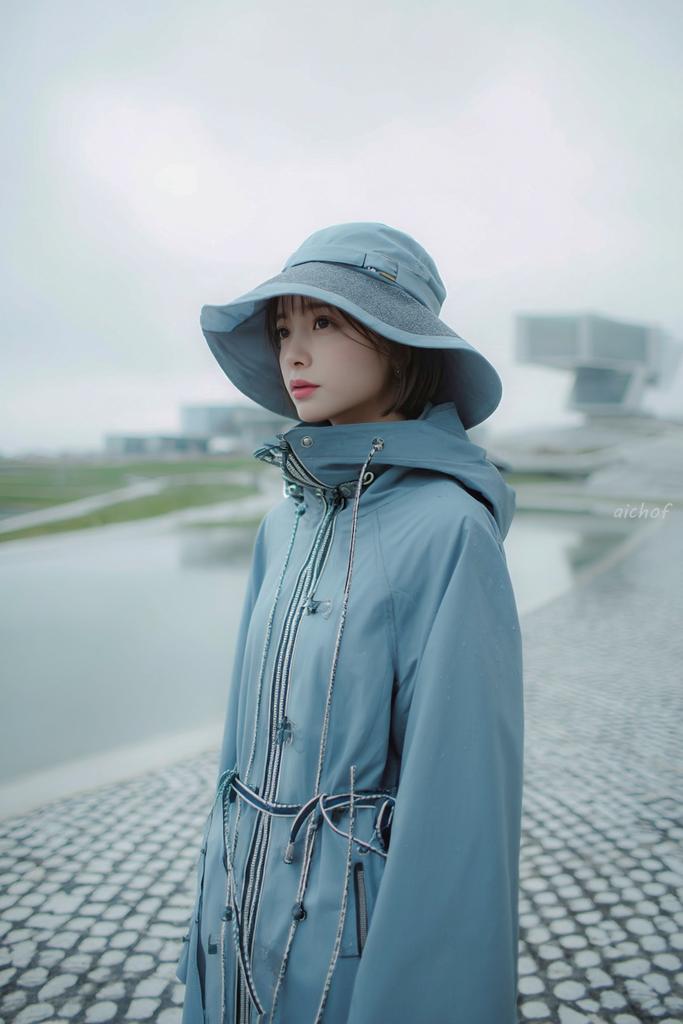
Portret redakcyjny Rainy Blue
To polecenie służy do stworzenia miękkiego, minimalistycznego portretu modowego kobiety w monochromatycznym stroju przeciwdeszczowym, idealnym do sesji zdjęciowej, lookbooka lub nastrojowego streetwearu.
To jest przykładowy przykład GPT Image 2 dla Moda i uroda . Skorzystaj z poniższego przykładu gotowego do skopiowania, aby wygenerować podobne materiały wizualne i sprawdź atrybucję Awesome GPT Image 2 Prompts oraz prawa do użytku komercyjnego przed ponownym wykorzystaniem.
Free 1K preview
Generate one preview image instantly, no sign-up required.
Opis
Monit o przygotowanie do kopiowania
A dreamy fashion editorial portrait of a young woman standing outdoors on a rainy, overcast day beside a shallow reflecting pool and a pebled stone walkway, shown from about mid-thigh up in a vertical composition. She wears a monochrome pale powder-blue rain outfit consisting of a wide-brim waterproof sun hat and a high-collared technical raincoat with a hood, shiny silver front zippers, multiple drawstrings, toggles, and cord details around the waist and chest. The coat is zipped high so the collar covers part of the lower face, giving a cocooned, utilitarian look. Her short dark bob hair peeks out from under the hat. Pose her turned slightly to the side, body angled right, head facing the camera, with a calm, quiet, introspective mood. Use soft diffused light, muted cool tones, misty atmosphere, and very shallow depth of field so the modern architectural structures in the background are blurred and minimal. The setting should feel futuristic and serene, with wet surfaces, faint raindrops, pale gray sky, gentle reflections in the water, and a clean minimalist color palette dominated by {argument name="outfit color" default="pale powder blue"}. Make the image look like high-end contemporary streetwear photography, slightly cinematic, airy, soft focus, delicate contrast, and subtle film-like texture. Add a small handwritten-style watermark reading {argument name="watermark text" default="aichof"} near the right-center edge.Zmienne monitujące
Edytowalne symbole zastępcze argumentów znalezione w monicie, wraz z ich wartościami domyślnymi.
Best for
- - Moda i uroda visual exploration
- - Image generation and reference-image edits
- - Reusable briefs that keep source attribution visible
Change these parts
- - Subject, product, character, or scene
- - Aspect ratio, camera, lighting, and background
- - Brand, text, color, and output constraints
Recommended model and settings
- - Model: gpt-image-2
- - Input mode: Tekst na obraz
- - Aspect ratio: source
- - Commercial status: review original source
How to use this prompt
- 1. Copy the prompt and preserve its structure for the first test.
- 2. Replace the subject, context, and publishing channel.
- 3. Change one camera, lighting, or style variable per iteration.
- 4. Inspect the output, source, text, and rights before reuse.
Limitations, source, and reuse cautions
- - Generated output is an editable draft, not factual, legal, or rights evidence.
- - Review the linked source, people, brands, logos, text, and third-party media before commercial use.
Więcej przypadków w tej kategorii
Priorytety według kategorii, zgodności trybu wprowadzania, jakości i niższego ryzyka.






Ponowne wykorzystanie i źródło notatek
Użyj tego monitu bezpiecznie po zapoznaniu się ze sprawą.
- 1.Skopiuj monit lub otwórz go bezpośrednio w Dovoo za pomocą przycisku generowania.
- 2.Dostosuj zmienne, proporcje obrazu i obrazy referencyjne do własnego przypadku użycia.
- 3.Przed publikacją lub płatnym wykorzystaniem należy sprawdzić prawa autorskie do źródła, wymogi dotyczące atrybucji oraz ryzyko związane z marką lub podobizną.