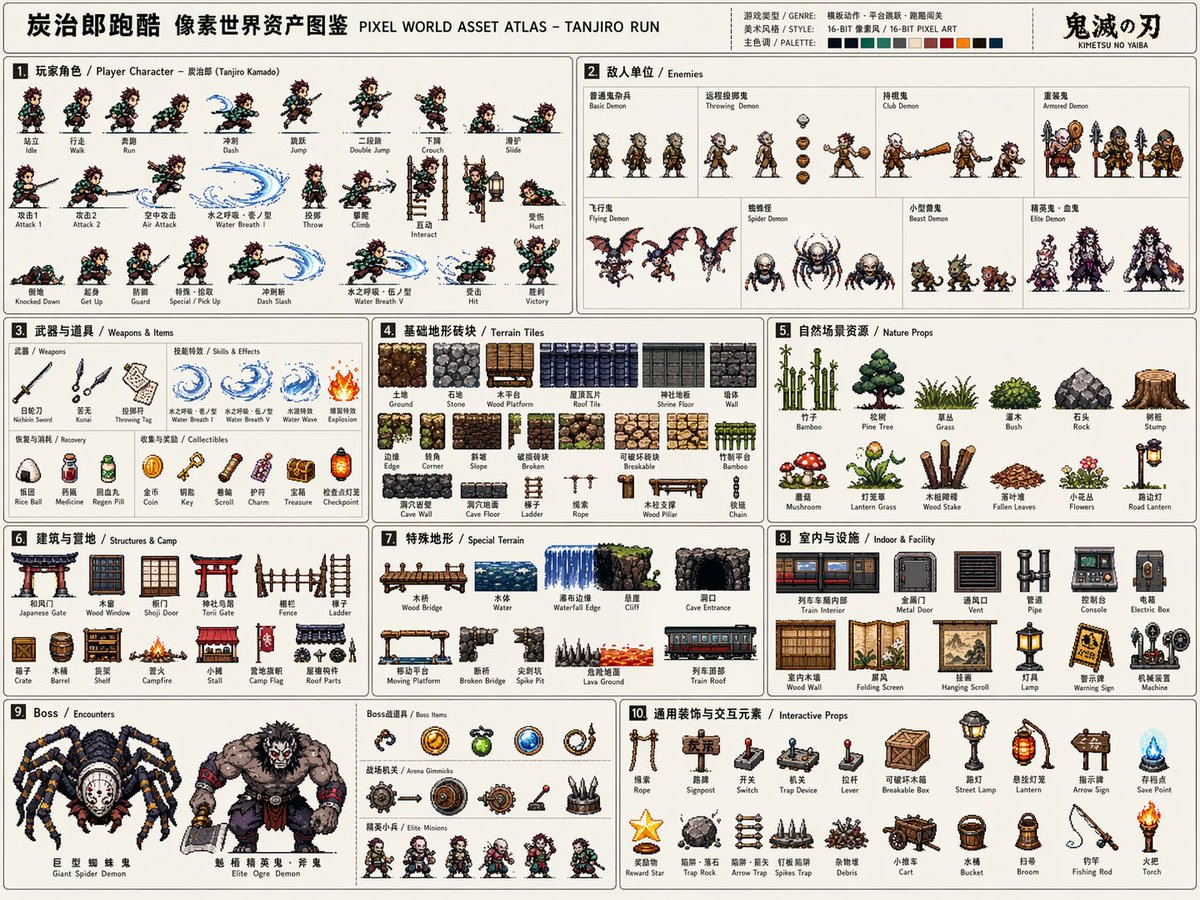
Szablon atlasu zasobów gier pikselowych
Kompleksowy, profesjonalny szablon do generowania arkuszy zasobów grafiki pikselowej o wysokiej gęstości 16-bitowej na potrzeby tworzenia gier, obejmujących postacie, animacje i środowiska.
To jest przykładowy przykład GPT Image 2 dla Anime i gry . Skorzystaj z poniższego przykładu gotowego do skopiowania, aby wygenerować podobne materiały wizualne i sprawdź atrybucję Awesome GPT Image 2 Prompts oraz prawa do użytku komercyjnego przed ponownym wykorzystaniem.
Potrzebujesz pełnego zestawu podpowiedzi? Użyj Anime i gry aby uzyskać więcej powiązanych przykładów, odwiedź centrum tematyczne lub otwórz GPT Image 2 szybki katalog aby zobaczyć pełny przykładowy indeks, struktury wielokrotnego użytku i informacje o źródle.
Free 1K preview
Generate one preview image instantly, no sign-up required.
3552/4000
Opis
Monit o przygotowanie do kopiowania
Please create a high-completion, high-information-density "Pixel World Asset Atlas" suitable for serialized release based on [Game Theme: {argument name="game theme" default="Demon Slayer/Tanjiro"}].

This is not a regular pixel illustration or a single game scene, but a "2D pixel game asset overview map" for game development, art setting, level design, and visual proposals. The visual should look like a complete game material board, systematically organizing core characters, enemies, items, terrain, scenes, mechanisms, Bosses, and decorative elements required for a [Game Type: {argument name="game type" default="Side-scrolling action"}] into a single clear, professional, and reusable game asset atlas.

[Basic Settings]
Theme Worldview: [Game Theme]
Game Type: [Game Type]
Era Background: [Era Background]
Protagonist Identity: [Protagonist Identity]
Enemy Types: [Enemy Types]
Main Scenes: [Main Scene Environment]
Overall Style: [Style Direction, e.g., {argument name="style" default="16-bit retro arcade pixel style"}]
Main Color: [Main Color]
Secondary Color: [Secondary Color]
Accent Color: [Accent Color]
Aspect Ratio: [Aspect Ratio, Landscape 4:3]
If not filled, automatically match according to the optimal plan for the game theme.

[Overall Visual Requirements]
The visual uses a large landscape canvas with a light or low-interference background, looking like a game development asset sheet or an instruction-style resource catalog. All elements should be 2D pixel art sprites with uniform pixel density, clear black/dark outlines, limited color scales, and retro game textures. Do not generate realistic photography, 3D rendering, painterly illustration, or movie poster styles. Focus on being "systematically complete, clearly categorized, resource-rich, and high in developability."

[Layout Structure]
The map uses a modular grid layout with fine lines dividing different resource areas. Each area needs a numbered title and short category labels, with a reading path from left to right, top to bottom. The layout should have the orderliness of an instruction manual or game dev document. Information density must be high but not chaotic; elements within each module should be equidistantly arranged.

[Modules to Include]
1. Player Character Module: Show complete action frames including standing, walking/running, jumping, etc. frames arranged horizontally like a sprite sheet.
2. Enemy Unit Module: Design multiple enemies including common, ranged, heavy, and elite units.
3. Weapons & Items Module: Show melee, ranged, projectiles, effects, and pickups.
4. Basic Terrain Tile Module: Show ground, walls, platforms, corners, and different material blocks.
5. Natural/External Scene Resource Module: Show trees, grass, rocks, and obstacles.
6. Building/Base/Camp Resource Module: Show doors, windows, walls, ladders, and camp facilities.
7. Special Terrain Module: Show bridges, water bodies, cliffs, and cave openings.
8. Indoor/Underground/Facility Resource Module: Show pipes, consoles, metal doors, and equipment.
9. Boss / Encounter Resource Module: Show large Bosses, special vehicles, and giant mechanisms.
10. General Decoration & Interaction Elements Module: Show ladders, ropes, signs, switches, and mechanisms.

[Visual Detail Requirements]
All resources must maintain consistent pixel size logic and worldview consistency. Clear scale relationships. Action frames must show continuity; terrain tiles must be tileable; items and mechanisms must have functional recognizability; Boss elements should feel oppressive.
Zmienne monitujące
Edytowalne symbole zastępcze argumentów znalezione w monicie, wraz z ich wartościami domyślnymi.
Zmienny
game theme
Domyślny
Demon Slayer/Tanjiro
Zmienny
game type
Domyślny
Side-scrolling action
Zmienny
style
Domyślny
16-bit retro arcade pixel style
Best for
- - Anime i gry visual exploration
- - Image generation and reference-image edits
- - Reusable briefs that keep source attribution visible
Change these parts
- - Subject, product, character, or scene
- - Aspect ratio, camera, lighting, and background
- - Brand, text, color, and output constraints
Recommended model and settings
- - Model: gpt-image-2
- - Input mode: Tekst na obraz
- - Aspect ratio: source
- - Commercial status: review original source
How to use this prompt
- 1. Copy the prompt and preserve its structure for the first test.
- 2. Replace the subject, context, and publishing channel.
- 3. Change one camera, lighting, or style variable per iteration.
- 4. Inspect the output, source, text, and rights before reuse.
Limitations, source, and reuse cautions
- - Generated output is an editable draft, not factual, legal, or rights evidence.
- - Review the linked source, people, brands, logos, text, and third-party media before commercial use.
Zaimportowano z Awesome GPT Image 2 Prompts . Wymagane jest podanie źródła. Status do użytku komercyjnego to allowed ; przed płatnym użyciem sprawdź prawa autorskie do źródła.
Więcej przypadków w tej kategorii
Priorytety według kategorii, zgodności trybu wprowadzania, jakości i niższego ryzyka.






Ponowne wykorzystanie i źródło notatek
Użyj tego monitu bezpiecznie po zapoznaniu się ze sprawą.
- 1.Skopiuj monit lub otwórz go bezpośrednio w Dovoo za pomocą przycisku generowania.
- 2.Dostosuj zmienne, proporcje obrazu i obrazy referencyjne do własnego przypadku użycia.
- 3.Przed publikacją lub płatnym wykorzystaniem należy sprawdzić prawa autorskie do źródła, wymogi dotyczące atrybucji oraz ryzyko związane z marką lub podobizną.