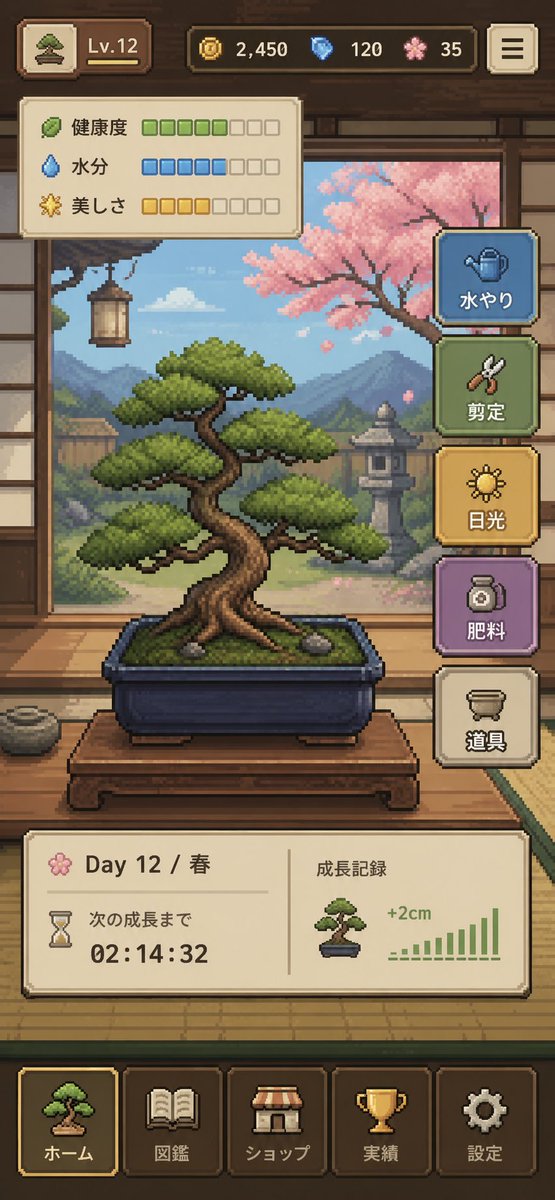
Pixel Art Bonsai Game UI
Dopracowany, pionowy interfejs gry mobilnej przedstawiający przytulny symulator pielęgnacji bonsai w pikselowej grafice, idealny do projektowania koncepcji interfejsu użytkownika, makiet gier niezależnych i prezentacji graficznych w sklepach z aplikacjami.
To jest przykładowy przykład GPT Image 2 dla Anime i gry . Skorzystaj z poniższego przykładu gotowego do skopiowania, aby wygenerować podobne materiały wizualne i sprawdź atrybucję Awesome GPT Image 2 Prompts oraz prawa do użytku komercyjnego przed ponownym wykorzystaniem.
Potrzebujesz pełnego zestawu podpowiedzi? Użyj Anime i gry aby uzyskać więcej powiązanych przykładów, odwiedź centrum tematyczne lub otwórz GPT Image 2 szybki katalog aby zobaczyć pełny przykładowy indeks, struktury wielokrotnego użytku i informacje o źródle.
Free 1K preview
Generate one preview image instantly, no sign-up required.
4000/4000
Opis
Monit o przygotowanie do kopiowania
{
  "type": "pixel art mobile game UI mockup",
  "theme": "cozy Japanese bonsai cultivation simulator",
  "style": {
    "rendering": "detailed 2D pixel art, polished retro game aesthetic, crisp sprites, warm lighting, soft atmospheric background",
    "aspect_ratio": "9:16 portrait",
    "camera": "straight-on view of a traditional Japanese room interior framing the bonsai in the center"
  },
  "subject": {
    "main_object": "bonsai tree in a rectangular dark blue ceramic pot",
    "bonsai": {
      "species_look": "pine-like bonsai with layered rounded foliage pads",
      "trunk": "thick twisted brown trunk with exposed roots",
      "placement": "on a low wooden display table",
      "soil": "mossy green surface with 2 small visible stones"
    }
  },
  "environment": {
    "setting": "traditional Japanese tatami room with open shoji view to a garden",
    "background_elements": [
      "wooden beams and wall trim",
      "hanging lantern on the left",
      "mountains in the distance",
      "stone lantern in the garden",
      "pink cherry blossom tree on the right",
      "soft blue sky with clouds"
    ],
    "mood": "calm, handcrafted, meditative"
  },
  "ui": {
    "top_bar": {
      "count": 5,
      "elements": [
        "small bonsai icon button at top left",
        "level badge showing \"Lv.12\"",
        "coin counter showing \"2,450\"",
        "blue gem counter showing \"120\"",
        "pink blossom currency counter showing \"35\""
      ],
      "top_right": "menu button with 3 horizontal lines"
    },
    "status_panel": {
      "position": "upper left below top bar",
      "count": 3,
      "rows": [
        {
          "label": "Health",
          "icon": "leaf",
          "filled": 5,
          "total": 8,
          "color": "green"
        },
        {
          "label": "Moisture",
          "icon": "water droplet",
          "filled": 5,
          "total": 8,
          "color": "blue"
        },
        {
          "label": "美しさ",
          "icon": "sparkle flower",
          "filled": 4,
          "total": 8,
          "color": "gold"
        }
      ]
    },
    "action_buttons": {
      "position": "right side vertical stack",
      "count": 5,
      "buttons": [
        {
          "label": "水やり",
          "icon": "watering can",
          "color": "blue"
        },
        {
          "label": "Pruning",
          "icon": "shears",
          "color": "green"
        },
        {
          "label": "Light",
          "icon": "sun",
          "color": "gold"
        },
        {
          "label": "Fertilizing",
          "icon": "fertilizer jar",
          "color": "purple"
        },
        {
          "label": "Tools",
          "icon": "pot or tools container",
          "color": "cream"
        }
      ]
    },
    "info_panel": {
      "position": "lower middle above navigation",
      "count": 2,
      "sections": [
        {
          "label": "Day 12 / Spring",
          "subitems": [
            "flower icon",
            "hourglass icon",
            "text \"次の成長まで\"",
            "countdown timer \"02:14:32\""
          ]
        },
        {
          "label": "Growth Record",
          "subitems": [
            "small bonsai thumbnail",
            "text \"+2cm\"",
            "green bar chart with 10 ascending bars"
          ]
        }
      ]
    },
    "bottom_navigation": {
      "position": "bottom",
      "count": 5,
      "tabs": [
        "ホーム",
        "Pokedex",
        "ショップ",
        "Achievements",
        "Settings"
      ],
      "icons": [
        "bonsai",
        "book",
        "shop awning",
        "trophy",
        "gear"
      ],
      "active_tab": "ホーム"
    }
  },
  "composition": "central bonsai hero object, UI panels framing the scene without covering the tree, game-ready mockup that looks like a screenshot from a finished mobile app",
  "color_palette": {
    "dominant": [
      "warm wood brown",
      "tatami beige",
      "moss green",
      "sky blue",
      "cherry blossom pink",
      "muted gold"
    ],
    "accent_buttons": [
      "dusty blue",
      "sage green",
      "mustard gold",
      "soft purple",
      "cream"
    ]
  },
  "quality": "clean, legible interface, professional indie game prototype, charming and highly cohesive"
}
Best for
- - Anime i gry visual exploration
- - Image generation and reference-image edits
- - Reusable briefs that keep source attribution visible
Change these parts
- - Subject, product, character, or scene
- - Aspect ratio, camera, lighting, and background
- - Brand, text, color, and output constraints
Recommended model and settings
- - Model: gpt-image-2
- - Input mode: Tekst na obraz
- - Aspect ratio: source
- - Commercial status: review original source
How to use this prompt
- 1. Copy the prompt and preserve its structure for the first test.
- 2. Replace the subject, context, and publishing channel.
- 3. Change one camera, lighting, or style variable per iteration.
- 4. Inspect the output, source, text, and rights before reuse.
Limitations, source, and reuse cautions
- - Generated output is an editable draft, not factual, legal, or rights evidence.
- - Review the linked source, people, brands, logos, text, and third-party media before commercial use.
Zaimportowano z Awesome GPT Image 2 Prompts . Wymagane jest podanie źródła. Status do użytku komercyjnego to allowed ; przed płatnym użyciem sprawdź prawa autorskie do źródła.
Więcej przypadków w tej kategorii
Priorytety według kategorii, zgodności trybu wprowadzania, jakości i niższego ryzyka.






Ponowne wykorzystanie i źródło notatek
Użyj tego monitu bezpiecznie po zapoznaniu się ze sprawą.
- 1.Skopiuj monit lub otwórz go bezpośrednio w Dovoo za pomocą przycisku generowania.
- 2.Dostosuj zmienne, proporcje obrazu i obrazy referencyjne do własnego przypadku użycia.
- 3.Przed publikacją lub płatnym wykorzystaniem należy sprawdzić prawa autorskie do źródła, wymogi dotyczące atrybucji oraz ryzyko związane z marką lub podobizną.