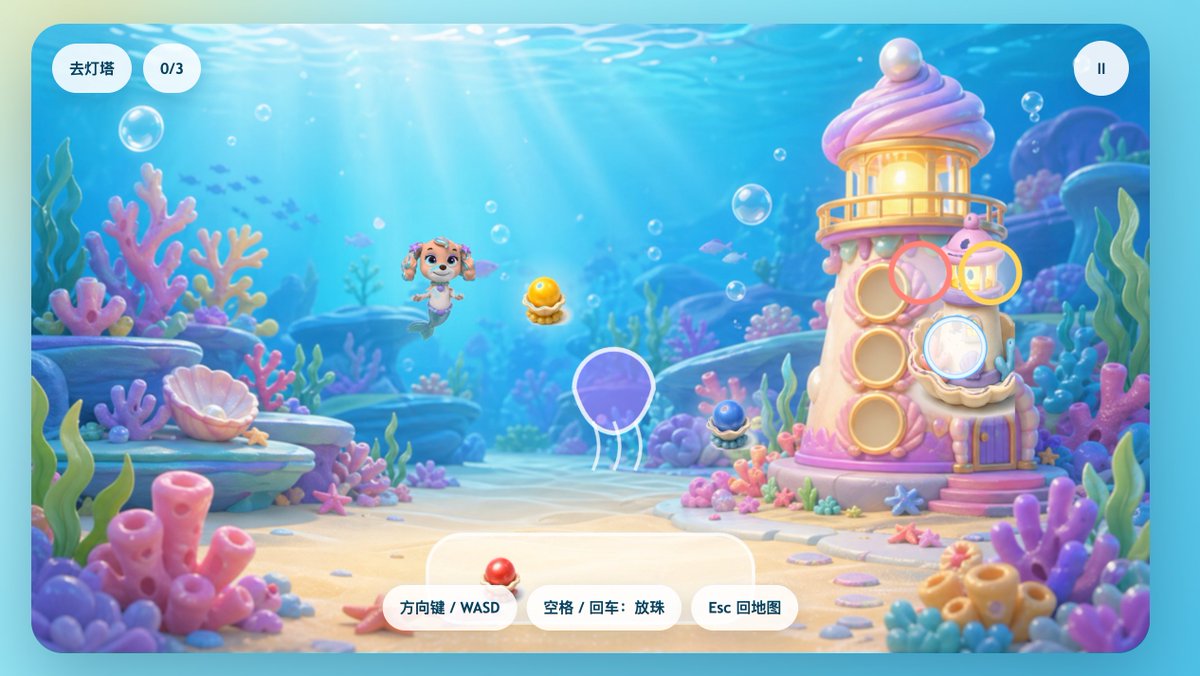
Pastelowy podwodny szczeniak syreny w grze UI
Fantazyjny ekran gry podwodnej przedstawiający szczeniaka syreny, latarnię morską z koralowcami i zabawne chińskie elementy interfejsu użytkownika, odpowiedni do ekranów powitalnych zwykłych gier dla dzieci lub scen z poziomami.
To jest przykładowy przykład GPT Image 2 dla Anime i gry . Skorzystaj z poniższego przykładu gotowego do skopiowania, aby wygenerować podobne materiały wizualne i sprawdź atrybucję Awesome GPT Image 2 Prompts oraz prawa do użytku komercyjnego przed ponownym wykorzystaniem.
Potrzebujesz pełnego zestawu podpowiedzi? Użyj Anime i gry aby uzyskać więcej powiązanych przykładów, odwiedź centrum tematyczne lub otwórz GPT Image 2 szybki katalog aby zobaczyć pełny przykładowy indeks, struktury wielokrotnego użytku i informacje o źródle.
Free 1K preview
Generate one preview image instantly, no sign-up required.
2287/4000
Opis
Monit o przygotowanie do kopiowania
A charming side-view underwater casual game start screen, rendered in a soft 3D cartoon style, designed like a refined children's web game interface. The scene depicts a bright seabed, with sunlight streaming through clear blue water, accompanied by floating bubbles, distant silhouettes of small fish, and a dreamy coral reef environment filled with rounded pink, purple, blue, and mint green corals, seagrass, shells, rocks, and sand. In the center-left of the image, a mermaid puppy character inspired by rescue dog cartoons floats happily underwater, with a dog face, sparkling large eyes, drooping ears, a small crown-shaped ornament on her head, and a fish tail instead of hind legs, facing forward with a cheerful expression. To the right stands a quirky candy-colored coral lighthouse, shaped like a pink and white shell tower, with a glowing lantern room on top, a pearl embedded in the roof, round shell windows, a small balcony, a purple door, and coral details at the base. Game UI elements are directly overlaid on the scene: two rounded white capsule buttons in the upper left corner, the first reading “Go to Lighthouse,” the second displaying “0/3”; and a circular white pause button with a pause icon in the upper right corner. Near the lighthouse, display 4 floating semi-transparent colored target rings around interaction points: a pink ring near the upper-middle window, a yellow ring near the upper-right lantern area, a light blue ring covering the lower-right shell window, and a ring with a white outline around a purple jellyfish in the lower-left center. 3 collectible shell pearl items are visible in the scene: a glowing golden pearl in an open shell in the center, a dark blue small pearl shell at the base of the lighthouse, and a red pearl shell placed on the UI panel at the bottom center. At the bottom center, place 3 rounded white operation prompt buttons, with the text: “Arrow Keys / WASD,” “Space / Enter: Drop Pearls,” and “Esc to Map.” Add a large semi-transparent rounded white panel behind the bottom operation buttons. The overall image should evoke a happy, safe, colorful, and magical feeling, with a high degree of refinement, soft depth of field, soft lighting, glossy toy texture, and a mobile or web game aesthetic suitable for children.
Best for
- - Anime i gry visual exploration
- - Image generation and reference-image edits
- - Reusable briefs that keep source attribution visible
Change these parts
- - Subject, product, character, or scene
- - Aspect ratio, camera, lighting, and background
- - Brand, text, color, and output constraints
Recommended model and settings
- - Model: gpt-image-2
- - Input mode: Tekst na obraz
- - Aspect ratio: source
- - Commercial status: review original source
How to use this prompt
- 1. Copy the prompt and preserve its structure for the first test.
- 2. Replace the subject, context, and publishing channel.
- 3. Change one camera, lighting, or style variable per iteration.
- 4. Inspect the output, source, text, and rights before reuse.
Limitations, source, and reuse cautions
- - Generated output is an editable draft, not factual, legal, or rights evidence.
- - Review the linked source, people, brands, logos, text, and third-party media before commercial use.
Zaimportowano z Awesome GPT Image 2 Prompts . Wymagane jest podanie źródła. Status do użytku komercyjnego to allowed ; przed płatnym użyciem sprawdź prawa autorskie do źródła.
Więcej przypadków w tej kategorii
Priorytety według kategorii, zgodności trybu wprowadzania, jakości i niższego ryzyka.

Anime Girl Heterochromia Portrait
Tekst na obraz

Hell Hound Character Sheet Infographic
Tekst na obraz

Cute Speech Bubble Mascot Profile Icon
Tekst na obraz

Autumn Cozy Casual Outfit Prompt
Tekst na obraz

Cute Focus Desk Flat Lay and Kawaii Illustration
Tekst na obraz

Street Selfie with Cat in Matching Cap
Tekst na obraz
Ponowne wykorzystanie i źródło notatek
Użyj tego monitu bezpiecznie po zapoznaniu się ze sprawą.
- 1.Skopiuj monit lub otwórz go bezpośrednio w Dovoo za pomocą przycisku generowania.
- 2.Dostosuj zmienne, proporcje obrazu i obrazy referencyjne do własnego przypadku użycia.
- 3.Przed publikacją lub płatnym wykorzystaniem należy sprawdzić prawa autorskie do źródła, wymogi dotyczące atrybucji oraz ryzyko związane z marką lub podobizną.